Product Overview
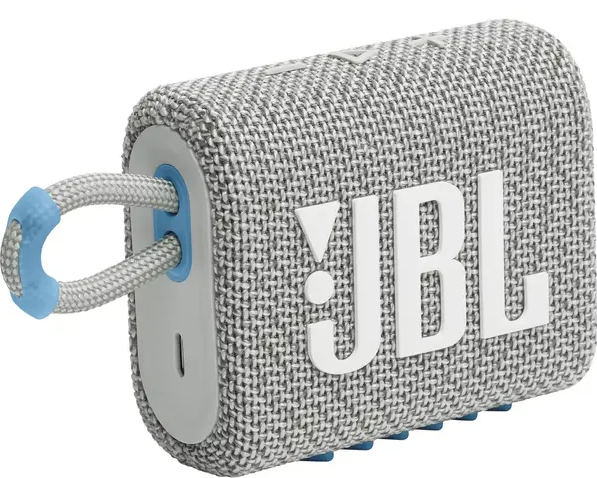
The JBL Go 3 is a compact, ultra‑portable Bluetooth speaker that delivers surprisingly punchy sound for its size. It’s designed to clip onto your bag or belt loop, making it a constant companion for outdoor adventures, showers, and casual listening. With an IP67 waterproof and dust‑proof rating, the Go 3 can handle a splash, a rainstorm, or even a quick drop in the pool. It’s available in a wide range of vibrant colours and features a rugged, fabric‑wrapped body with a sturdy integrated loop.
Key Features
- IP67 Waterproof & Dust‑Proof: The Go 3 is fully sealed against dust and can be submerged in fresh water up to 1 metre for 30 minutes. It also floats, so you won’t lose it in the pool or lake.
- Integrated Loop: A durable fabric carry loop is built directly into the body, letting you clip it to a bag, belt loop, or shower caddy with a small carabiner (not included).
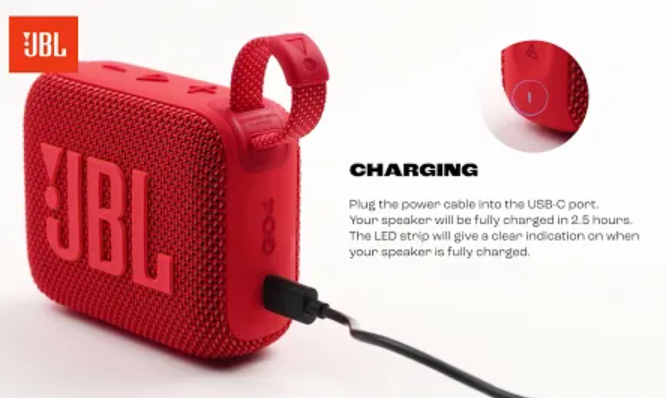
- USB‑C Charging: The Go 3 charges via the modern USB‑C port. A USB‑C to USB‑A cable is included in the box.
- Bluetooth 5.1: Provides a stable wireless connection up to 10 metres (about 33 feet) with faster pairing and lower power consumption than older Bluetooth versions.
- Pro Sound Technology: Despite its tiny size, the Go 3 delivers clear vocals and a punchy bass response, tuned by JBL’s audio engineers.
- 5 Hours of Playtime: On a full charge, the speaker plays for up to 5 hours, depending on volume level and content. It’s enough for a day at the beach or a backyard BBQ.
- Multi‑Speaker Connection (Limited): The Go 3 does not support PartyBoost or Connect+. However, you can pair two Go 3 speakers together in stereo mode using the JBL Portable app. This feature is app‑controlled and requires both speakers to be the same model.
How to Use
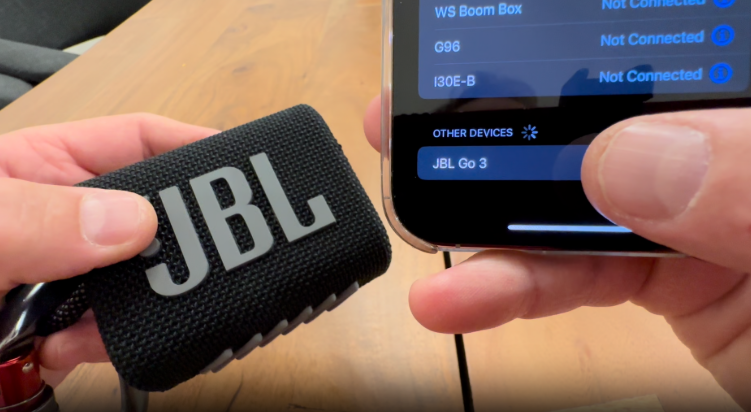
First‑Time Setup & Bluetooth Pairing
- Charge the speaker: Before using it for the first time, plug the included USB‑C cable into the speaker and a 5V/2A USB‑A power adapter (phone charger). The red LED near the power button glows while charging and turns off when full.
- Turn it on: Press the Power button once. The speaker plays a short start‑up tone and the power LED lights up. The Bluetooth button LED blinks blue, indicating it’s ready to pair.
- Pair with your device: On your phone or tablet, open Bluetooth settings and select “JBL Go 3” from the list. Once connected, the Bluetooth LED turns solid blue and you’ll hear a confirmation chime.
- Pairing a second device: The Go 3 remembers up to 8 devices but connects to only one at a time. To pair a new device, press and hold the Bluetooth button for 2 seconds until the LED blinks blue. The previous device will disconnect. Find “JBL Go 3” on the new device and connect.
Button Controls
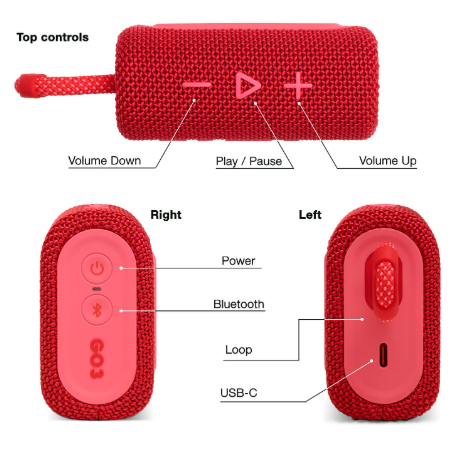
All buttons are on the top edge and are easy to press by feel.
Note: The Play/Pause button also handles call functions: press once to answer a call, press twice to end or reject. The Go 3 has a built‑in microphone, so you can use it as a speakerphone.
Charging the Speaker
- Connect the USB‑C cable to the port under the waterproof flap on the back of the speaker. The red LED glows while charging and turns off when the battery is full. A full charge takes about 2.5 hours.
- You can listen to music while charging. The speaker continues to play.
- Important: Always close the charging port flap firmly after charging to maintain the waterproof seal.
Using the JBL Portable App
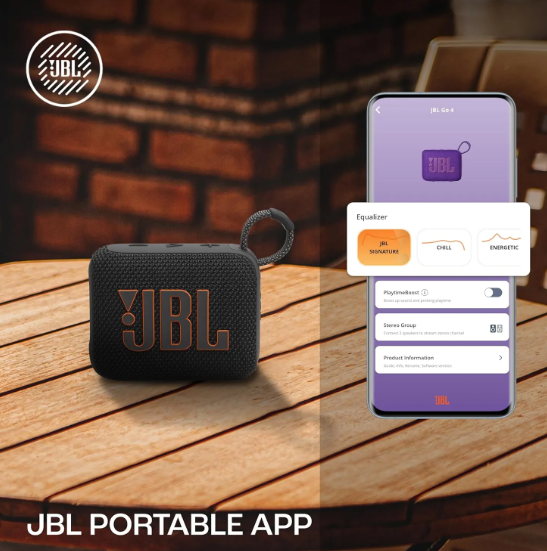
The free JBL Portable app (iOS and Android) lets you:
- Rename your speaker.
- Check the approximate battery level.
- Pair two Go 3 speakers in Stereo mode (left/right channels). Open the app, tap the PartyBoost icon, and follow the on‑screen steps.
- Update the speaker’s firmware (if an update is available).
Troubleshooting & Common Problems
Tips
- Keep it charged: Even if you don’t use it often, charge the speaker at least once every few months to keep the battery healthy. Avoid leaving it fully discharged for weeks.
- Rinse after adventure: After using the Go 3 near salt water, sand, or mud, rinse it gently under fresh running water and dry it thoroughly with a soft cloth before charging.
- Maximize battery life: Lower the volume to 70–80% for longer playback. Avoid playing at max volume continuously.
- Attach it securely: Use a small carabiner (not included) through the integrated loop to hook it onto your bag, belt loop, or tent. The loop is durable but avoid hanging heavy items from it.
- Update the firmware: Occasionally check the JBL Portable app for firmware updates. Updates can improve Bluetooth stability and audio performance.
Safety Information
- Charging safety: Use only a certified USB‑C charger with an output of 5V/2A (standard phone charger). Do not use fast‑charging adapters that exceed 5V; the speaker may not charge correctly.
- Water exposure: The IP67 rating applies to fresh water only. Avoid exposing the speaker to salt water, chlorinated pools, soaps, or oils. If it comes into contact with these, rinse with fresh water immediately. The charging port flap must be fully closed and dry before connecting the USB‑C cable to avoid damage.
- Hearing safety: Prolonged exposure to high volume can damage hearing. If the speaker is used in a small enclosed space, keep the volume at a moderate level.
- Temperature: Do not leave the speaker in direct sunlight for extended periods, or in extremely cold environments (below 0°C) while charging. The internal battery may be damaged.
- Cleaning: Wipe the speaker with a soft, damp cloth. Do not use abrasive cleaners, bleach, or solvents. The fabric grille can be gently brushed to remove dust.
Common Problems
- Speaker doesn’t charge: Check that the USB‑C cable and adapter are working (test with another device). Ensure the charging port is clean and dry. Try a different USB‑C cable.
- One side of the speaker is quieter: The Go 3 is a mono speaker. If stereo sound seems unbalanced, it’s because it mixes both channels into a single driver. This is normal.
- Bluetooth keeps dropping: Move your phone closer and remove any metal objects between the speaker and the phone. Wi‑Fi routers and microwaves can cause interference. Try turning off Wi‑Fi on your phone temporarily to test.
- The speaker beeps and turns off: This is the low‑battery warning. Charge the speaker.
- The Play/Pause button doesn’t skip tracks: The double‑press and triple‑press gestures require quick timing. Make sure you’re pressing firmly and quickly. On some apps (like YouTube), track skip may not be supported over Bluetooth.
Related Manuals
If this guide was helpful, here are a few more popular manuals from productsmanuals.com that you might find useful:
- JBL Flip 6 Manual – PartyBoost, Reset & Troubleshooting Guide
Learn how to link multiple JBL PartyBoost speakers and fix common issues.
- UE BOOM 3 Manual – Magic Button, Pairing & PartyUp Guide
Master the BOOM 3’s one‑touch playlist control and stereo pairing.
- Apple AirPods Pro 2 Manual – ANC, Spatial Audio & Reset Steps
Fix one‑sided audio, clean the mesh, and use Conversation Boost.
- Ronin R-520 Manual – Budget True Wireless Earbuds Setup & Touch Controls
Pair, reset, and get the best fit from your affordable earbuds.
- Samsung Galaxy S24 Ultra Manual – S Pen, Galaxy AI & Pro Camera Guide
Get the most from the 200 MP sensor, Circle to Search, and DeX mode.
Browse all guides at productsmanuals.com .
Copyright Warning ⚠
Copyright 2026 productsmanuals.com All rights reserved. This JBL Go 3 manual is original content and may not be copied, republished, or redistributed without written permission. JBL, Go, and the JBL logo are trademarks of Harman International. This guide is unofficial and not affiliated with JBL or Harman.


[…] JBL Go 3 Manual – Waterproof Bluetooth Speaker Setup & Troubleshooting Pair, charge, and protect your ultra‑portable speaker. […]
[…] JBL Go 3 Manual – Waterproof Bluetooth Speaker Setup & Troubleshooting Pair, charge, and protect your ultra‑portable speaker. […]
[…] JBL Go 3 Manual – Waterproof Bluetooth Speaker Setup & Troubleshooting Pair, charge, and protect your ultra‑portable speaker. […]
[…] JBL Go 3 Manual – Waterproof Bluetooth Speaker Setup & Troubleshooting Pair, charge, and protect your ultra‑portable speaker. […]