 Nanit Pro N101 Baby Monitor-Setup, Breathing, and Troubleshooting Guide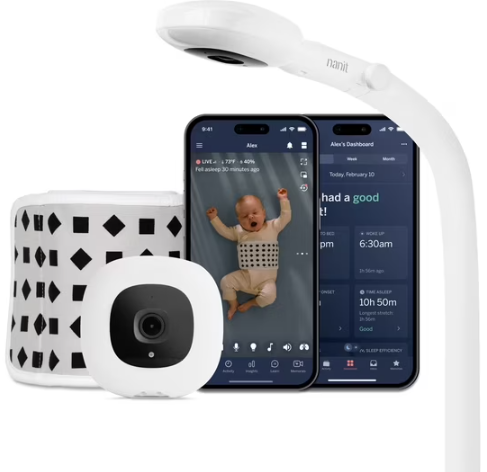
Introduction
Nanit ships the Pro Camera 101 with a wall mount, a floor stand adapter, a breathing band, a power cord, and a small Quick‑Start card. The printed guide covers only basic mounting steps, but real‑world questions — “how do I set up breathing motion monitoring,” “why won’t the camera connect to Wi‑Fi,” “what does the blinking blue light mean,” or “how do I adjust the sensitivity” — are what parents search for every day. This companion gives you all of that in clear, reassuring language.
What’s Inside the Box
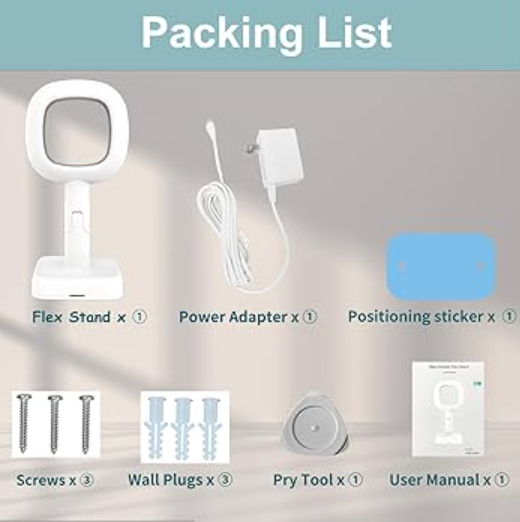
Your package includes:
- The Nanit Pro Camera (model N101) with a 1080p HD lens and night vision
- A wall mount (or floor stand, depending on your bundle)
- A Breathing Band (small, medium, or large, depending on the bundle)
- A power adapter with a long, flat USB‑C cable
- Cable management clips and screw kit
- A Quick‑Start Guide and warranty card
No screws for masonry are included; you may need wall anchors if mounting into drywall.
Physical Tour and Camera Lights
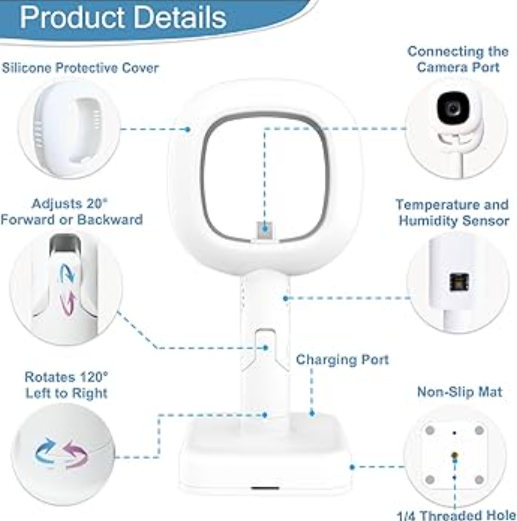
The Nanit Pro is an oval‑shaped camera with a lens on the front, a small speaker on the back, and a subtle night light array.
Status LED (front, below the lens):
- Solid blue: Camera is booting up or connecting.
- Pulsing blue: Ready for Wi‑Fi setup (pairing mode).
- Solid green: Camera is online and streaming normally.
- Blinking green: Reconnecting to Wi‑Fi or temporary network issue.
- Solid red: Microphone or camera turned off from the app, or hardware fault.
- Blinking red: No internet connection, or sensor error.
- Night light (top): Soft, warm light that can be turned on/off in the Nanit app. Brightness adjustable.
- USB‑C power port (back): Connect the included flat cable. The camera is not battery‑powered; it must remain plugged in at all times.
- Speaker and microphone: Allow two‑way audio. You can talk back through the camera from your phone.
Mounting the Camera Over the Crib
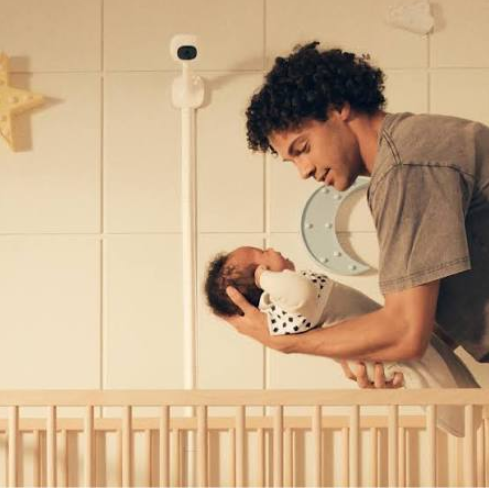
- The camera must be mounted directly above the crib, looking straight down, for the breathing monitoring feature to work correctly. The recommended height is about 60–75 cm above the mattress.
- Use the included paper template to mark the screw holes on the wall. Drill holes and insert wall anchors if needed. Screw the wall mount plate securely.
- Slide the camera onto the mount until it clicks. Adjust the angle so the crib mattress fills the entire frame. Use the app’s live view to fine‑tune.
- Route the power cable along the wall and secure it with the cable clips. Ensure the cable is completely out of the baby’s reach.
First‑Time Setup and Wi‑Fi Connection
- Plug the camera into a power outlet using the included adapter and cable. The status LED will pulse blue.
- Download the Nanit app (iOS or Android) and create a Nanit account.
- In the app, tap “Add a device” and select Nanit Pro. The app will ask you to scan the QR code on the back of the camera or on the Quick‑Start leaflet.
- The app will guide you through connecting the camera to your 2.4 GHz Wi‑Fi network. The Nanit Pro does not support 5 GHz. If your router combines bands, temporarily disable 5 GHz during setup.
- Once connected, the LED turns solid green. The app will then walk you through setting up the crib, child profile, and breathing wear.
Setting Up Breathing Motion Monitoring
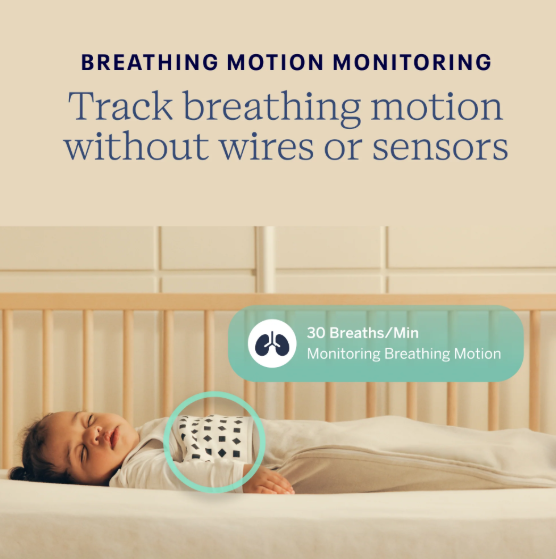
The breathing monitoring feature uses the patterned Breathing Band worn around the baby’s tummy, combined with the camera’s computer vision to detect the rise and fall of the chest. It is not a medical device but provides peace of mind by tracking breaths per minute and alerting you if no motion is detected for 20 seconds.
- Dress your baby in a onesie and wrap the Breathing Band snugly around the tummy over the clothing. The pattern must be fully visible to the camera.
- In the Nanit app, go to the live view, and you’ll see a green overlay on the baby indicating that breathing motion is being tracked. The app shows real‑time breaths per minute (BPM).
- If the baby moves out of the camera’s view or the pattern is obscured, you’ll get a notification on your phone. Adjust the camera or the band.
Important: Always place the baby on their back in a bare crib with no loose blankets. The breathing monitoring is an aid, not a substitute for safe sleep practices.
Using the Nanit App
The Nanit app is the command center for the camera.
- Live view: See and hear your baby. Use pinch‑to‑zoom. Two‑way audio is available by pressing the microphone icon.
- Background audio: You can turn off your phone’s screen and still hear the nursery audio. Enable this in the app settings; it works like an audio monitor.
- Night light: Tap the light icon in the live view to turn the night light on/off, and drag to adjust brightness.
- Sleep tracking: The camera analyses your baby’s sleep patterns (falling asleep, night wakings, total sleep time). You’ll see daily reports in the app, and parents find this helpful for establishing routines.
- Notifications: You can set alerts for sound, motion, temperature/humidity (built‑in sensors), and breathing motion. Adjust sensitivity in Settings > Notifications to avoid false alarms.
- Cleaning and Safety
- Camera lens: Wipe gently with a dry microfiber cloth. Do not use liquids.
- Breathing Band: Machine washable in cold water, air dry only. Do not iron. Inspect regularly for stretching or wear.
- Cable safety: Ensure the power cable is securely fastened and completely out of reach of the crib. The clips provided should keep it tight against the wall.
Troubleshooting Common Issues
| Problem | Likely Cause | What to Try |
|---|---|---|
| Camera LED blinking red | No internet | Restart your router. Check that the camera is plugged in. The LED will turn green when the connection is restored. |
| Breathing motion not detecting | Pattern not visible or too dark | Make sure the Breathing Band is smooth and the pattern is facing the camera. Increase the night light brightness or ensure the room is dimly lit; very dark rooms can cause detection issues. |
| App says “Camera offline” | Wi‑Fi disconnect or router issue | Unplug the camera for 10 seconds and plug it back in. The LED should pulse blue then turn green. Also check your phone’s connection. |
| Notifications too sensitive / too many alerts | Threshold too low | In Settings > Notifications, reduce sound sensitivity and motion sensitivity. |
| Two‑way audio not working | Mic permission or software glitch | Ensure the Nanit app has microphone permission enabled in your phone’s settings. Restart the app. |
| Night light won’t turn on | Feature disabled in app or hardware | Check the light setting in the app. If it still doesn’t work, unplug the camera for 30 seconds and restart. |
How to Factory Reset the Camera
- Locate the small reset button on the back of the camera (a pinhole next to the USB‑C port).
- With the camera powered on, use a paperclip to press and hold the button for about 10 seconds.
- The LED will flash rapidly, then the camera will reboot into pairing mode (pulsing blue).
- Open the Nanit app, remove the camera from your account (Settings > Remove Camera), and re‑add it as a new device.
Quick Reference Card
| Task | How |
|---|---|
| Turn on night light | App live view > tap light icon |
| Start two‑way talk | App live view > press mic button |
| Check breathing BPM | Live view shows real‑time BPM when Breathing Band is worn |
| Factory reset | Hold reset button for 10 seconds |
| Restart camera | Unplug power for 10 seconds, plug back in |
Download the Nanit Pro Cheat Sheet
A one‑page PDF with LED meanings, breathing wear tips, and troubleshooting. Print it and keep it near the nursery.
“Nanit Pro N101 Quick Guide (PDF)”
Official Nanit Support and Manuals
For warranty, accessories, and the official PDF manual, visit: https://support.nanit.com
Frequently Asked Questions
- Does the Nanit Pro work without Wi‑Fi?
No, it requires a constant 2.4 GHz Wi‑Fi connection to stream video and send alerts. There is no local monitor unit. - Is the Breathing Band safe for newborns?
Yes, it’s designed for babies from birth. Always ensure it’s snug but not tight, and place the baby on their back to sleep. - Can I use the camera without the Breathing Band?
Absolutely. The camera works as a standard HD baby monitor with sound and motion alerts, sleep tracking, and night light. - What is the field of view?
It has a wide‑angle 130‑degree lens when used without the crib‑mounted overhead view. In the overhead mount, it’s specifically framed for the crib. - Can I view the camera on multiple phones?
Yes, share access with your partner or caregiver via the Nanit app settings. Each person needs their own Nanit account. - Does the camera record continuously?
It streams live, but you can take snapshots and record short clips manually. Continuous cloud recording is available via a Nanit Insights subscription (optional). - How accurate is the temperature sensor?
The built‑in sensor is generally within 1‑2°C of the actual room temperature. It’s a useful guide, not a precision thermometer. - Can I mount the camera on a floor stand instead of the wall?
Yes, Nanit sells a separate floor stand. The wall mount is included; the floor stand is an accessory. - What happens if the power goes out?
The camera will turn off. When power is restored, it should automatically reconnect to Wi‑Fi. You may need to unplug and replug it if it doesn’t. - How do I stop the night light from turning on automatically?
The night light is manually controlled; it won’t turn on by itself unless you’ve set a schedule in the app. - Is the video encrypted?
Yes, the video stream is encrypted end‑to‑end. Nanit uses bank‑level security for its camera feeds. - Can I use the Nanit Pro as a regular home security camera?
It’s designed for nursery use, but you can use it to monitor any room. However, it must always be plugged in and has no pan/tilt functionality. - A Gentle Reminder Before You Settle In
- Your Nanit Pro is a companion in the nursery, not a replacement for your presence. Use the breathing band correctly, keep the firmware updated, and check the live view whenever you feel the need. A secure mount and a tucked‑away cable make all the difference.
Copyright Warning!
Copyright 2026 productsmanuals.com All rights reserved. This Nanit Pro N101 manual is original content and may not be copied, republished, or redistributed without written permission. Nanit and the Nanit logo are trademarks of Nanit, Inc. This guide is unofficial and not affiliated with Nanit.

[…] ships the MAX G30P with a charging brick, a set of hex keys, and a tiny Quick‑Start leaflet that only covers basic […]
[…] The unit features a digital control panel with dedicated function buttons for each cooking mode, plus up/down arrows for time and temperature adjustment. The basket pulls out easily and automatically pauses cooking when removed, so you can shake or check your food without losing your settings. The AF161 is a standalone air fryer—it does not include a pressure cooker or steam function like Ninja’s Combi models. […]