
Product Overview
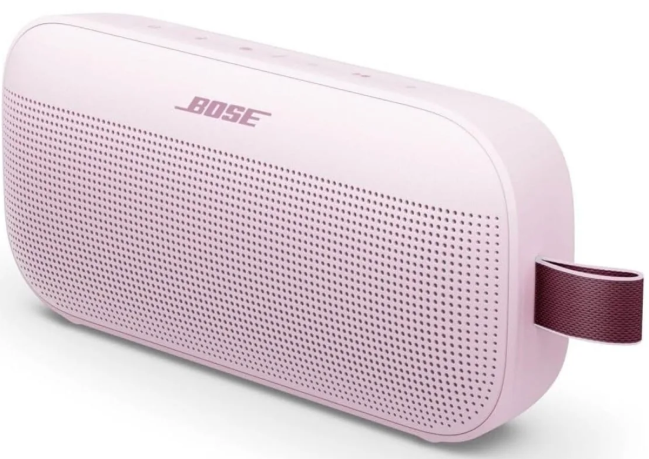
The Bose SoundLink Flex is a rugged, waterproof Bluetooth speaker designed for outdoor adventures. It delivers deep, clear sound with PositionIQ technology that automatically adjusts the audio based on the speaker’s orientation — upright, flat, or hanging from its integrated utility loop. The soft silicone back and powder‑coated steel grille protect it from drops, dust, and water. It’s IP67 rated, so it can survive a fall into the pool, a splash at the beach, or a dusty trail. The rechargeable lithium‑ion battery lasts up to 12 hours on a full charge. It’s available in Black, White Smoke, and Stone Blue.
Key Features
- IP67 Waterproof & Dust‑Proof: Fully sealed against dust and can be submerged in fresh water up to 1 metre for 30 minutes. It also floats, so you won’t lose it in the pool or lake.
- PositionIQ Technology: A built‑in sensor detects whether the speaker is upright, flat on its back, or hanging. It automatically adjusts the equaliser to optimise sound for that position. You don’t need to change any settings.
- Utility Loop: A durable fabric loop is integrated into the side. Use it to clip the speaker to a backpack, belt loop, shower caddy, or fence with a carabiner (not included).
- Bluetooth 5.3: Provides a stable, low‑latency wireless connection up to 9 metres (30 feet). Pairs with smartphones, tablets, and laptops.
- Party Mode & Stereo Mode: Pair two SoundLink Flex speakers together via the Bose Connect app. Party Mode plays the same audio through both speakers. Stereo Mode separates left and right channels for wider sound.
- Built‑in Microphone: Take phone calls directly through the speaker. The mic is designed to reduce wind and background noise for clearer voice pickup.
- 12‑Hour Battery: Up to 12 hours of continuous playback on a full charge. A full charge via USB‑C takes about 4 hours.
How to Use
What’s in the Box
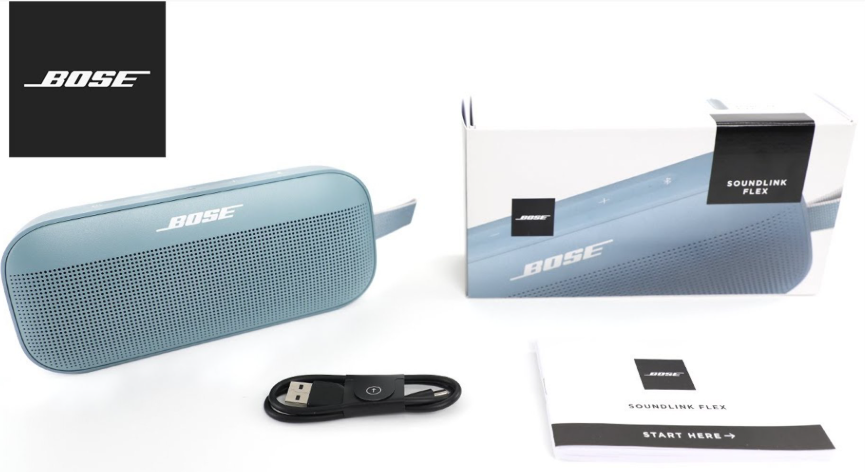
- Bose SoundLink Flex speaker
- USB‑A to USB‑C charging cable (about 30 cm)
- Quick‑Start Guide and warranty card
No power adapter is included. Use any standard 5V/1A USB‑A charger or computer USB port.
First‑Time Setup & Bluetooth Pairing
- Charge the speaker: Connect the USB‑C cable to the port on the back (under a protective cover) and a USB‑A power source. The battery light blinks white while charging and turns off when full. A full charge takes about 4 hours.
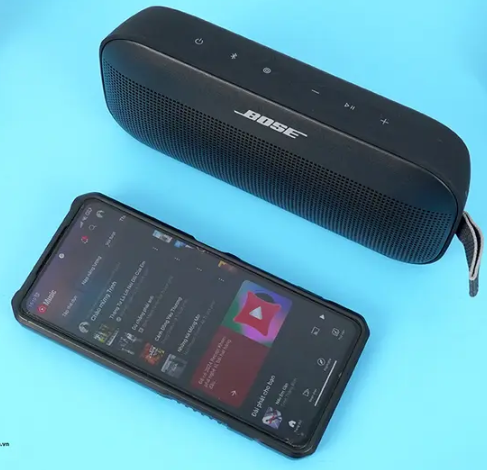
- Turn it on: Press the Power button on the top edge. The speaker plays a start‑up tone and the Bluetooth light blinks blue. The first time you turn it on, it automatically enters pairing mode.
- Pair with your device: On your phone, open Bluetooth settings and select “Bose SoundLink Flex” from the list. Once connected, the Bluetooth light glows solid white, and the speaker announces “Connected to [device name].”
- Pairing a second device: The speaker remembers up to 8 devices but connects to only one at a time. To pair a new device, press and hold the Bluetooth button for about 2 seconds until the light blinks blue. Then select the speaker on the new device.
Button Controls
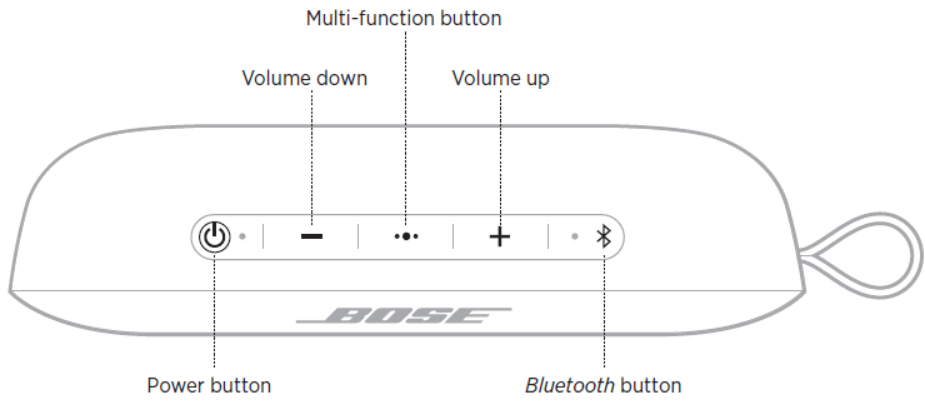
| Button | Location | Action |
|---|---|---|
| Power | Top edge | Press to turn on/off. |
| Bluetooth | Top edge | Press once to check which device is connected. Press and hold to enter pairing mode (blue blinking light). |
| Volume + | Top edge | Press to increase volume. |
| Volume – | Top edge | Press to decrease volume. |
| Play / Pause (Multi‑function) | Top edge | Press once to play/pause. Press twice to skip forward. Press three times to skip back. Press and hold for voice assistant (Siri/Google Assistant). |
Call controls: Press the Play/Pause button once to answer, press twice to end or reject a call. Press and hold to decline an incoming call.
Charging & Battery
- Charge via USB‑C: The port is under a protective flap on the back. Ensure the flap is fully closed after charging to maintain waterproofness.
- Battery indicator: The battery light on the top edge glows solid red while charging, solid white when fully charged. When the battery is low, the light blinks red and the speaker announces “Battery low” periodically.
- Auto‑off: The speaker turns off after 20 minutes of inactivity to save battery.
Party Mode & Stereo Mode (Bose Connect App)
Download the Bose Connect app (iOS or Android) to use these features:
- Turn on both SoundLink Flex speakers. Do not connect them to any phone via Bluetooth yet.
- Open the Bose Connect app. It will detect both speakers. Drag one speaker onto the other on the screen.
- Choose Party Mode (both play the same audio) or Stereo Mode (one acts as left, the other as right).
- Once linked, pair your phone to one of the speakers. Audio plays through both.
Troubleshooting & Common Problems
| Problem | Likely Cause | What to Try |
|---|---|---|
| Speaker won’t turn on | Battery drained | Charge the speaker for at least 30 minutes using a known‑good charger and cable. Press and hold the Power button for 10 seconds. |
| Won’t pair with phone | Already connected to another device, or not in pairing mode | Turn off Bluetooth on previously connected devices. On the speaker, press and hold the Bluetooth button until the light blinks blue. Re‑pair from the phone. |
| Sound cuts out or stutters | Weak Bluetooth signal, interference, or low battery | Keep your phone within 9 metres with no walls in between. Move away from Wi‑Fi routers and other Bluetooth devices. Charge the speaker. |
| Audio is distorted at high volume | Speaker over‑driven, or battery low | Lower the volume slightly. If the battery is very low, charge it. |
| Charging port flap won’t stay closed | Debris or the rubber seal is misaligned | Clean the area around the port with a dry cloth. Press the flap firmly until it sits flush. If the flap is damaged, the speaker may not be waterproof. |
| Party Mode or Stereo Mode not working | Only one speaker detected, or app not up‑to‑date | Ensure both speakers are SoundLink Flex models. Update the Bose Connect app. Place the two speakers close together (within 1 metre). |
Frequently Asked Questions
- Is the SoundLink Flex truly waterproof?
Yes, it has an IP67 rating. It is dust‑tight and can be submerged in fresh water up to 1 metre for 30 minutes. It also floats. Avoid salt water and chlorinated pools; rinse with fresh water afterwards and dry the charging port flap before charging. - Can I pair two Flex speakers for louder sound?
Yes, use the Bose Connect app. Party Mode plays the same audio through both speakers. Stereo Mode separates left and right channels. - Does the speaker have a microphone for calls?
Yes. Press the Play/Pause button once to answer, twice to hang up. The mic is located near the buttons. - How long does the battery last?
Up to 12 hours of continuous playback at moderate volume. Heavy bass tracks and maximum volume reduce runtime. - Can I use the speaker while it’s charging?
Yes, you can play music while the speaker is connected to a USB‑C charger. Just keep the charging port dry. - What does the blinking red light mean?
A blinking red battery light means the battery is critically low (below 10%). Charge the speaker soon.
Tips
- Rinse after adventure: After using the Flex near salt water, sand, or mud, rinse it gently under fresh running water and dry it thoroughly with a soft cloth before charging.
- Maximize battery life: Lower the volume to 70–80% for longer playback. Turn off the speaker when not in use.
- Use the utility loop: Clip a small carabiner (not included) through the loop to attach the speaker to a bag, belt loop, or tent.
- Update firmware: The Bose Connect app may notify you of firmware updates. Keep the speaker updated for the best performance and stability.
- Store properly: If you won’t use the speaker for several weeks, charge it to about 50% and store in a cool, dry place.
Safety Information
- Charging: Use only a standard 5V/1A USB‑A charger. Fast chargers (9V, 12V) will step down to 5V, but avoid cheap, unregulated chargers.
- Water exposure: The IP67 rating applies to fresh water only. Do not expose the speaker to salt water, chlorinated pools, soaps, or oils without rinsing afterwards. The charging port flap must be fully closed and dry before connecting the USB‑C cable.
- Volume: Prolonged exposure to high volume can damage hearing. Start at a low volume and increase gradually.
- Cleaning: Wipe the speaker with a soft, damp cloth. Do not use abrasive cleaners, bleach, or solvents. The grille can be gently brushed to remove dust.
- Temperature: Do not leave the speaker in direct sunlight for extended periods, or in extremely cold environments while charging. The internal battery may be damaged.
Related Manuals
If this guide was helpful, here are a few more popular manuals from productsmanuals.com that you might find useful:
- Samsung Galaxy Watch 7 Manual – Health Sensors, Galaxy AI & Battery Tips
Master ECG, body composition, sleep apnea detection, and more. - JBL Go 3 Manual – Waterproof Bluetooth Speaker Setup & Troubleshooting
Pair, charge, and protect your ultra‑portable speaker. - Audionic AirPods Pro 2 Manual – ANC, Spatial Audio & Reset Steps
Fix one‑sided audio, clean the mesh, and use Conversation Boost. - iPhone 17 Manual – Settings, Camera & Hidden Features Guide
Explore Dynamic Island, Action button, and battery‑health tricks. - Dell Inspiron 15 3520 Manual – Laptop Setup, Upgrades & Troubleshooting
Upgrade RAM and SSD, and fix common performance issues.
Browse all guides at productsmanuals.com .
Copyright Warning ⚠
Copyright 2026 productsmanuals.com All rights reserved. This Bose SoundLink Flex manual is original content and may not be copied, republished, or redistributed without written permission. Bose, SoundLink, and the Bose logo are trademarks of Bose Corporation. This guide is unofficial and not affiliated with Bose.

[…] Bose SoundLink Flex Manual – Product Overview, Features, Setup & Troubleshooting Guide […]