
Why This Companion Helps
Nespresso ships the Vertuo Next with a welcome set of capsules, a power cord, and a small Quick‑Start leaflet. The full manual is available online, but it doesn’t always answer the real‑world questions people type into Google. Every day, thousands search for a “Nespresso Vertuo Next manual” because they want clear, practical help with descaling, understanding the button lights, or fixing a machine that won’t brew. This companion gives you exactly that.
What You’ll Find in the Box

Your box includes:
- The Nespresso Vertuo Next machine (available in various colours)
- A power cord (region‑specific)
- A welcome set of 12 Vertuo coffee capsules (variety pack)
- A Quick‑Start Guide and safety booklet
No milk frother is included; you can use the Aeroccino (sold separately) or any milk frother.
Physical Tour
Physical Tour and Button Functions
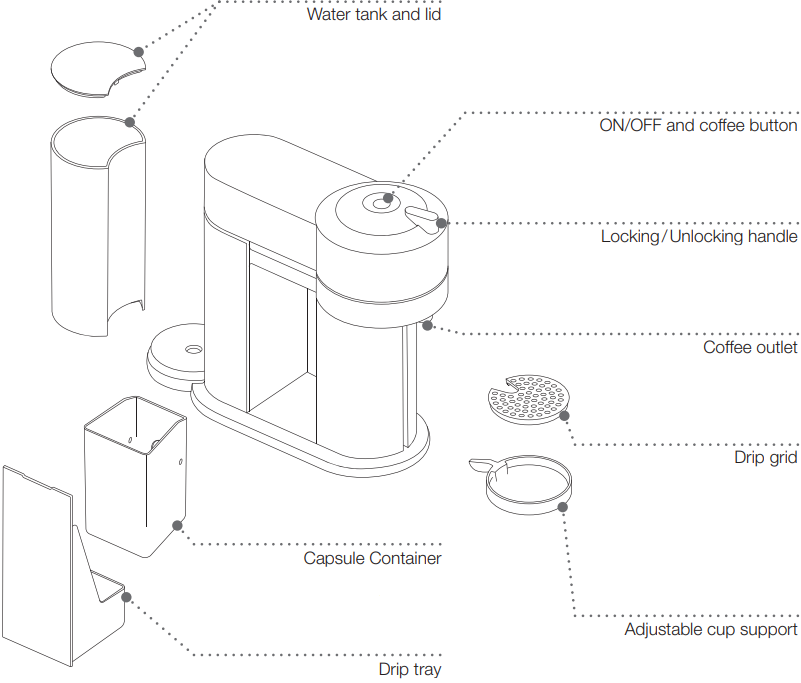
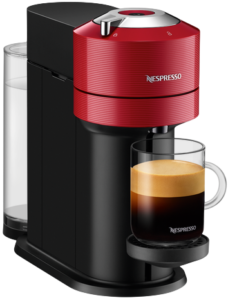
The Vertuo Next has a minimalist design with a single button on top.
- Single button (with LED ring): Press to brew. The LED ring provides all status feedback.
- Lock lever: On the left side of the head. Lift to open, place a capsule, and push down firmly to close.
- Capsule holder: The deep well that accepts large Vertuo dome‑shaped capsules. After brewing, used capsules are automatically ejected into the internal container.
- Water tank (back): Holds about 1.1 litres. Lift straight up to remove for filling.
First‑Time Setup and Wi‑Fi Pairing
- Remove all packaging and the plastic film from the water tank. Rinse the water tank with fresh water and fill it to the MAX line.
- Plug in the machine and press the button. The LED will flash green as it warms up. Wait until it turns solid green.
- Place a capsule in the holder (do not press the lever down yet). The machine is pre‑programmed; it will read the barcode on the capsule rim.
- To rinse the machine before first use: place a container (at least 500 ml) under the coffee outlet. With no capsule in the holder, close the lever and press the button three times quickly. The machine will run a cleaning cycle.
- For Wi‑Fi pairing (optional, for firmware updates): Download the Nespresso app on your phone. In the app, go to Machine > Add Machine. Put the machine into pairing mode by pressing the button three times in quick succession (LED will flash blue). Follow the in‑app instructions to connect the machine to your 2.4 GHz Wi‑Fi.
Brewing a Cup of Coffee

- Fill the water tank with fresh water. Turn the machine on.
- Lift the lock lever to open the head. Drop a Vertuo capsule into the holder (the dome shape faces down, rim up).
- Close the lever firmly until it clicks. The machine will read the capsule barcode and automatically set the brewing parameters.
- Place a cup of appropriate size under the outlet. Press the button once. The LED will pulse while brewing.
- When the LED returns to solid green, the brewing is complete. Lift the lever to eject the used capsule into the internal container. The machine will automatically go to standby after a few minutes of inactivity.
If the button does nothing: Ensure the water tank is seated correctly and the lever is fully closed. The LED will flash red if there’s an error (see troubleshooting).
Descaling the Vertuo Next

Descale every 3 months or when the LED ring turns half green, half orange (descaling alert). Use only Nespresso descaling solution (liquid).
- Empty the water tank. Pour 500 ml of fresh water into the tank, then add the entire bottle of Nespresso descaling solution.
- Place a container (at least 1 litre) under the coffee outlet.
- Enter descaling mode: Press and hold the button for 7 seconds. The LED will blink orange quickly.
- Press the button once to start the descaling cycle. The liquid will run through in bursts. Wait until the water tank is empty and the LED turns steady orange.
- Rinse the water tank thoroughly and fill with fresh water to the MAX line. Press the button again to start the rinsing cycle. The machine will flush the remaining water.
-
When the cycle completes, the LED will turn solid green. Press and hold the button for 7 seconds to exit descaling mode. The machine is ready.
Troubleshooting Common Issues
| Problem | Likely Cause | What to Try |
|---|---|---|
| LED flashes red twice, then pauses (blinks rhythmically) | Water tank empty or capsule not read | Refill the water tank. Open the head, remove the capsule, and re‑seat it firmly. Close the lever. |
| LED flashes red continuously | Machine fault | Unplug the machine, wait 10 seconds, plug back in. If the LED still flashes red, contact Nespresso. |
| Coffee is not hot enough | Machine not pre‑warmed or cup not warmed | Run a blank shot (no capsule) of hot water into your cup first. Pre‑heat the cup with hot water. |
| Machine not reading capsule (no coffee, LED red) | Dirty barcode reader | Open the head, and gently wipe the clear ring around the capsule holder with a damp cloth. Re‑insert the capsule. |
| Coffee splatters or overflows | Cup too small or misshapen capsule | Use a larger cup. Ensure the capsule is not dented or damaged before inserting. |
| Water tank empty but LED green (no low water alert) | Sensor covered or disabled | Manually check water level. The sensor only alerts if you try to brew with insufficient water. |
| Wi‑Fi disconnects after a few days | Router or signal issue | Reset Wi‑Fi on the machine (press button 3 times, LED flashes blue, then re‑pair in app). Ensure your router is broadcasting 2.4 GHz. |
How to Reset the Machine
- Soft reset (restart): Unplug the power cord, wait 10 seconds, and plug it back in. All settings are retained.
- Factory reset (clear pairings and descaling alert):
- Turn the machine off.
- Press and hold the button, then plug in the power cord while still holding the button.
- Continue holding for about 5 seconds until the LED blinks rapidly. Release.
- The machine will now be in its out‑of‑the‑box state. You’ll need to re‑pair Wi‑Fi (if desired) and set up again.
- Reset descaling alert without running a cycle: Press and hold the button for 3 seconds while the machine is off. The LED will blink, and the alert will be dismissed. Only use this if you are certain the machine has been recently descaled.
Quick Reference Card
| Task | How |
|---|---|
| Brew coffee | Place capsule, close lever, press button |
| Rinse / cleaning cycle | No capsule, press button 3 times |
| Enter descaling mode | Hold button for 7 seconds until LED blinks orange |
| Factory reset | Hold button while plugging in, release after rapid blinking |
| Dismiss descaling alert | Hold button for 3 seconds while off (if recently descaled) |
| Pair Wi‑Fi | Press button 3 times (LED blue), use Nespresso app |

[…] Nespresso Vertuo Next Manual – Setup, Descaling & Troubleshooting […]