
Product Overview
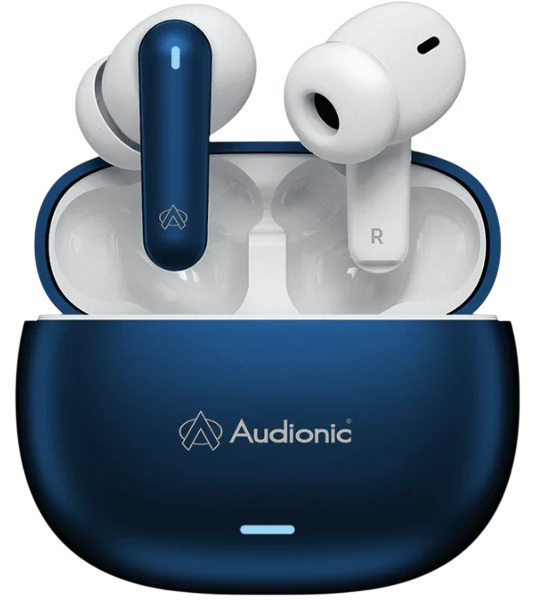
The Audionic AirBuds Pro 2 are affordable true wireless stereo (TWS) earbuds designed for everyday music listening and hands‑free calls. They feature Bluetooth 5.3 for a stable connection, touch controls on each earbud, and a compact charging case with a digital battery display. The earbuds are lightweight and come with three sizes of ear tips, making them comfortable for long listening sessions. With IPX5 water resistance, they can handle sweat and light rain, making them suitable for workouts and outdoor use.
Key Features
- Bluetooth 5.3: Provides a stable, low‑latency wireless connection with a range of up to 10 metres (33 feet). Pairs quickly with Android, iOS, Windows, and macOS devices.
- 13 mm Dynamic Drivers: Deliver clear sound with decent bass for the price. Vocals are clear, and the overall profile is balanced for casual listening.
- Touch Controls: Tap gestures on each earbud let you play/pause music, skip tracks, answer calls, and activate voice assistant without touching your phone.
- Digital Battery Display: The charging case has a small LED screen that shows the remaining battery percentage of the case in numbers, not just dots.
- USB‑C Charging: The case charges via USB‑C (cable included). The earbuds themselves charge magnetically inside the case.
- IPX5 Water Resistance: The earbuds are sweat‑proof and splash‑resistant, suitable for workouts and light rain. The case is not waterproof.
- Voice Assistant Support: Triple‑tap either earbud to wake Siri or Google Assistant on your connected phone.
- Low‑Latency Gaming Mode: Reduces audio delay in games and videos. Activate by tapping the touch panel four times on either earbud (may vary by firmware).
How to Use
What’s in the Box
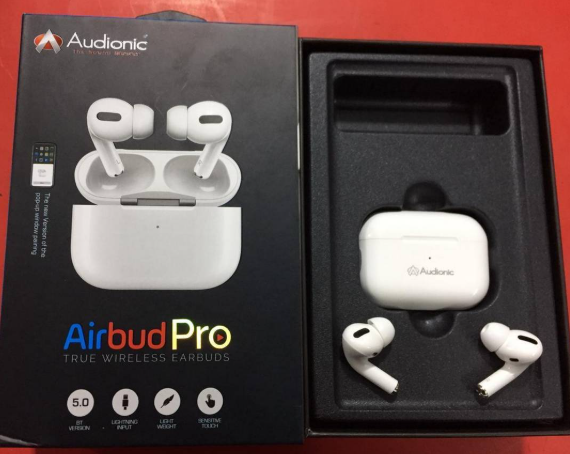
- Left and right AirBuds Pro 2 earbuds (medium ear tips pre‑installed)
- Charging case with digital battery display
- USB‑A to USB‑C charging cable
- Three pairs of silicone ear tips: small (S), medium (M), large (L)
- User manual leaflet
First‑Time Setup & Charging
- Remove the protective film from the charging contacts on both earbuds and place them in the case. Close the lid.
- Charge the case fully before first use. Connect the USB‑C cable to the case and a standard 5V/1A USB‑A charger. The digital display shows the battery percentage climbing. A full charge takes about 1.5 hours.
Pairing with Your Phone
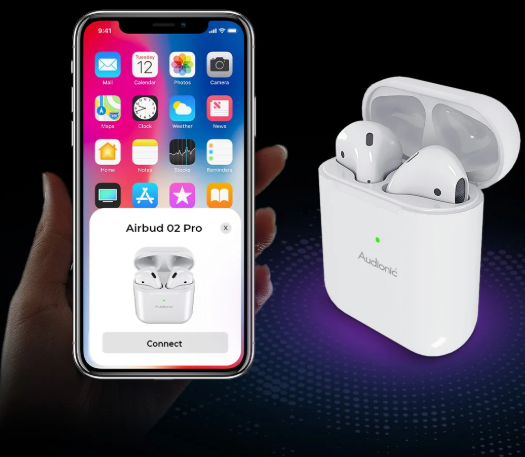
- Open the charging case lid. The earbuds will turn on automatically and enter pairing mode – the LEDs on the earbuds will blink white or flash alternately. The digital display on the case shows a flashing number.
- On your phone, open Bluetooth settings and select “Audionic AirBuds Pro 2” from the list. Once connected, the LEDs stop flashing and you’ll hear a confirmation tone.
- Single earbud use: You can use either the left or right earbud independently. Simply remove one from the case; it will connect to your phone on its own.
Touch Controls
| Gesture | Action |
|---|---|
| Single tap (left or right) | Play / Pause |
| Double tap (right) | Next track |
| Double tap (left) | Previous track |
| Triple tap (either) | Activate voice assistant (Siri / Google Assistant) |
| Long press (1.5 seconds) | Answer / End a call |
| Long press (3 seconds) | Reject an incoming call |
| Four taps (either) | Toggle Gaming Mode (low‑latency) on/off |
Note: There is no volume control on the earbuds themselves. Adjust volume from your phone.
Charging the Earbuds and Case
- Charging the earbuds: Place them in the case. The magnetic pins will align, and the earbuds start charging automatically. The earbud LEDs glow red while charging and turn off when full.
- Charging the case: Connect the USB‑C cable to the case and a standard USB‑A power source. The digital display shows the battery percentage. The case takes about 1.5 hours to fully charge.
- Battery life: Up to 5 hours of playback on the earbuds (at 60% volume), with an additional 20 hours from the case. Total battery life is about 25 hours.
Troubleshooting & Common Problems
| Problem | Likely Cause | What to Try |
|---|---|---|
| One earbud not working (no sound) | Sync lost, or dirty charging contacts | Place both earbuds in the case, close the lid for 30 seconds, then remove them together. Clean the metal contacts on the earbuds and inside the case with a dry cotton swab. |
| Earbuds won’t pair with phone | Not in pairing mode, or already connected to another device | Turn off Bluetooth on previously connected devices. Place the earbuds in the case, close the lid, wait 10 seconds, and open the lid again. They should enter pairing mode. |
| Touch controls not responding | Wet fingers, or dirty touch surface | Wipe the touch area with a dry cloth. Make sure your fingers are dry. Remove and reinsert the earbud to restart the sensor. |
| Audio cuts out or stutters | Bluetooth interference or low battery | Keep your phone within 5 metres with no walls in between. Charge the earbuds fully. Move away from Wi‑Fi routers and other Bluetooth devices. |
| Earbuds don’t turn on when removed from case | Battery completely dead, or case battery empty | Charge the case for at least 30 minutes. If the earbuds still won’t turn on, clean the charging contacts and try again. |
| Microphone sounds muffled during calls | Dirt in the mic hole | Clean the small microphone openings with a dry, soft brush. Ensure the earbud is seated correctly in your ear. |
| Gaming Mode not activating | Tapping too slowly, or firmware difference | Try tapping four times quickly on either earbud. If the feature is not supported on your specific batch, it may not be available. |
Common Problems Quick List
- Case battery display shows incorrect percentage: Fully discharge and recharge the case once to recalibrate the display.
- Earbuds don’t turn off when placed in case: Ensure the charging contacts are clean and the case has battery power. The earbuds turn off automatically when they detect the magnetic charging pins.
- Audio lags behind video: Activate Gaming Mode by tapping either earbud four times. This reduces latency. If the problem persists, some streaming apps auto‑sync video; others may not.
How to Factory Reset and Restart
Soft restart: Place both earbuds in the case, close the lid, wait 10 seconds, and remove them. This resets the Bluetooth connection without losing pairing data.
Factory reset (clear all pairings):
- Remove the earbuds from the case. They should be on.
- Press and hold the touch panel on both earbuds simultaneously for about 10 seconds. The LEDs will blink red and white, then turn off. Release when the LEDs turn off.
- Place the earbuds back in the case. Close the lid for a few seconds.
- Open the lid and remove the earbuds. They are now in factory pairing mode. On your phone, go to Bluetooth settings, forget the old “Audionic AirBuds Pro 2” entry, and pair as new.
Frequently Asked Questions
- How do I know when the case battery is low?
The digital display on the case shows the remaining percentage. When it drops to single digits, charge the case soon. - Can I use the earbuds independently (one at a time)?
Yes. Either earbud works independently for music and calls. Remove one from the case; the other stays off. - Are the earbuds good for running?
Yes. The IPX5 rating means they can handle sweat and light rain. Make sure the ear tips fit well so they don’t fall out. - Does the case support wireless charging?
No, the case charges only via the USB‑C cable. - Can I use the earbuds with a smart TV?
Yes, if your TV supports Bluetooth audio. Put the earbuds in pairing mode and select them from the TV’s Bluetooth list. - What is the range of Bluetooth?
Up to 10 metres (33 feet) in open space. Walls and other obstacles reduce range. - Why is the audio louder in one ear than the other?
Check the ear tip sizes and ensure both earbuds are seated equally. Also, check your phone’s accessibility settings for audio balance.
Tips
- Choose the right ear tips: Try all three sizes. A good seal improves bass and passive noise isolation. The tips should feel snug but not painful.
- Clean the charging contacts regularly: Use a dry cotton swab to clean the metal pins on the earbuds and inside the case. Dirty contacts are the most common cause of charging issues.
- Store the earbuds in the case: Always put the earbuds back in the case when not in use. This protects them and keeps the battery topped up.
- Use Gaming Mode for videos: If you notice audio‑video lag, enable Gaming Mode (four taps on either earbud). It reduces latency.
- Turn off Bluetooth when not in use: If the earbuds keep reconnecting to your phone unexpectedly, turn off Bluetooth on the phone or put the earbuds in the case.
Safety Information
- Charging: Use only a standard 5V/1A USB‑A charger. Fast chargers (9V, 12V) will step down to 5V, so they are safe, but avoid using cheap, unregulated chargers.
- Battery: Do not expose the case or earbuds to direct sunlight for extended periods, or leave them in a hot car. Extreme heat can damage the battery.
- Volume: Prolonged exposure to high volume can damage hearing. Start at a low volume and increase gradually.
- Cleaning: Wipe the earbuds with a soft, slightly damp cloth. Do not submerge the earbuds or the case in water. Clean the charging contacts with a dry cotton swab only.
- Ear tips: Inspect the ear tips regularly. If they become loose or damaged, replace them to prevent them from getting stuck in your ear.
Related Manuals
If this guide was helpful, here are a few more popular manuals from productsmanuals.com that you might find useful:
- Sonos Beam Gen 2 S19 Manual Setup TV Connection and Troubleshooting Guide
Master pairing, TWS, USB, and FM modes on your compact speaker. - JBL Flip 6 Manual And Complete Guide to Pairing, Buttons, Reset, Party Boost, and Features (2026)
Set up your subwoofer, remote, and Bluetooth for the best sound. - Ronin R-520 Manual – Budget True Wireless Earbuds Setup & Touch Controls
Fix one‑sided audio, pair easily, and get the best fit. - JBL Go 3 Manual – Waterproof Bluetooth Speaker Setup & Troubleshooting
Pair, charge, and protect your ultra‑portable speaker. - iPhone 17 Manual – Settings, Camera & Hidden Features Guide
Master Dynamic Island, Action button, and battery‑health tricks.
Browse all guides at productsmanuals.com .
Copyright Warning ⚠
Copyright 2026 productsmanuals.com All rights reserved. This Audionic AirBuds Pro 2 manual is original content and may not be copied, republished, or redistributed without written permission. Audionic and the Audionic logo are trademarks of Audionic. This guide is unofficial and not affiliated with Audionic.
