
Product Overview
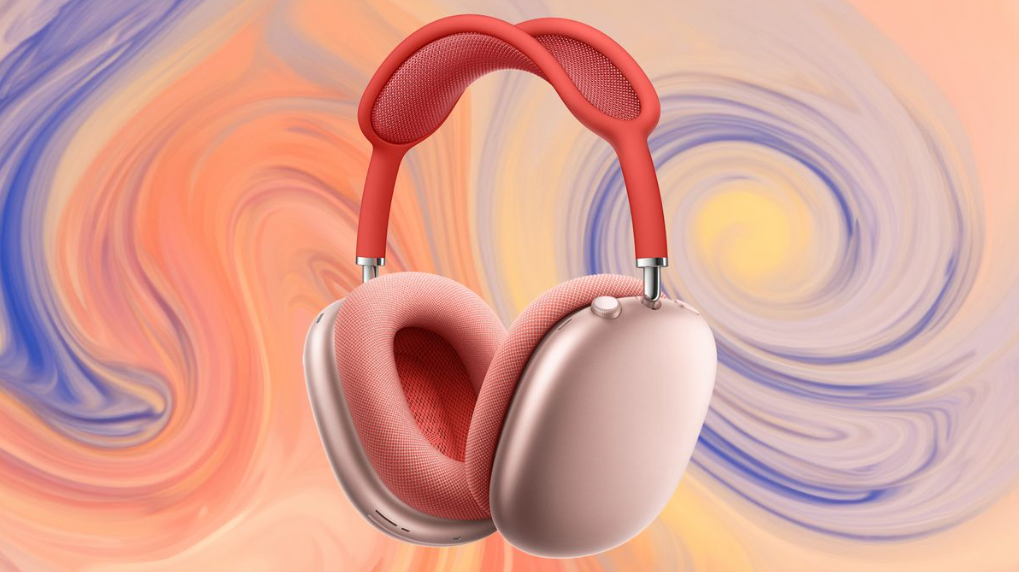
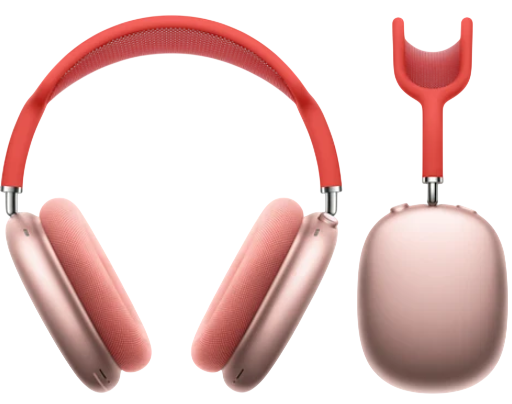
The AirPods Max are Apple’s premium over‑ear wireless headphones. They combine high‑fidelity audio with Active Noise Cancellation, Transparency mode, and personalized Spatial Audio. The headphones feature a stainless‑steel frame, a breathable knit mesh canopy, and memory‑foam ear cushions. They connect automatically to your iPhone, iPad, Mac, and Apple Watch via Bluetooth 5.0 and the H1 chip. The included Smart Case puts them into an ultra‑low‑power state to preserve battery. They are available in five colours: Space Grey, Silver, Sky Blue, Green, and Pink.
Key Features
- Active Noise Cancellation (ANC): Blocks outside sound using six outward‑facing microphones and two inward‑facing microphones. Ideal for commuting, working, and focusing.
- Transparency Mode: Lets external sound in so you can hear conversations, announcements, and your surroundings without removing the headphones.
- Personalized Spatial Audio: Uses the TrueDepth camera on your iPhone to create a custom profile based on the shape of your ears. Works with Dolby Atmos for a theatre‑like experience. Dynamic head tracking keeps the audio anchored to your device as you move your head.
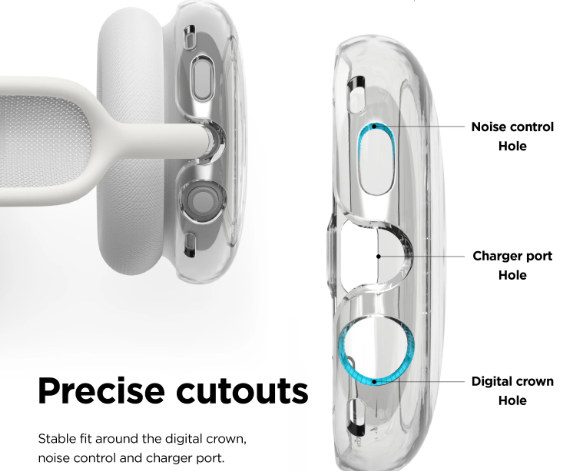
- Digital Crown: Borrowed from Apple Watch, the large dial on the right ear cup lets you precisely adjust volume, play/pause music, skip tracks, answer calls, and activate Siri.
- Noise Control Button: A dedicated button on the right ear cup toggles between ANC and Transparency mode. You can customize it in Bluetooth settings.
- H1 Chip (each ear cup): Delivers computational audio for real‑time noise cancellation, adaptive EQ, and seamless switching between Apple devices signed into the same iCloud account.
- Smart Case: Places the headphones into an ultra‑low‑power state when stored. The AirPods Max are not turned off by a button; they enter a low‑power state when placed in the case or left stationary for a period.
How to Use
What’s in the Box
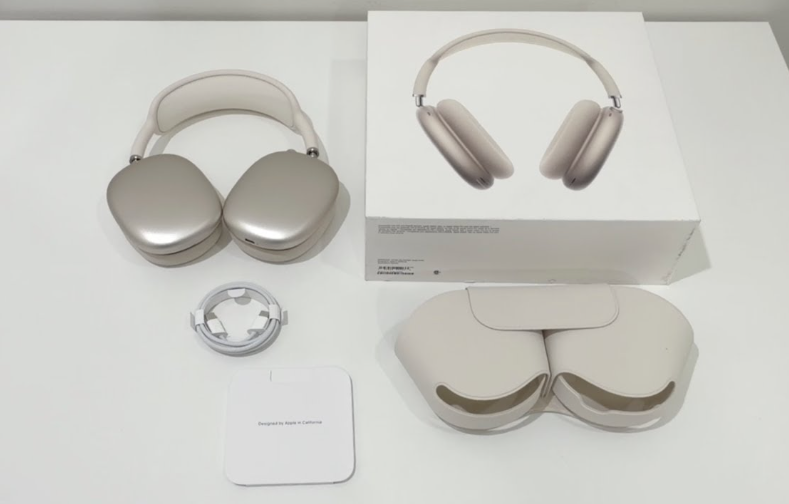
- AirPods Max headphones
- Smart Case
- Lightning to USB‑C charging cable
- Quick‑Start Guide and safety booklet
No power adapter is included. Use any USB‑C power adapter or computer port for charging.
First‑Time Pairing
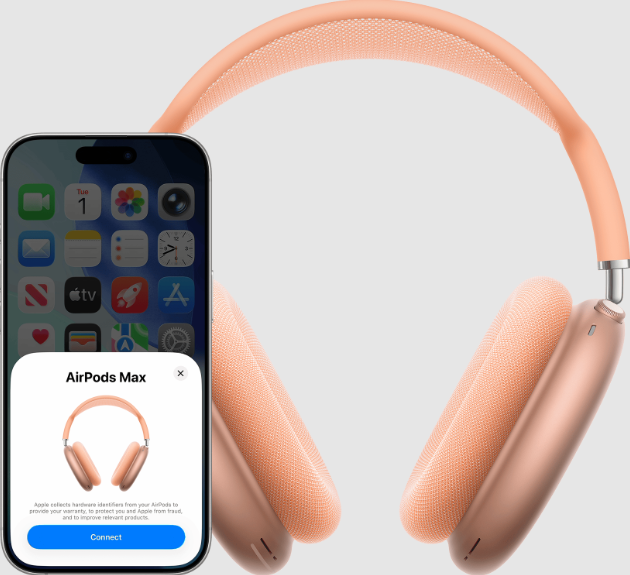
- Remove the AirPods Max from the Smart Case. They power on automatically.
- Hold the headphones near your unlocked iPhone or iPad. A setup animation appears on the screen. Tap “Connect.”
- Follow the prompts to enable Spatial Audio and set up Siri.
- Your AirPods Max are now paired and will automatically switch between all your Apple devices signed into the same iCloud account.
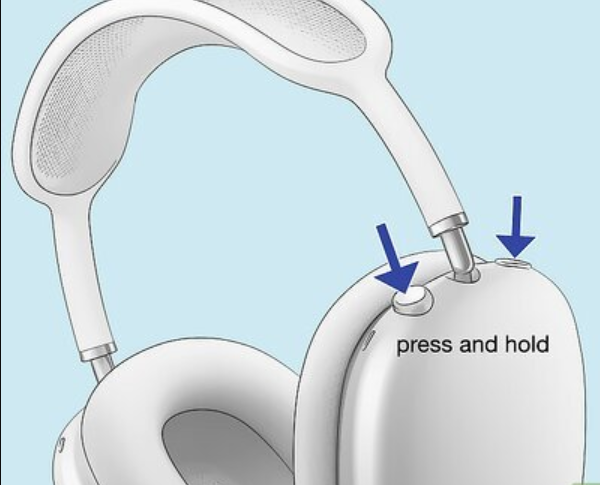
- For non‑Apple devices (Android, Windows, etc.): Press and hold the Noise Control button (on the right ear cup) until the status light flashes white. Then select “AirPods Max” in your device’s Bluetooth settings.
Physical Controls
| Control | Location | Action |
|---|---|---|
| Digital Crown | Right ear cup, top | Turn to adjust volume. Press once to play/pause. Press twice to skip forward. Press three times to skip back. Press and hold for Siri. |
| Noise Control button | Right ear cup, behind the Digital Crown | Press once to toggle between ANC and Transparency mode. You can customise this in Settings > Bluetooth > AirPods Max > Noise Control Button. |
Charging & Battery
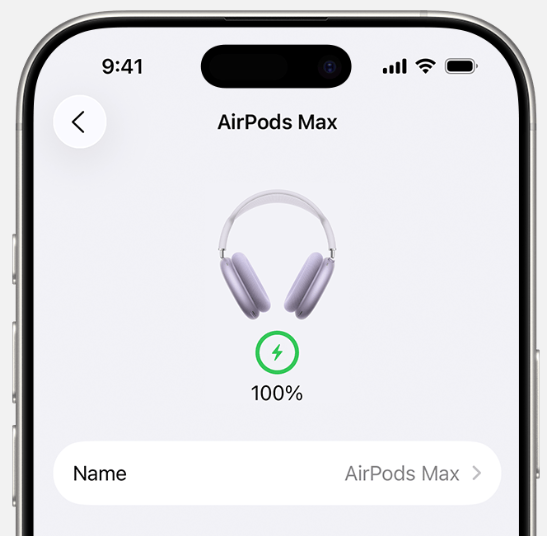
- Charge with Lightning: Connect the included Lightning to USB‑C cable to the port on the bottom of the right ear cup and a USB‑C power source. A full charge takes about 2 hours and provides up to 20 hours of listening time with ANC on.
- Check battery level: The battery status appears on your iPhone when you hold the headphones near it, or you can check the Batteries widget.
- Low‑power mode: Place the AirPods Max in the Smart Case to put them into an ultra‑low‑power state immediately. If left outside the case, they enter a low‑power mode after 5 minutes of inactivity and a deeper low‑power mode after 72 hours.
Cleaning & Storage
- Ear cushions: Remove them by pulling gently; they snap off. Hand‑wash with mild soap and water, rinse, and air‑dry completely (at least 24 hours) before reattaching.
- Headband and canopy: Wipe with a slightly damp cloth. Do not use cleaners.
- Smart Case: Wipe with a soft, dry cloth.
Troubleshooting & Common Problems
| Problem | Likely Cause | What to Try |
|---|---|---|
| Headphones won’t turn on | Battery drained, or not removed from Smart Case | Charge for at least 15 minutes. Remove the headphones from the case and try again. |
| ANC not working effectively | Ear cushions not sealing, or dirty microphones | Remove and reattach the ear cushions. Clean the microphone grilles with a dry cloth. |
| Only one ear working | Audio balance, or connection issue | Check Settings > Accessibility > Audio/Visual > Balance. Reset the AirPods Max (see reset instructions below). |
| AirPods Max won’t connect | Bluetooth off, or already connected to another device | Turn Bluetooth off and on again on your device. Put the headphones in the Smart Case for 10 seconds, then try again. |
| Digital Crown not responding | Software glitch, or low battery | Charge the headphones. Restart them by pressing and holding both the Digital Crown and the Noise Control button until the LED flashes amber. |
| Static or crackling sound | Bluetooth interference, or moisture | Move closer to your device. Dry the headphones thoroughly if they’ve been exposed to moisture (they are not waterproof). |
Frequently Asked Questions
- Are the AirPods Max waterproof?
No, they are not water‑resistant. Avoid wearing them in rain, during workouts, or in humid environments. - Can I use them wired?
Yes, with the Lightning to 3.5 mm audio cable (sold separately). This provides lossless audio and works even when the battery is dead. - How do I reset the AirPods Max?
Press and hold both the Digital Crown and the Noise Control button for 15 seconds until the status light flashes amber, then white. Release. The headphones will reset to factory settings. - What is the difference between Transparency mode and Adaptive Audio?
Adaptive Audio (available on AirPods Pro 2 and AirPods 4) dynamically blends ANC and Transparency. AirPods Max have separate ANC and Transparency modes; they do not have Adaptive Audio. - Can I use the AirPods Max with an Apple TV?
Yes. Put them on, open Control Center on the Apple TV, select the AirPods tab, and choose AirPods Max. - How do I clean the ear cushions?
Remove them by pulling gently. Hand‑wash with mild soap and water, rinse, and air‑dry for at least 24 hours before reattaching.
Tips
- Use the Smart Case for travel: It puts the headphones into the lowest power state. If you leave the headphones out of the case, the battery drains faster.
- Enable Head Tracking: In Control Center, long‑press the volume slider while listening to spatial audio content and choose Head Tracked for immersive sound.
- Share Audio: While listening to music or watching a video, bring a second pair of AirPods (Pro, Max, etc.) near your iPhone. Tap Share Audio on the pop‑up.
- Customize the Digital Crown direction: If the volume feels backwards (up for quieter), go to Settings > Bluetooth > AirPods Max > Digital Crown and switch the direction.
Safety Information
- Hearing safety: Prolonged listening at high volume can damage hearing. iOS includes a Headphone Safety feature in Settings > Sound & Haptics > Headphone Safety that can limit the maximum volume.
- Charging: Use only Apple‑certified or reputable third‑party Lightning cables and USB‑C adapters.
- Skin sensitivity: The ear cushions and headband are made of hypoallergenic materials. If you experience irritation, clean the cushions regularly and allow the headphones to air out after use.
- Storage: Store the headphones in the Smart Case when not in use. Avoid leaving them in direct sunlight or very hot or cold environments.
Related Manuals
If this guide was helpful, here are a few more popular manuals from productsmanuals.com that you might find useful:
- iPhone Air A3312 Manual – Apple Intelligence, Camera Control & Setup
Master the thinnest iPhone with Apple Intelligence and Camera Control. - iPhone 17 Manual – Settings, Camera & Hidden Features Guide
Explore Dynamic Island, Action button, and battery‑health tricks. - AudionicAirPods Pro 2 Manual – ANC, Spatial Audio & Reset Steps
Fix one‑sided audio, clean the mesh, and use Conversation Boost. - Samsung Galaxy S24 Ultra Manual – S Pen, Galaxy AI & Pro Camera Guide
Get the most from the 200 MP sensor, Circle to Search, and DeX mode. - JBL Go 3 Manual – Waterproof Bluetooth Speaker Setup & Troubleshooting
Pair, charge, and protect your ultra‑portable speaker.
Browse all guides at productsmanuals.com .
Copyright Warning ⚠
Copyright 2026 productsmanuals.com All rights reserved. This Apple AirPods Max A2096 manual is original content and may not be copied, republished, or redistributed without written permission. Apple, AirPods Max, Digital Crown, and the Apple logo are trademarks of Apple Inc. This guide is unofficial and not affiliated with Apple.
