
Samsung Galaxy Buds FE Manual: How to Set Up & Use
Introduction
The Samsung Galaxy Buds FE (Fan Edition) are affordable true wireless earbuds that bring Active Noise Cancellation, a comfortable wing-tip design, and seamless Galaxy ecosystem integration to a budget-friendly price point. Announced in late 2023, they remain one of the most searched entry-level ANC earbuds globally. Model number SM-R400N (or SM-R400 for the international variant). This manual covers everything from pairing and touch controls to ANC settings, battery care, and troubleshooting.
Product Overview
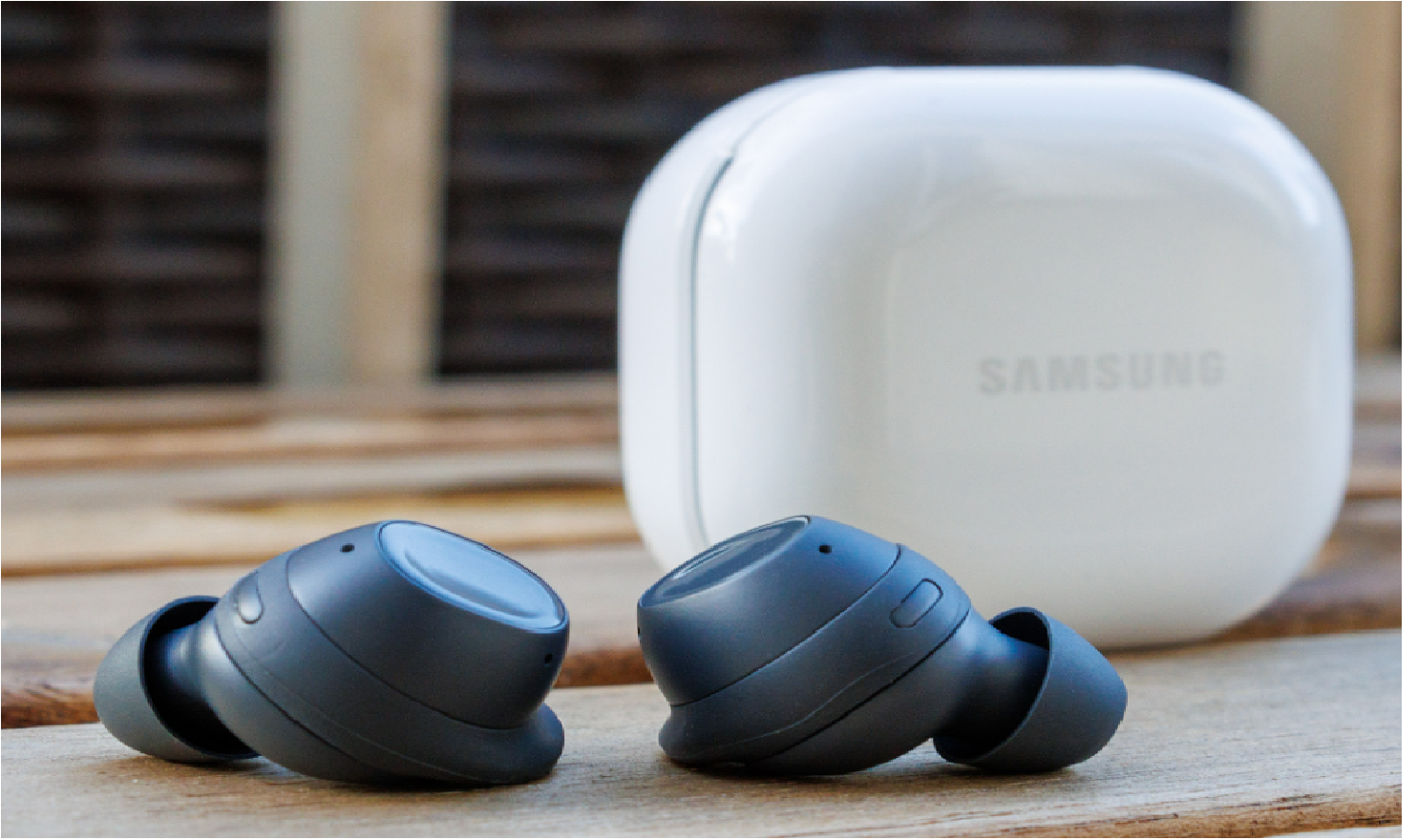
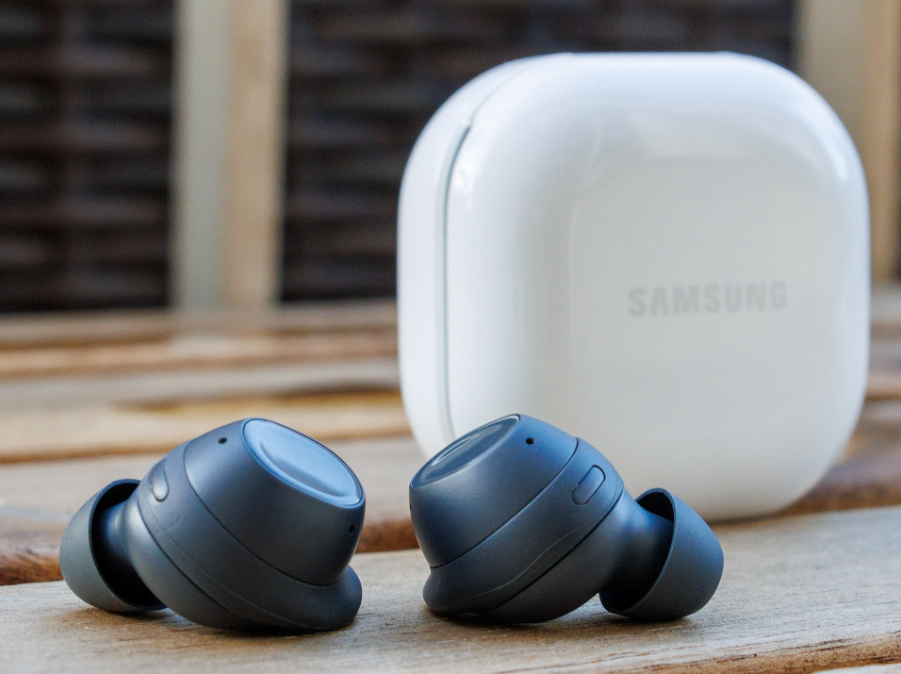
The Galaxy Buds FE are designed for users who want a secure, comfortable fit with active noise cancellation without paying flagship prices. They feature a wing-tip design that keeps the earbuds stable during workouts and daily use. The earbuds connect via Bluetooth 5.2 and support the Samsung Galaxy Wearable app for customization. They work with both Samsung Galaxy devices and other Android phones (with limited features on non-Samsung devices). The case provides additional battery life and supports USB-C charging. They are available in Graphite and White.
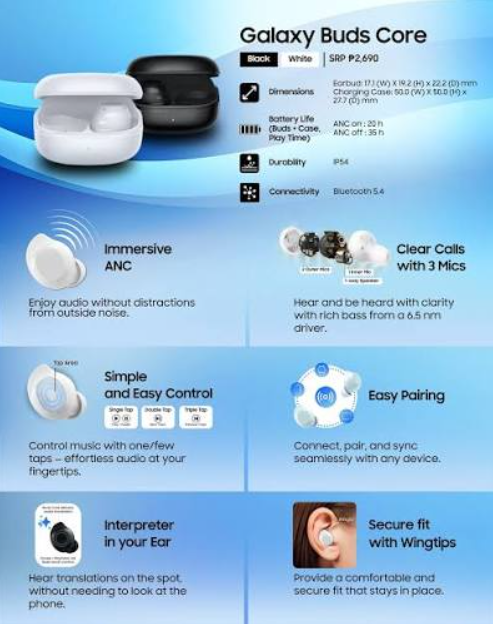
Full Specifications
| Specification | Detail |
|---|---|
| Model | SM-R400N (Galaxy Buds FE) |
| Type | True Wireless Stereo (TWS) Earbuds |
| Driver | 1-way, 6.5 mm dynamic driver |
| Microphone | 3 microphones (2 outer, 1 inner) |
| Active Noise Cancellation | Yes, with Ambient Sound mode |
| Battery (Earbuds) | 60 mAh per earbud |
| Battery (Case) | 479 mAh |
| Playback Time (ANC On) | Up to 6 hours |
| Playback Time (ANC Off) | Up to 8.5 hours |
| Total with Case | Up to 30 hours |
| Charging | USB-C, wireless charging (Qi) |
| Connectivity | Bluetooth 5.2 |
| Sensors | Accelerometer, gyroscope, proximity sensor, touch sensor |
| Water Resistance | IPX2 (sweat resistant only) |
| App | Samsung Galaxy Wearable |
| Compatible With | Android 8.0+, 1.5 GB RAM+ |
| Colours | Graphite, White |
Key Features
- Active Noise Cancellation (ANC): Blocks external noise for focused listening. Toggle between ANC and Ambient Sound via touch-and-hold.
- Ambient Sound Mode: Lets outside sound in so you can hear traffic, announcements, or conversations without removing the earbuds.
- Wing-Tip Design: Silicone wing tips provide a secure fit, making the earbuds ideal for workouts and active use.
- Three Microphone Array: Two outer mics and one inner mic work together for clear voice pickup during calls. The inner mic monitors ear canal noise for improved ANC.
- Galaxy Ecosystem Integration: Auto Switch lets you seamlessly move between Galaxy devices. Find My Earbuds helps locate lost earbuds via SmartThings Find.
- Touch Controls: Customizable single, double, and triple tap gestures for playback, volume, and call management.
- Wireless Charging Case: The case supports Qi wireless charging as well as USB-C wired charging.
- IPX2 Water Resistance: Handles light sweat and splashes, but is not designed for heavy rain or submersion.
How to Use
What’s in the Box
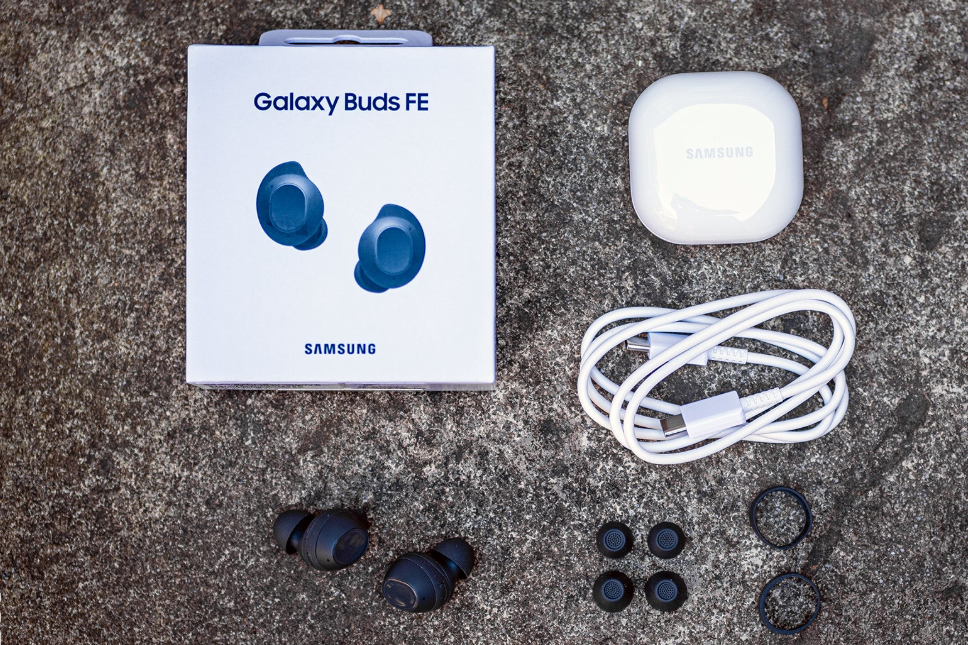
- Left and right Galaxy Buds FE earbuds (medium ear tips and wing tips pre-installed)
- Charging case
- USB-C to USB-A charging cable
- Spare ear tips (S, L)
- Spare wing tips (S, L)
- Quick Start Guide and warranty card
First-Time Setup & Pairing
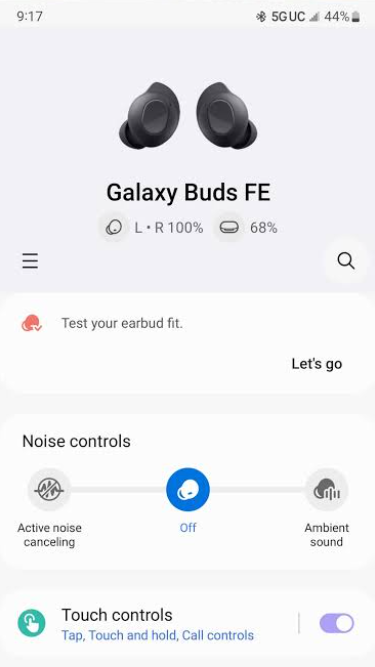
- Charge the earbuds and case fully before first use. Connect the USB-C cable to the case and a USB power source. A full charge takes about 1.5 hours.
- Open the case lid with the earbuds inside. The LED on the case will blink.
- On a Samsung Galaxy phone: A pop-up will appear automatically. Tap “Connect.” Follow the prompts.
- On a non-Samsung Android phone: Download the Galaxy Wearable app from the Play Store. Open the app, tap “Add new device,” and select Galaxy Buds FE. The earbuds will enter pairing mode automatically.
- Manual pairing: If automatic pairing fails, open the case, press and hold both earbud touchpads for 3 seconds until the LED blinks red-green-blue, then select “Galaxy Buds FE” in your phone’s Bluetooth settings.
- Complete setup: Follow the in-app prompts to configure ANC, touch controls, and voice assistant.
Touch Controls (Default Settings)
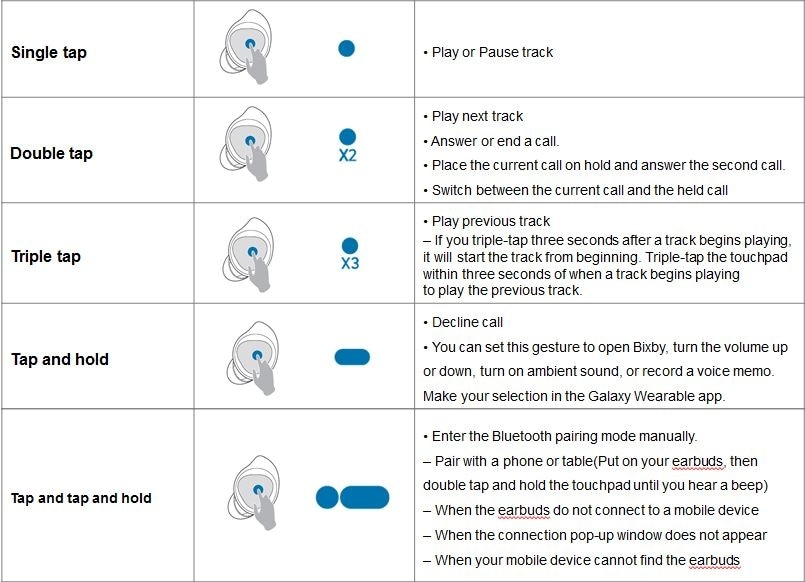
| Gesture | Action |
|---|---|
| Single tap | Play / Pause |
| Double tap | Next track |
| Triple tap | Previous track |
| Touch and hold | Switch between ANC and Ambient Sound |
| Double tap (during call) | End call / Answer call |
| Touch and hold (during call) | Mute / Unmute microphone |
Customization: Open the Galaxy Wearable app, go to Touch controls, and assign different functions to tap gestures. You can also disable touch controls entirely if preferred.
Volume control: The Buds FE do not have default volume control gestures. You can enable Volume control in the app under Labs, then double-tap the edge of the earbud to adjust volume.
ANC and Ambient Sound
- Active Noise Cancellation (ANC): Blocks external noise. Enable via the Galaxy Wearable app or by touch-and-hold (if configured).
- Ambient Sound: Lets external sound in. Adjust the level (1-3) in the app.
- Adaptive: The earbuds automatically adjust ANC based on your surroundings (requires enabling in the app).
- Voice Detect: Automatically switches to Ambient Sound and lowers media volume when you start speaking. Enable in the app.
Battery and Charging
- Earbud battery: Up to 6 hours with ANC on, up to 8.5 hours with ANC off.
- Total with case: Up to 30 hours.
- Charging: USB-C wired charging or Qi wireless charging.
- Quick charge: 5 minutes of charging provides about 1 hour of playback.
- Battery check: Open the Galaxy Wearable app or check the LED on the case (green = above 60%, yellow = 30-60%, red = below 30%).
Resetting the Earbuds
- Open the Galaxy Wearable app.
- Go to Earbud settings > Reset.
- Confirm. The earbuds will restart and forget all paired devices.
Manual reset: Place both earbuds in the case, close the lid, wait 7 seconds, then open the lid. Press and hold both touchpads for 10 seconds until the LED flashes red, then green. Close the lid and re-pair.
Case Specifications
| Specification | Detail |
|---|---|
| Case Model | EB-U2500 |
| Battery Capacity | 479 mAh |
| Battery Type | Lithium-ion (Li-Po) |
| Input (Wired) | USB-C, 5V / 1A (5W) |
| Input (Wireless) | Qi standard, up to 2.5W |
| Output to Earbuds | 5V / 0.3A per earbud |
| Total Playback with Case | Up to 30 hours (ANC off) |
| Charging Time (Case only) | Approx. 1.5 hours (USB-C) |
| Charging Time (Case + Earbuds) | Approx. 2 hours (USB-C) |
| Dimensions | 50.5 x 50.0 x 27.7 mm |
| Weight | 40.5 g (empty) |
| Material | Polycarbonate (matte finish) |
| Colours | Graphite, White |
| Water Resistance | None (case is not water-resistant) |
| Operating Temperature | 0°C to 35°C (32°F to 95°F) |
| Storage Temperature | -10°C to 45°C (14°F to 113°F) |
Case Design & Build
- Shape: Rounded, pebble-like form factor that fits easily in a pocket or small bag.
- Lid: Magnetic flip-top lid that snaps shut securely. Opens with one hand.
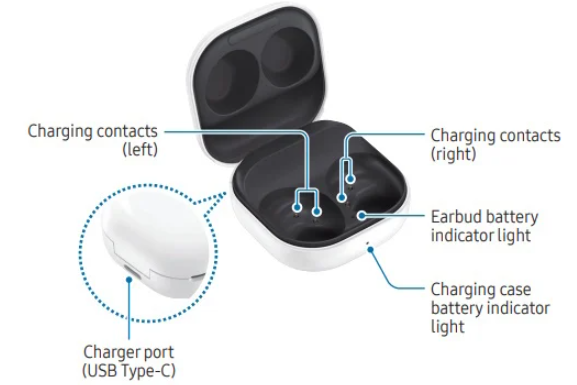
- Interior: Two magnetic cradles that align the earbuds for charging. Gold-plated pogo pins transfer power to the earbuds.
- Exterior: Matte polycarbonate shell that resists fingerprints.
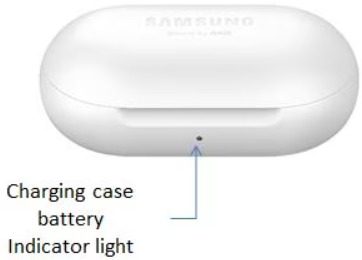
- LED Indicator: A single multi-colour LED on the front of the case.
- Charging Port: USB-C port on the bottom or back edge (model-dependent).
- Wireless Charging Coil: Embedded in the bottom of the case for Qi charging.
- Reset Button: A small recessed button on the back or bottom (used for factory reset).
LED Indicator Meanings
The LED on the front of the case communicates battery and charging status.
| LED Colour / Pattern | Meaning |
|---|---|
| Green (solid, brief) | Case battery above 60% |
| Yellow (solid, brief) | Case battery between 30% and 60% |
| Red (solid, brief) | Case battery below 30% |
| Red (blinking) | Case battery critically low (below 5%) or charging error |
| Green (blinking) | Case is charging via USB-C or wireless |
| Red → Green → Blue (flashing) | Earbuds in pairing mode |
| No light | Case battery empty or earbuds not seated |
Note: The LED only lights up when the lid is opened or closed, or when the case is connected to a charger. It turns off after a few seconds to conserve power.
Charging the Earbuds in the Case
- Place the earbuds in the case: Align the earbuds with their respective slots (L in left, R in right). The magnets will pull them into place.
- Check alignment: The earbuds should sit flush. If they don’t, remove and reinsert.
- Close the lid: Charging begins automatically. The LED will flash the current case battery level.
- Charging time: Earbuds charge from 0% to 100% in about 1 hour inside the case.
- Quick charge: A 5-minute charge in the case provides approximately 1 hour of playback.
Important: Dirty charging contacts on the earbuds or inside the case can prevent charging. Clean them with a dry cotton swab.
Charging the Case (USB-C)
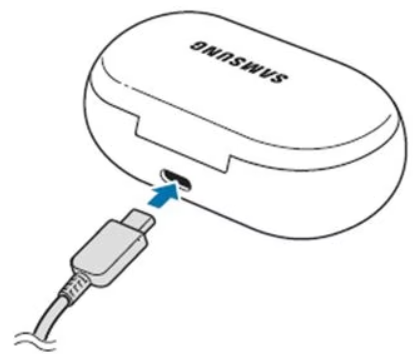
- Connect the cable: Plug the included USB-C cable into the charging port on the case.
- Connect to power: Plug the other end into a USB wall adapter (5V/1A recommended) or a computer USB port.
- LED status: The LED blinks green while charging and turns solid green briefly when fully charged.
- Charging time: A full charge takes about 1.5 hours for the case alone, or about 2 hours if the earbuds are also charging.
- Disconnect: Unplug when fully charged. There is no harm in leaving it plugged in, but unplugging saves energy.
Recommended charger: Use a standard 5W (5V/1A) USB-A or USB-C charger. Fast chargers (9V, 12V) will step down to 5V, so they are safe, but avoid unregulated cheap chargers.
Wireless Charging
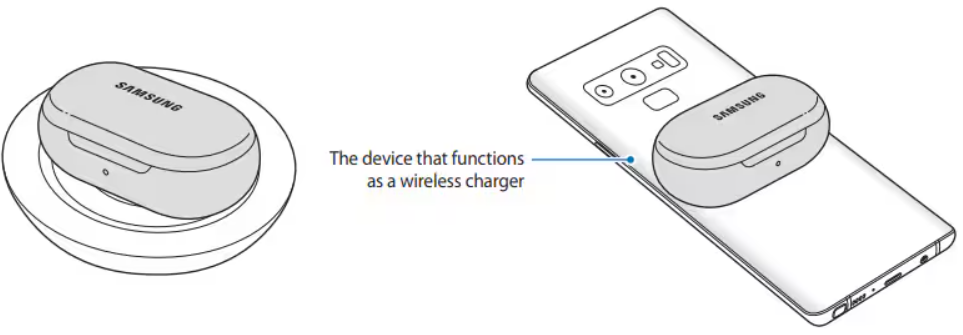
The Galaxy Buds FE case supports Qi wireless charging.
- Place the case on a Qi-certified wireless charging pad. The coil is in the centre of the case bottom.
- Check alignment: The LED will blink green to indicate charging has started. If it doesn’t, reposition the case.
- Charging time: Wireless charging is slower than wired — expect about 3–4 hours for a full charge.
- Remove any thick case: If you use a protective cover on the Buds FE case, remove it before wireless charging, as it may block the coil.
Note: Wireless charging may not work through metal cases or thick silicone covers.
Battery Levels & Checking
| Method | What It Shows |
|---|---|
| Open the case lid | LED flashes the case battery level (green/yellow/red) |
| Galaxy Wearable app | Exact percentage for earbuds and case |
| Samsung phone pop-up | Battery levels when the case is opened near a Galaxy phone |
| Case LED while charging | Blinking green = charging; solid green = fully charged |
Battery level thresholds:
- Green: Above 60%
- Yellow: 30% to 60%
- Red: Below 30%
- Blinking red: Below 5% — charge immediately
Case Battery Capacity & Life
- Case battery: 479 mAh
- Total playback with case: Up to 30 hours (ANC off), up to 21 hours (ANC on)
- Earbud battery: 60 mAh per earbud
- Earbud playback: Up to 8.5 hours (ANC off), up to 6 hours (ANC on)
- Number of full earbud charges from case: Approximately 2.5–3 full charges
- Case battery lifespan: Approximately 2–3 years with regular use, or 500+ charge cycles before noticeable capacity loss
- Replacement: The case battery is not user-replaceable. Contact Samsung support if the battery fails.
Case Maintenance Schedule
| Frequency | Task |
|---|---|
| Daily | Wipe the case exterior with a dry, soft cloth |
| Weekly | Clean the charging contacts inside the case with a dry cotton swab |
| Weekly | Wipe the earbud contacts and the case pogo pins |
| Monthly | Inspect the USB-C port for dust or debris; clean gently with a wooden toothpick |
| Monthly | Check that the lid hinge is free of grit |
| Every 3 months | Deep clean the case interior with a slightly damp cloth (not wet) |
| As needed | Remove ear tips and wing tips from earbuds; clean separately |
Cleaning the Case
Exterior Cleaning
- Unplug the case from any charger.
- Wipe the exterior with a soft, dry, lint-free cloth.
- For stubborn marks, lightly dampen the cloth with water. Do not use soap, alcohol, or solvents.
- Dry immediately with a clean cloth.
Interior Cleaning
- Open the lid.
- Use a dry cotton swab to gently clean the charging contacts (gold pins) inside the case.
- Do not use water or liquid inside the case.
- If debris is stuck in the USB-C port, use a wooden toothpick to gently remove it. Never use metal objects.
What to Avoid
- Do not submerge the case in water.
- Do not use compressed air inside the case — it can push debris deeper.
- Do not use alcohol wipes, bleach, or abrasive cleaners.
- Do not expose the case to extreme heat (e.g., dashboard of a car in summer).
Case Troubleshooting
| Problem | Likely Cause | What to Try |
|---|---|---|
| Case won’t charge (wired) | Faulty cable, adapter, or port | Try a different USB-C cable and wall adapter. Clean the USB-C port with a wooden toothpick. |
| Case won’t charge (wireless) | Misalignment or incompatible pad | Reposition the case on the charging pad. Remove any protective cover. Try a different Qi charger. |
| LED not lighting up | Battery empty, or earbuds not seated | Charge the case for 30 minutes. Ensure earbuds are properly seated. |
| Earbuds not charging in case | Dirty contacts or misalignment | Clean the earbud contacts and case pogo pins with a dry cotton swab. Reinsert earbuds until they click. |
| Case battery drains quickly | Old battery or excessive wireless charging | Wired charging is more efficient. If the case is over 2 years old, the battery may be degraded. |
| Case feels warm while charging | Normal during charging | Some warmth is normal. If it becomes too hot to touch, unplug and let it cool. |
| Case LED blinks red | Battery critically low, or charging error | Charge immediately. If the LED continues blinking red after 30 minutes, contact Samsung support. |
| Case won’t open or close smoothly | Debris in hinge, or damage | Clean the hinge area with a dry brush. If the hinge is broken, contact Samsung. |
Case Error Indicators
The Galaxy Buds FE case does not display numeric error codes. Instead, it uses LED patterns.
| LED Pattern | Meaning | Action |
|---|---|---|
| Blinking red (continuous) | Charging error or critical battery | Try a different cable and charger. If persists, contact Samsung. |
| No LED when earbuds inserted | Earbuds not seated, or case battery dead | Reinsert earbuds. Charge the case. |
| LED flashes red-green-blue | Earbuds in pairing mode | Not an error — normal pairing indicator. |
| LED blinks green rapidly | Case is charging via USB-C or wireless | Normal — wait for solid green. |
| LED solid red | Case battery below 5% | Charge immediately. |
Case Reset Procedures
Soft Reset (Earbuds Only)
- Place both earbuds in the case.
- Close the lid for 10 seconds.
- Open the lid and remove earbuds. This resets the Bluetooth connection.
Hard Reset (Case + Earbuds)
- Place both earbuds in the case and close the lid.
- Wait 7 seconds, then open the lid.
- Press and hold both earbud touchpads for about 10 seconds until the LED flashes red, then green.
- Close the lid and re-pair the earbuds.
Factory Reset (via App)
- Open the Galaxy Wearable app.
- Go to Earbud settings > Reset.
- Confirm. The earbuds and case will reset to factory defaults.
Reset Button (Hardware)
Some Galaxy Buds FE cases have a small recessed reset button on the back or bottom. Press and hold it with a paperclip for 10 seconds to force a hardware reset.
Case Storage & Transport
- Store in a cool, dry place away from direct sunlight.
- Avoid extreme temperatures: Do not leave the case in a hot car or in freezing conditions.
- Keep the lid closed when not in use to prevent dust from entering.
- Do not store with sharp objects that could scratch the case or damage the USB-C port.
- For travel: The case fits easily in a pocket, but consider a protective pouch if carrying it loose in a bag with keys or coins.
- Long-term storage: Charge the case to about 50% before storing for extended periods. Recharge every 3 months to prevent deep discharge.
Case Safety Information
- Battery: Do not puncture, crush, or expose to fire. If the case battery swells, stop using it immediately and contact Samsung.
- Charging: Use only certified USB-C cables and adapters. Avoid using damaged cables.
- Water: The case is not water-resistant. Keep it dry. If it gets wet, dry it thoroughly before charging.
- Heat: Do not expose the case to temperatures above 45°C (113°F). This can damage the battery and cause fire.
- Children: Keep the case and earbuds out of reach of small children. Choking hazard from small parts (ear tips, wing tips).
- Disassembly: Do not attempt to open or disassemble the case. The battery is not user-replaceable.
- Wireless charging: Remove any metal objects (keys, coins) from between the case and the wireless charger.
Case Compatibility
| Device / Charger | Compatible? | Notes |
|---|---|---|
| Galaxy Buds FE earbuds | Yes | Designed specifically for these earbuds |
| USB-C chargers (5V/1A) | Yes | Standard charging |
| USB-C fast chargers (9V/12V) | Yes (steps down to 5V) | Safe, but no faster than 5W |
| Qi wireless charging pads | Yes | Up to 2.5W |
| Samsung Wireless Charger Duo | Yes | Charges case and phone simultaneously |
| Samsung Wireless PowerShare | Yes | Can charge case on the back of a Galaxy phone |
| Other Galaxy Buds models | No | Case is specific to Buds FE |
| Third-party protective covers | May block wireless charging | Remove cover before wireless charging |
| Metal cases | No | Block wireless charging signal |
Case Warranty & Support
- Warranty period: 1 year from date of purchase (region-dependent)
- Covered: Manufacturing defects, battery failure under normal use
- Not covered: Physical damage, water damage, normal battery degradation, lost case
- How to claim: Contact Samsung support with proof of purchase and the case serial number (located inside the lid or on the bottom)
- Replacement: If the case is defective, Samsung may replace it or the entire earbud set
Case Disposal & Recycling
- Do not dispose of the case in household trash. It contains a lithium-ion battery.
- Recycle: Take the case to an electronics recycling centre or a Samsung service centre.
- Before disposal: Discharge the battery completely, then tape over the charging contacts to prevent short circuits.
- Samsung take-back: Samsung offers a free recycling program in many regions.
Case Quick Reference Card
| Task | How |
|---|---|
| Check case battery | Open lid — LED flashes green/yellow/red |
| Charge case (wired) | Connect USB-C cable to 5V/1A adapter |
| Charge case (wireless) | Place on Qi pad; remove protective cover |
| Charge earbuds | Place in case and close lid |
| Clean contacts | Dry cotton swab on earbud and case contacts |
| Soft reset | Earbuds in case, lid closed 10 seconds, open |
| Hard reset | Hold both touchpads 10 seconds until LED flashes red-green |
| Factory reset | Galaxy Wearable app > Earbud settings > Reset |
| Storage | 50% charge, cool dry place, recharge every 3 months |
Troubleshooting & Common Problems
| Problem | Likely Cause | What to Try |
|---|---|---|
| One earbud not working | Sync issue or dirty contacts | Place both in case, close lid for 30 seconds, remove. Clean charging contacts with dry cotton swab. |
| Earbuds won’t pair | Already connected to another device | Turn off Bluetooth on other devices. Reset earbuds and re-pair. |
| ANC not working effectively | Poor ear tip seal | Try different ear tip sizes. Run the Earbud fit test in the Galaxy Wearable app. |
| Touch controls not responding | Wet fingers or dirty surface | Wipe with dry cloth. Ensure fingers are dry. Restart earbuds. |
| Battery drains quickly | High volume or ANC on constantly | Reduce volume. Turn off ANC when not needed. Close background apps. |
| Poor call quality | Microphone blocked or wind noise | Ensure earbuds are seated properly. The mic is on the outer surface. Use the Voice Detect feature. |
| Earbuds not charging | Dirty contacts or dead case battery | Clean contacts with dry cotton swab. Charge case for 30 minutes before testing earbuds. |
Frequently Asked Questions
- Does the Galaxy Buds FE work with iPhone?
No, the Galaxy Buds FE require an Android device (Android 8.0+, 1.5GB RAM+). They do not support iOS. - Is the Galaxy Buds FE waterproof?
It has an IPX2 rating, which means it is only resistant to light sweat and splashes. It is not waterproof and should not be exposed to rain or submersion. - How do I check the battery level?
Open the Galaxy Wearable app or check the case LED (green/yellow/red). - Can I use the Buds FE with a Samsung TV?
Yes, you can pair them via the TV’s Bluetooth settings. Audio sync is generally good. - How do I clean the earbuds?
Wipe with a dry, soft cloth. Remove ear tips and wing tips and rinse with water only. Dry completely before reattaching. Do not use alcohol or liquids on the earbuds themselves. - Do the Buds FE support 360 Audio?
No, 360 Audio is a feature reserved for higher-end Galaxy Buds models. The Buds FE do not support it. - How do I update the firmware?
Open the Galaxy Wearable app. If an update is available, you will see a notification under Earbud settings > Earbud software update. Keep the earbuds in the case during the update. - What should I do if the earbuds get wet?
Wipe them dry immediately with a soft cloth. Do not charge until completely dry.
Tips
- Choose the right ear tips: Try all three sizes. A proper seal improves bass, ANC, and comfort.
- Use wing tips for workouts: The wing tips provide extra stability during exercise.
- Enable Voice Detect: Automatically switches to Ambient Sound when you speak, so you don’t have to remove the earbuds.
- Clean charging contacts regularly: Dirty contacts are the #1 cause of charging issues. Use a dry cotton swab.
- Reset if issues persist: A factory reset solves most connectivity and sync problems.
- Keep firmware updated: Samsung regularly releases updates that improve stability and add features.
- Use Find My Earbuds: Enable in the Galaxy Wearable app to locate lost earbuds via SmartThings Find.
- Avoid extreme heat: Do not leave the earbuds or case in a hot car. High temperatures degrade battery life.
Safety Information
- Battery: Do not puncture, crush, or expose to fire. If the battery swells, stop using and contact Samsung.
- Charging: Use only Samsung-certified or reputable USB-C chargers. Avoid charging in extremely hot or cold environments.
- Water resistance: IPX2 is minimal. Do not expose to rain, heavy sweat, or water. If wet, dry immediately before charging.
- Volume: Prolonged exposure to high volume can damage hearing. Keep volume at a moderate level.
- Ear tips and wing tips: Inspect regularly for wear or damage. Replace if loose or torn to avoid them getting stuck in your ear.
- Children: Keep earbuds, case, and small parts out of reach of small children. Choking hazard.
- Pacemakers: Consult your doctor before using wireless earbuds if you have a pacemaker or implanted medical device.
You can also save the official manual as a PDF by opening it in your browser and using File > Print > Save as PDF.
Related Manuals
If this guide was helpful, here are a few more popular manuals from productsmanuals.com that you might find useful:
- Samsung Galaxy Buds 2 Pro Manual – 24-bit Audio, ANC & Galaxy AI
Explore Samsung’s flagship earbuds with superior sound quality and seamless switching. - Google Nest Doorbell (Battery) GA01318 – Setup, Features & Troubleshooting
Secure your front door with this wire-free smart doorbell and Google Home app. - Ring Battery Video Doorbell (2nd Gen) – Setup, Motion Zones & Troubleshooting
Explore Ring’s best-selling wire-free doorbell with 1440p HD video. - Samsung Galaxy Watch 7 – Health Sensors, Galaxy AI & Battery Tips
Master ECG, body composition, sleep apnea detection, and more. - Honeywell T6 Pro TH6320U2008 – ISU Settings, Scheduling & Troubleshooting
Configure your programmable thermostat for heat pump and conventional systems.
Browse all guides at productsmanuals.com .
Copyright 2026 productsmanuals.com All rights reserved. This Samsung Galaxy Buds FE manual is original content and may not be copied, republished, or redistributed without written permission. Samsung, Galaxy Buds, and the Samsung logo are trademarks of Samsung Electronics. This guide is unofficial and not affiliated with Samsung.
