Introduction
Jackery ships the Explorer 1000 with an AC wall charger, a DC car charger, a storage bag, and a small Quick‑Start leaflet. The printed guide gives only basic safety and power‑on steps. Real‑world questions — “how long does it take to charge from solar,” “what does the flashing battery icon mean,” “can I use it while it’s charging,” or “how do I reset the unit” — are what thousands of people search for every day. This companion gives you all of that in clear, practical language.
What’s Inside the Box
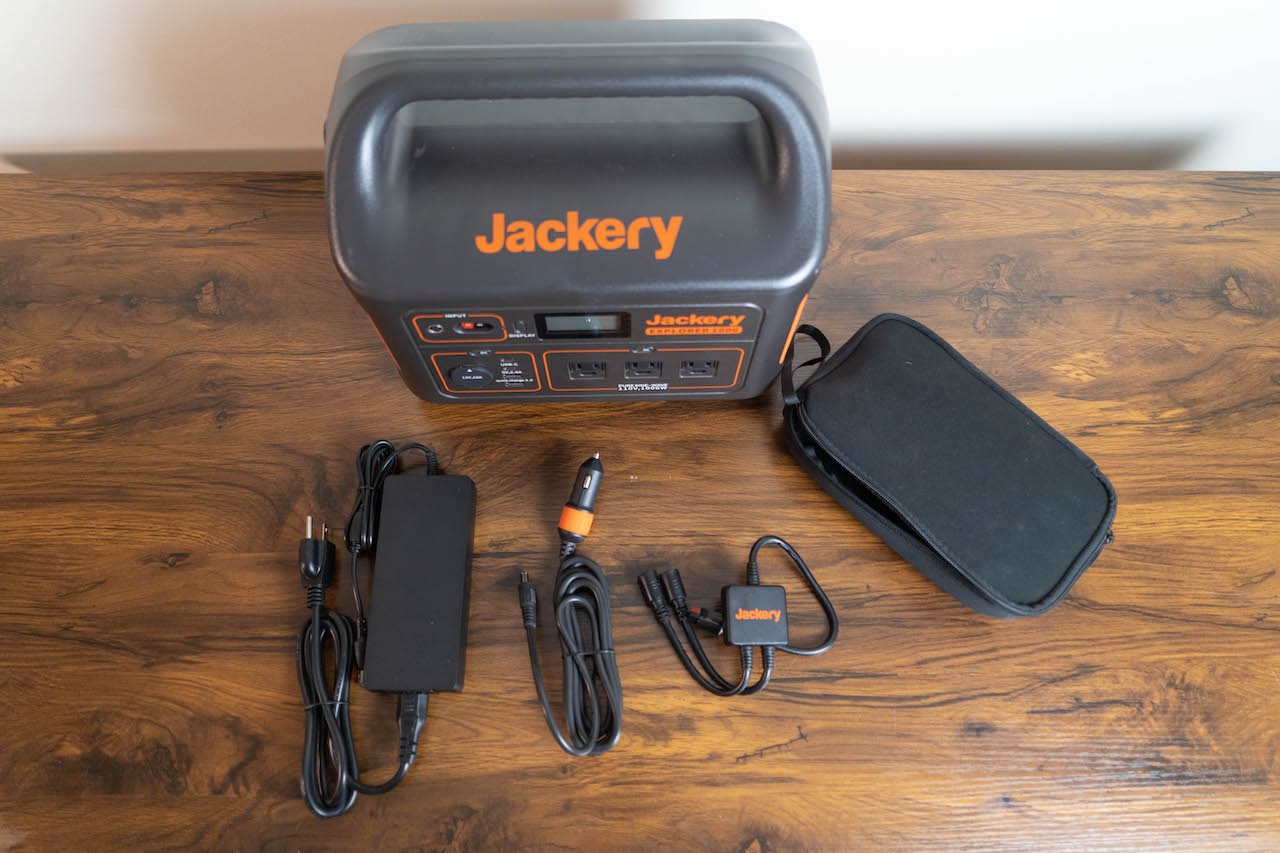
Your package includes:
- The Jackery Explorer 1000 portable power station (lithium‑ion, 1002Wh capacity, 1000W continuous AC output)
- An AC wall charger (with a heavy brick and a figure‑8 power cord)
- A DC car charger (cigarette lighter plug to barrel connector)
- A canvas storage bag for cables
- A Quick‑Start Guide and warranty card
No solar panels are included. Jackery’s Solar Saga 100W or 200W solar panels are sold separately and connect via an included MC4‑to‑8mm adapter.
Physical Tour and Display Panel
The Explorer 1000 is a sturdy, rectangular orange‑and‑black box with an integrated handle. The front panel houses all controls and the LCD screen.
- Power button (main): Press and hold for about 3 seconds to turn the unit on. The LCD lights up. Press and hold again to turn off.
- AC output button: Press to enable or disable the three AC outlets (pure sine wave, 110V/120V). An LED above the button shows status. Turn AC off when not in use to save battery.
- DC output button: Press to enable or disable the DC outputs: 12V cigarette‑style port (10A) and two 6.5×1.4mm barrel ports. The LED shows status.
- USB output button: Press to enable or disable the USB ports: one USB‑C (60W PD) and two USB‑A (Quick Charge 3.0). These are always powered when the unit is on (no separate button on some models, but the general DC button controls them).
- LCD display: Shows input power (watts), output power (watts), battery percentage (0‑100%), and a battery bar with segments. Also displays error codes and status icons.
- Input port (left side): The silver‑coloured socket for the AC wall charger or solar panel cable.
- Built‑in torch light: Press the light button (separate small button) to turn on a low/high/SOS light.
First‑Time Setup and Charging
Before using the Explorer 1000 for the first time, give it a full charge.
- Plug the AC wall charger into a wall outlet. Connect the barrel plug into the input port on the side of the Jackery.
- The LCD will automatically light up, showing an input wattage (around 160‑170W) and the battery percentage climbing.
- A full charge from empty takes about 7‑8 hours using the wall charger.
- The battery percentage reading may be slightly inaccurate during the first few cycles. For best accuracy, fully charge and discharge the unit 2‑3 times.
Understanding the LCD Display Icons
The LCD gives real‑time information:
- Input power (IN): Shows how many watts are coming in from the wall charger, car charger, or solar panels.
- Output power (OUT): Shows how many watts are being drawn by all connected devices combined.
- Battery percentage (%): Large number indicating remaining charge.
- Battery bar: A segmented bar that empties as the battery drains.
- AC icon: Indicates the AC inverter is on.
- DC icon: Indicates the DC outputs are on.
- Fan icon: Appears when the internal cooling fan is running (normal during charging or heavy AC load).
- Error code (E01, E02, etc.): Flashes when there’s a fault (see troubleshooting).
Using the AC Outlets (Appliances and Tools)
The Explorer 1000’s pure sine wave inverter can run devices up to 1000W continuously, with a 2000W surge. This includes laptops, small fridges, CPAP machines, TVs, and power tools.
- Turn on the main power button.
- Press the AC output button to enable the AC inverter. You’ll hear a faint hum as the inverter starts.
- Plug your device into one of the three AC outlets. The display will show the output wattage.
- When done, unplug the device and press the AC output button again to turn off the inverter (saves battery).
Important notes:
The AC inverter has a no‑load auto‑off feature: if no device draws power for a while, it may turn off automatically. Just press the AC button to re‑enable.
Never plug high‑wattage appliances like space heaters, air conditioners, or microwaves that exceed 1000W continuous, as the unit will shut down and show an overload error.
Charging from Solar Panels
- The Explorer 1000 supports solar charging via its built‑in MPPT controller, which optimises the power from the panels.
- Connect your Jackery SolarSaga 100W (or 200W) panel to the input port using the included MC4‑to‑8mm adapter.
- Place the panel in direct sunlight. The LCD will show input wattage climbing. A single 100W panel in full sun provides about 80‑90W.
- Charging time from two 100W panels (parallel) is about 6‑7 hours under ideal conditions. With one panel, it’s roughly 12‑14 hours.
You can use the Jackery while it’s charging (pass‑through charging), but avoid heavy simultaneous loads and charging from solar, as it can stress the battery.
Charging from a Car
The included DC car charger plugs into a vehicle’s 12V cigarette lighter socket. It charges the Explorer 1000 at about 100‑120W, taking around 10‑12 hours from empty. Always start the car’s engine before plugging in, to avoid draining the car battery.
Battery Care and Storage
Optimal storage charge: Store the Jackery at about 60‑80% charge. Avoid leaving it fully drained for weeks.
Temperature: Keep it in a cool, dry place (ideally 0‑25°C). Avoid hot cars or direct sunlight for prolonged periods.
Recharge interval: Even when not in use, recharge it every 3‑4 months to keep the internal battery management system active and the battery healthy.
Troubleshooting Common Issues
| Problem | Likely Cause | What to Try |
|---|---|---|
| Unit won’t turn on | Battery fully drained or overload tripped | Charge for at least 15 minutes. Try the reset procedure below. |
| AC outlets don’t output power | AC inverter not enabled or overload | Press the AC button to turn it on. Reduce the connected load. |
| Display shows “E01” or “E02” | Overload or short circuit | Unplug all devices. Turn off the unit, wait 30 seconds, and turn it back on. If error persists, contact Jackery. |
| Solar input wattage very low | Cloudy, panel not angled correctly | Reposition the panel to face the sun directly. Even a slight angle drop reduces output significantly. |
| Fan runs loudly | Normal during high load or charging | The internal fan keeps the electronics cool. Ensure the vents on both sides are clear. |
| USB‑C not charging laptop | Laptop requires more than 60W | The USB‑C port delivers 60W max. Use the AC adapter for laptops that need more power. |
How to Reset the Explorer 1000
- Turn off the unit (press and hold the main power button until the display goes off).
- Unplug all cables and devices.
- Leave the unit off for at least 60 seconds.
- Turn it back on and test.
For a deeper reset (if the unit is unresponsive), plug the AC charger into the wall and into the Jackery, then press and hold the main power button for 15 seconds while the charger is connected. This often clears stuck errors.
Quick Reference Card
| Task | How |
|---|---|
| Turn on | Hold main power button 3 seconds |
| Enable AC | Press AC output button |
| Check remaining battery | Look at the LCD percentage or press the display button (if present) |
| Activate flashlight | Press the light button (separate small button) |
| Reset after overload | Turn off, unplug devices, wait 60 seconds, turn on |
| Check input from solar | Read IN wattage on LCD |
Download the Jackery Explorer 1000 Cheat Sheet
A one‑page PDF with display icons, solar charging tips, and troubleshooting codes. Print it and keep it with your gear.
“Jackery Explorer 1000 Quick Guide (PDF)”
Official Jackery Support and Manuals
For warranty, additional accessories, and the official PDF manual, visit: https://www.jackery.com/support
Frequently Asked Questions
- Can I use the Jackery Explorer 1000 while it’s charging?
Yes, pass‑through charging is supported. You can plug devices into the AC/DC/USB ports while the unit is charging from a wall outlet, car, or solar panel. However, doing so will slow down charging and may increase battery wear if done heavily and frequently. - How long will the Jackery run my appliance?
A rough formula: watt‑hours (1002Wh) × 0.85 (efficiency loss) ÷ appliance wattage. For example, a 60W CPAP might run for about 14 hours. For a 500W blender, about 1.7 hours. Always check the appliance’s actual power draw. - What does the “E” error code mean?
E01 or E02 indicates an overload or short circuit. Unplug all devices, turn off the unit, wait 30 seconds, and restart. If the error remains, contact Jackery. - Can I connect the Explorer 1000 to my home circuit breaker panel?
No. The Explorer 1000 is not designed for home integration or transfer switches. It’s a standalone portable power station for plug‑in devices. For home backup integration, you’d need the Jackery 2000 Plus or similar with a transfer switch kit (sold separately). - How do I know if the solar panel is working?
Check the input wattage (IN) on the LCD. Even on a bright day with a 100W panel, you should see at least 60‑80W. If it’s near zero, check the cable connections and ensure the panel is not shaded. - Why does the fan turn on even when nothing is plugged in?
The internal battery management system occasionally runs the fan during charging or after heavy use to cool the electronics. This is normal. - Can I use a third‑party solar panel with the Jackery?
Yes, as long as the panel has an MC4 connector and you use the correct adapter (8mm DC barrel, polarity center‑positive), and the panel’s open‑circuit voltage is within 12‑30V for the Explorer 1000 (most 12V/24V panels work). Always verify voltage specifications to avoid damage. - Does the Explorer 1000 have a built‑in MPPT controller?
Yes, it has an MPPT charge controller that maximises solar efficiency. You don’t need an external controller. - How do I store the unit for camping?
Charge it to about 80%, keep it in a cool place, and store the cables separately. Cover the input and output ports with dust caps if available. - Is the Jackery safe for CPAP machines?
Yes, the pure sine wave AC inverter is safe for CPAPs. Many users run a CPAP overnight on a fully charged Explorer 1000. Ensure the CPAP’s power adapter is within the 1000W limit. - Can I recharge the Jackery from my car while driving?
Yes, using the included DC car charger. It draws about 10A from the 12V socket. Keep the engine running to avoid a dead car battery. - What is the lifespan of the battery?
The lithium‑ion battery is rated for 500 full charge cycles to 80% capacity. With typical use (one cycle per week), it will last several years. Partial cycles count proportionally.
A Practical Note Before You Pack
Your Jackery Explorer 1000 is a versatile power companion. Keep the AC inverter off when not in use, charge it fully before a trip, and store it at a healthy percentage. A little care with battery hygiene and avoiding deep discharges will keep it ready for every blackout, campout, or tailgate.
Copyright Warning!
Copyright 2026 productsmanuals.com All rights reserved. This Jackery Explorer 1000 manual is original content and may not be copied, republished, or redistributed without written permission. Jackery and the Jackery logo are trademarks of Jackery Inc. This guide is unofficial and not affiliated with Jackery.