
Product Overview
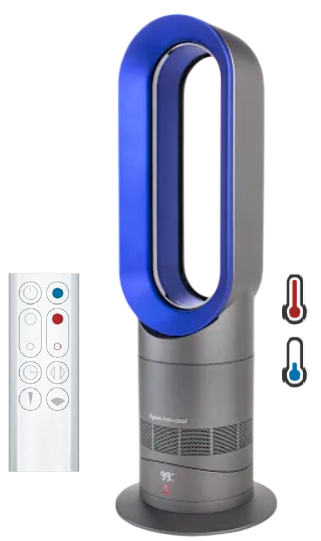
The Dyson Hot+Cool AM09 is a bladeless fan heater that works year‑round – it heats rooms quickly in winter and provides a cooling breeze in summer. It uses Air Multiplier™ technology to draw in air and project it smoothly and evenly. In heater mode, a ceramic heating element warms the air; the thermostat maintains the set temperature. The AM09 has two airflow modes: Focused (for a powerful, direct stream of air) and Diffused (for wide, gentle airflow). It includes a remote control that stores magnetically on the top, and it’s equipped with a tilt function and automatic shut‑off if tipped over.
Key Features
- 2‑in‑1 Heater & Fan: Works as a powerful fan in summer and a fast‑heating ceramic heater in winter. The thermostat adjusts the room temperature precisely.
- Air Multiplier™ Technology: No visible spinning blades. The loop amplifier draws in air and accelerates it, producing a smooth, uninterrupted stream.
- Focused & Diffused Modes: Choose Focused mode for a strong, direct airflow to heat or cool a single person. Choose Diffused mode for wide, gentle airflow to heat or cool a whole room.
- Intelligent Thermostat: Set the desired room temperature between 1 °C and 37 °C in heat mode. The AM09 will automatically turn the heat on and off to maintain that temperature. The LED display shows the target temperature.
- Remote Control with Magnetic Storage: The small curved remote attaches magnetically to the top of the fan. It controls power, temperature, airflow mode, oscillation, and sleep timer.
- Oscillation: Press the oscillation button to rotate the fan up to 70 degrees (on some settings) to distribute air across the room.
- Sleep Timer: Set the fan to turn off automatically after 15 minutes, 30 minutes, 45 minutes, 1 hour, 2 hours, 4 hours, or 8 hours. Ideal for nighttime use.
- Safety Features: The AM09 automatically shuts off if it tips over. It also lacks exposed heating elements and blades, making it safer around children and pets.
How to Use
What’s in the Box
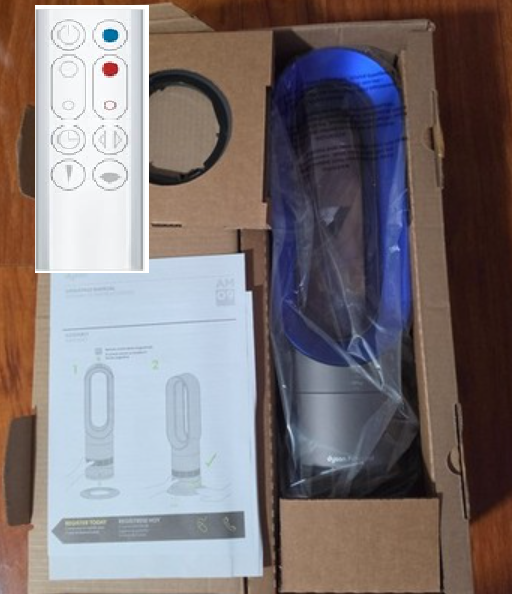
- Dyson Hot+Cool fan heater (loop amplifier and base are separate; they click together)
- Remote control (curved, with CR2032 battery pre‑installed)
- User manual and warranty card
The fan is ready to use after assembly. No tools are required.
Assembly
- Place the loop amplifier on a flat surface. Align the base with the bottom of the loop and push it on until it clicks securely. The fan should be stable.
- Plug the power cord into a wall outlet. The AM09 will do a brief self‑check, and the LED display will light up.
Using the Remote Control
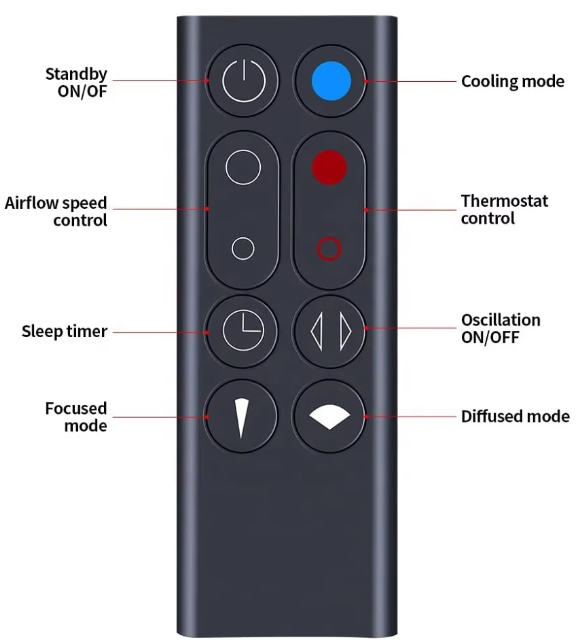
| Button | Function |
|---|---|
| Power | Turns the fan on/off. |
| Heat mode (red symbol) | Press to activate heating. The display shows the target temperature. Use the Temp +/− buttons to adjust (1 °C to 37 °C). |
| Cool mode (blue symbol) | Press to activate fan‑only mode. The display shows the airflow speed (1–10). |
| Airflow mode | Toggles between Focused (direct stream, icon: single person) and Diffused (wide stream, icon: room). |
| Oscillation | Press to start or stop the fan rotating side to side. |
| Sleep timer | Press repeatedly to set the auto‑off time (15 min to 8 hours). The LED displays the selected time. |
| Temp +/− | In heat mode, adjusts the target temperature. In cool mode, adjusts the airflow speed. |
Heating a Room
- Press the Power button. Press the Heat mode button (red symbol). The LED turns red.
- Use the Temp +/− buttons to set the desired room temperature (e.g., 22 °C). The AM09 will blow warm air until the room reaches that temperature. The thermostat will then turn the heat off and on automatically to maintain it.
- Select Diffused mode for whole‑room heating, or Focused mode if you want the warmth directed at you.
- To save energy, the thermostat will turn off the heating element when the target is reached, but the fan continues to run at a low level to monitor the air temperature. This is normal.
Using as a Cooling Fan
- Press the Power button. Press the Cool mode button (blue symbol). The LED turns blue.
- Use the Temp +/− buttons to adjust the airflow speed from 1 (gentle breeze) to 10 (powerful cooling). There is no temperature target in cool mode – it just blows air.
- Select Focused mode for a personal breeze or Diffused mode for room‑wide circulation.
Cleaning the Filter
The AM09 has a mesh filter in the base to trap dust. Clean it every month.
- Turn off and unplug the fan.
- Look at the base: the filter is a circular mesh ring. Rotate it counter‑clockwise to remove it.
- Wash the filter under warm running water. Do not use soap. Shake off excess water and let it dry completely (at least 24 hours).
- Replace the filter by aligning it and rotating clockwise until it clicks.
Troubleshooting & Common Problems
| Problem | Likely Cause | What to Try |
|---|---|---|
| Fan won’t turn on | Power connection, or the plug fuse | Check the plug is fully inserted and the outlet is working. If the plug has a fuse, check and replace if blown. |
| No heat, only blows cold air | Thermostat set too low, or the tip‑over switch activated | In heat mode, set the target temperature higher than the room temperature (e.g., 25 °C). Ensure the fan is upright on a level surface. |
| Fan oscillates erratically or not at all | Obstruction, or the base is not fully seated | Check that nothing is blocking the base or loop. Remove and re‑attach the base. |
| Remote control not working | Battery depleted, or magnetic interference | Replace the CR2032 battery. Ensure the remote is pointed at the display (on the front of the base). Remove any metal objects between the remote and the fan. |
| H1 or H2 error on display | The fan is too hot, or a thermostat fault | H1: The room temperature is above the target, so the fan is not heating. Lower the target. H2: A thermostat sensor fault. Unplug for 5 minutes, then restart. If it persists, contact Dyson. |
| Fan makes a rattling noise | The base is loose, or debris in the filter | Remove and re‑seat the base. Clean the mesh filter. Ensure the filter is dry and properly installed. |
Frequently Asked Questions
- Can the AM09 be used as the primary heater for a room?
It’s designed for supplementary heating in rooms up to about 250 square feet. It’s powerful, but for very large or poorly insulated rooms, you may need a larger system. - Does the fan blade get hot?
There are no visible blades or exposed heating elements. The loop remains cool to the touch, but the air coming out is hot. The ceramic heating element is enclosed. - How do I reset the thermostat?
The thermostat resets automatically when you unplug the fan for 10 seconds and plug it back in. There’s no separate reset button. - Can I use the fan without the remote?
The AM09 has no physical buttons on the body. The remote is required. If you lose it, you can buy a replacement from Dyson. - Is the filter washable?
Yes, the mesh filter is washable and should be cleaned monthly. It does not need to be replaced. - What is the maximum power consumption?
In heat mode at maximum, it uses about 2,000 W. In cool mode, it uses up to 56 W.
Tips
- Use the sleep timer: Set the timer to 1 hour before bed in winter. The AM09 will turn off automatically after you fall asleep.
- Store the remote on the fan: The remote is magnetic and attaches to the top of the loop. This prevents losing it.
- Pre‑heat the room: In cold weather, run the AM09 in heat mode with Diffused airflow for 10 minutes before entering the room.
- Keep the filter clean: A clogged filter reduces airflow and can cause the fan to overheat. Clean it monthly.
- Place the fan away from curtains and furniture: The AM09 should have at least 30 cm clearance on all sides for proper airflow.
Safety Information
- Tip‑over protection: The AM09 will automatically turn off if it falls over. Place it on a stable, level surface out of reach of children and pets.
- No external heating elements: The ceramic heating element is completely enclosed. Do not insert any objects into the loop.
- Power cord: Do not run the cord under rugs or carpets. Keep it away from high‑traffic areas to prevent tripping.
- Water: The AM09 is not waterproof. Do not use it in bathrooms or near water sources.
- Cleaning: Always unplug the fan before cleaning. Do not use abrasive cleaners or solvents.
Related Manuals
If this guide was helpful, here are a few more popular manuals from productsmanuals.com that you might find useful:
- Samsung Galaxy Watch 7 Manual – Health Sensors, Galaxy AI & Battery Tips
Master ECG, body composition, sleep apnea detection, and more. - LG Dual Inverter AC Manual – Remote, Self‑Clean & Error Codes
Cool efficiently and fix blinking lights with simple steps. - iPhone XS Max Manual – Settings, Camera & Hidden Features Guide
Explore Dynamic Island, Action button, and battery‑health tricks. - Samsung Galaxy S23 Ultra Manual – S Pen, 200 MP Camera & Galaxy AI
Get the most from the 200 MP sensor, Space Zoom, and built‑in S Pen. - Dell Latitude 5430 Manual – Laptop Setup, Upgrades & Troubleshooting
Upgrade RAM and SSD, and fix common performance issues.
Browse all guides at productsmanuals.com .
Copyright 2026 productsmanuals.com All rights reserved. This Dyson Hot+Cool AM09 manual is original content and may not be copied, republished, or redistributed without written permission. Dyson, Air Multiplier, and the Dyson logo are trademarks of Dyson Ltd. This guide is unofficial and not affiliated with Dyson.
