
Product Overview
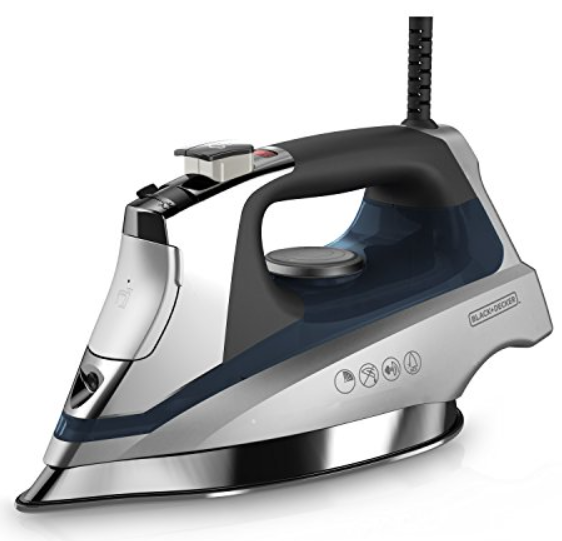
The Black+Decker D3030 Allure Professional Steam Iron is designed for everyday household ironing with a focus on speed and ease. It features a durable stainless‑steel soleplate, variable steam control, and a powerful steam surge for stubborn wrinkles. The iron has a 12‑ounce water tank, an anti‑drip system, and a 3‑way auto‑shutoff for safety. Its lightweight design and comfortable grip make it suitable for long ironing sessions. It heats up quickly and is intended for use with tap water (distilled water is not recommended).
Key Features
- Stainless‑Steel Soleplate: The non‑stick soleplate glides smoothly over all fabric types. It resists scratches and is easy to clean.
- Variable Steam Control: A dial on the top of the iron lets you adjust the steam output from low to high, or turn it off completely for dry ironing.
- Powerful Steam Surge: A dedicated button on the handle delivers an extra burst of steam horizontally or vertically. Ideal for heavy fabrics, hanging garments, and drapes.
- Spray Mist: A fine water spray helps dampen stubborn wrinkles. The spray nozzle is located on the front of the iron.
- Anti‑Drip System: Prevents water from leaking out of the soleplate when the iron is too cool to produce steam.
- 3‑Way Auto‑Shutoff: The iron turns off automatically after 30 seconds on its side or soleplate, and after 8 minutes on its heel. An indicator light blinks and a beep sounds when auto‑off activates.
- 12‑Ounce Water Tank: The translucent tank lets you see the water level easily. It’s large enough for a typical ironing session without frequent refills.
How to Use
What’s in the Box
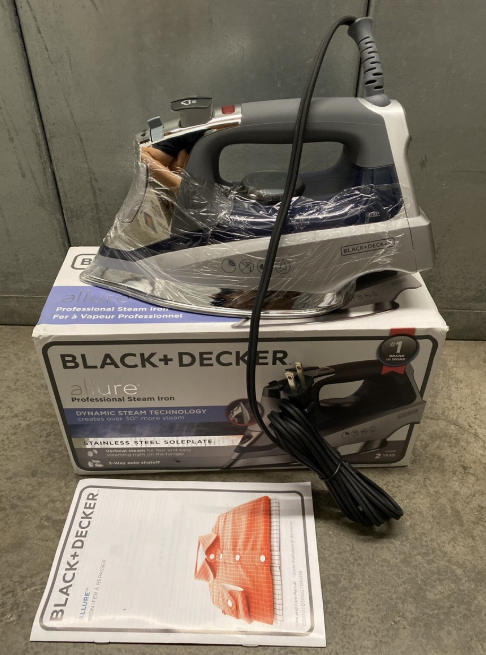
- Black+Decker D3030 Allure steam iron
- Small plastic water filling cup
- User manual and warranty card
No spray bottle or additional accessories are included.
First‑Time Setup & Filling the Tank
- Remove all packaging and the protective film from the soleplate. Wipe the soleplate with a damp cloth to remove any manufacturing residue.
- Place the iron on a stable, heat‑resistant surface. Plug it into a grounded outlet.
- Filling with water: Turn the iron off and unplug it. Slide the steam control to Off (no steam). Open the water fill cover on the front of the iron. Use the included cup to pour tap water into the tank up to the MAX line. Do not overfill. Close the cover securely.
- The D3030 is designed for tap water. If you have very hard water, you can mix 50% tap water with 50% distilled water to reduce mineral buildup. Do not use 100% distilled water, as it can cause corrosion over time.
Using the Controls
| Control | Location | Function |
|---|---|---|
| Temperature dial | Under the handle | Turn to set the fabric type: Synthetics (•), Silk/Wool (••), Cotton (•••), Linen (Max). The indicator light turns off when the selected temperature is reached. |
| Steam control dial | On top of the handle | Slide to adjust steam output: Off, Low, Medium, High. |
| Steam surge button | Top of the handle | Press to release a powerful burst of steam. Wait a few seconds between presses. |
| Spray button | Top of the handle | Press to spray a mist of water from the front nozzle. |
Ironing Different Fabrics
| Fabric | Temperature Setting | Steam Setting | Notes |
|---|---|---|---|
| Synthetics (polyester, nylon, acrylic) | • (Low) | Off | Use a pressing cloth to avoid shine. Iron inside out if possible. |
| Silk / Wool | •• (Medium) | Low | Use a pressing cloth for silk. Wool can be ironed with steam on low. |
| Cotton | ••• (High) | High | Spray mist or use steam surge for stubborn wrinkles. |
| Linen | Max | High | Iron while damp for best results. Use steam surge frequently. |
Always check the garment’s care label. If in doubt, start with a lower temperature.
Steam Surge & Vertical Steaming
- Horizontal steam surge: With the iron on a high temperature and steam setting, press the steam surge button to release a powerful shot of steam. Use this for tough creases.
- Vertical steaming: Hang the garment or drapes. Hold the iron a few inches away and press the steam surge button. The burst of steam penetrates the fabric without the soleplate touching it. This is useful for removing wrinkles from suits, hanging dresses, and curtains.
Auto‑Shutoff & Restarting
- The iron automatically turns off after 30 seconds on its side or soleplate, or 8 minutes on its heel. The power indicator light blinks, and the iron beeps.
- To restart, simply pick up the iron and move it gently. The auto‑shutoff resets, and the iron heats up again.
Troubleshooting & Common Problems
| Problem | Likely Cause | What to Try |
|---|---|---|
| Iron won’t heat up | Auto‑shutoff active, or temperature dial set too low | Move the iron gently to reset auto‑shutoff. Turn the temperature dial to a higher setting. Ensure the outlet is working. |
| No steam | Steam control set to Off, or water tank empty | Slide the steam control to Low/High. Refill the water tank. If the iron is not hot enough, steam will not be produced. |
| Water spits or leaks from the soleplate | Anti‑drip active, or water in the steam chamber | Wait until the iron reaches the set temperature before using steam. If the iron has been stored with water in the tank, it may spit initially; this is normal. Turn the steam to Off and dry‑iron a towel to clear excess water. |
| Brown or white residue on fabric | Mineral deposits from hard water | Clean the soleplate and steam vents (see below). Use a mixture of tap and distilled water. Flush the iron by filling the tank, heating to max, and pressing the steam surge button over a sink. |
| Soleplate sticks to fabric | Temperature too high, or buildup on the soleplate | Clean the soleplate with a damp cloth and a paste of baking soda (when cool). Lower the temperature setting. |
| Steam surge not working | Water tank low, or iron not hot enough | Refill the tank. Set the temperature to Cotton or Linen and wait for the indicator light to turn off. |
Common Problems Quick List
- Iron won’t stand upright: The heel rest is designed to be stable. If it tips, ensure the cord isn’t pulling the iron backward.
- Water drips from the fill cover: Ensure the water fill cover is completely closed.
- Burning smell first time: A slight smell is normal when first used. It should disappear after a few minutes. If it persists, unplug and check the soleplate.
Frequently Asked Questions
- Can I use distilled water in this iron?
Black+Decker recommends regular tap water. Using 100% distilled water can cause the iron to spit and leak because distilled water lacks minerals that aid in steam production. If your tap water is very hard, use a 50/50 mix of tap and distilled water. - How do I clean the soleplate?
When the iron is completely cool, wipe the soleplate with a damp cloth. For stubborn buildup, make a paste of baking soda and water, apply gently with a soft cloth, then wipe clean. Do not use abrasive cleaners or scouring pads. - What is the anti‑drip system?
It prevents water from leaking through the soleplate when the iron is too cool to generate steam. This is normal and protects your clothes from water spots. - How long does it take to heat up?
About 1–2 minutes to reach the Cotton setting. - Can I use the iron vertically without touching the fabric?
Yes, the steam surge works vertically. Hold the iron a few inches from the hanging garment and press the steam surge button. - What should I do if the auto‑shutoff won’t reset?
Unplug the iron for 10 seconds, then plug it back in. The auto‑shutoff should reset. If it still won’t heat, the internal thermostat may need service.
Tips
- Empty the tank after each use: Turn the iron off, unplug it, and pour out any remaining water while the iron is still warm (not hot). This prevents mineral buildup and extends the life of the iron.
- Start with low‑temperature fabrics: Iron synthetics and silk first, then move to cotton and linen. This prevents accidentally melting delicate fabrics with a hot soleplate.
- Use the steam surge for deep wrinkles: For heavy cotton or linen, press the steam surge button a few times while moving the iron slowly.
- Clean the steam vents: Use a cotton swab dipped in white vinegar to gently clean the steam holes on the soleplate. Rinse by running the iron over a damp cloth.
- Store properly: Always store the iron upright on its heel. Never wrap the cord tightly around the iron — loop it loosely to prevent cord damage.
Safety Information
- Auto‑shutoff: The iron automatically turns off after 30 seconds on its side or soleplate, and after 8 minutes on its heel. Always unplug the iron when not in use.
- Cord safety: Keep the cord away from the hot soleplate. Do not use the iron if the cord is frayed or damaged.
- Water filling: Always unplug the iron before filling the water tank. Do not exceed the MAX fill line.
- Children: Keep the iron and cord out of reach of children. The soleplate remains hot for some time after unplugging.
- Cleaning: Unplug the iron and let it cool completely before cleaning. Do not immerse the iron in water.
Related Manuals
If this guide was helpful, here are a few more popular manuals from productsmanuals.com that you might find useful:
- Samsung Galaxy Watch 7 Manual – Health Sensors, Galaxy AI & Battery Tips
Master ECG, body composition, sleep apnea detection, and more. - iPhone Air A3312 Manual – Apple Intelligence, Camera Control & Setup
Discover the thinnest iPhone with Apple Intelligence and Camera Control. - iPhone 12 mini Manual – Settings, Camera & Hidden Features Guide
Explore Dynamic Island, Action button, and battery‑health tricks. - Samsung Galaxy S23 Ultra Manual – S Pen, 200 MP Camera & Galaxy AI
Get the most from the 200 MP sensor, Space Zoom, and built‑in S Pen. - Dell Inspiron 15 3520 Manual – Laptop Setup, Upgrades & Troubleshooting
Upgrade RAM and SSD, and fix common performance issues.
Browse all guides at productsmanuals.com .
Copyright 2026 productsmanuals.com All rights reserved. This Black+Decker D3030 manual is original content and may not be copied, republished, or redistributed without written permission. Black+Decker and the Black+Decker logo are trademarks of Stanley Black & Decker, Inc. This guide is unofficial and not affiliated with Black+Decker.
