

Introduction
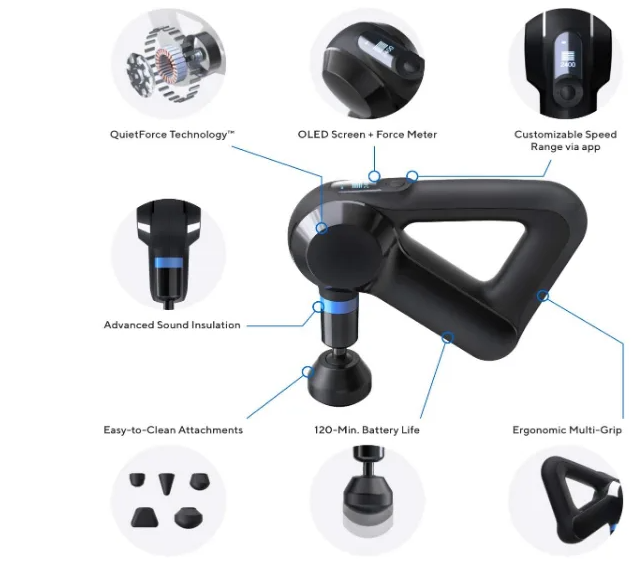
The Theragun Prime is one of the world’s best-selling percussive therapy devices. It is the flagship model from Therabody and has been ranked among the top-selling massage guns on Amazon for years. The Prime delivers 16mm of percussive therapy depth through its proprietary QX65 motor with QuietForce Technology, making it quieter than most competitors while still delivering deep, effective muscle treatment. It features five built-in speeds, Bluetooth connectivity to the Therabody app, an ergonomic triangle multi-grip, and a 120-minute battery life. This manual covers everything from unboxing and first-time setup to using the attachments, pairing with the app, and troubleshooting common issues.
Note: Theragun Prime has multiple generations (4th, 5th, and 6th Gen). Specifications vary slightly between generations. This manual covers the key features shared across generations and notes differences where applicable.
Product Overview
The Theragun Prime is a handheld percussive therapy device designed for athletes, fitness enthusiasts, and anyone who wants to relieve muscle tension, speed up recovery, and improve mobility. It uses a brushless motor that delivers up to 2,400 percussions per minute at a 16mm amplitude, reaching deep into muscle tissue. The device is built with an ergonomic triangle multi-grip that allows you to hold it in multiple positions, making it easy to reach your back, shoulders, and legs without straining. The Prime is equipped with Bluetooth connectivity, allowing it to pair with the Therabody app for guided routines, customizable speeds, and real-time treatment recommendations. The 6th Gen model is the most durable yet, built to withstand drops up to 10 feet.
The Prime sits in the middle of Therabody’s lineup — more powerful than the Mini but more affordable than the Pro. It is the best-selling model for users who want professional-grade recovery without the highest price tag.
Full Specifications
| Specification | Detail |
|---|---|
| Model | G4-PRIME-BLK (4th Gen) / G5-PRIME (5th Gen) / G6-PRIME (6th Gen) |
| Motor | QX65 brushless motor with QuietForce Technology |
| Amplitude | 16 mm |
| Speeds | 5 built-in: 1750, 1900, 2100, 2200, 2400 PPM; app-controlled customizable range (1750–2400 PPM) |
| Battery Life | 120 minutes |
| Battery Type | 12V internal Lithium-ion |
| Charge Time | 80 minutes |
| Charging Port | USB-C |
| Bluetooth | Yes, for Therabody app |
| Dimensions (4th/5th Gen) | 8.9 in x 6.3 in x 2.7 in (22.5 cm x 16 cm x 7.3 cm) |
| Dimensions (6th Gen) | 130 mm x 156 mm x 52 mm |
| Weight (4th/5th Gen) | 2.1–2.2 lbs (approx. 1 kg) |
| Weight (6th Gen) | 907 g (32 oz) |
| Warranty | 1-year limited warranty |
| In-the-Box (4th/5th Gen) | Theragun Prime device, 4 attachments, USB-C charging cable, travel case |
| In-the-Box (6th Gen) | Theragun Prime device, 2 attachments (Dampener & Standard Ball), USB-C charging cable |
Key Features

- 16mm Percussive Therapy Depth: Delivers deep muscle treatment that reaches beyond the surface to relieve soreness and tension.
- QX65 Motor with QuietForce Technology: The brushless motor is powerful yet significantly quieter than traditional massage guns. You can use it while watching TV or in shared spaces without disturbing others.
- 5 Built-in Speeds: Choose from 1750, 1900, 2100, 2200, and 2400 percussions per minute using the button pad. The Therabody app adds a customizable speed range.
- Ergonomic Triangle Multi-Grip: The triangular shape allows for multiple grip positions, making it easy to reach your upper back, lower back, shoulders, and legs.
- Bluetooth App Integration: Connect to the Therabody app for guided treatment routines, AI-driven recovery plans (Coach), and real-time recommendations based on your activity data.
- 120-Minute Battery Life: Long enough for multiple treatment sessions on a single charge.
- Closed-Cell Foam Attachments: The attachments are made from non-porous closed-cell foam, which is more hygienic and easier to clean than hard plastic.
- Durable Construction (6th Gen): The 6th Gen model is built to withstand drops up to 10 feet, making it ideal for gym and outdoor use.
How to Use
What’s in the Box
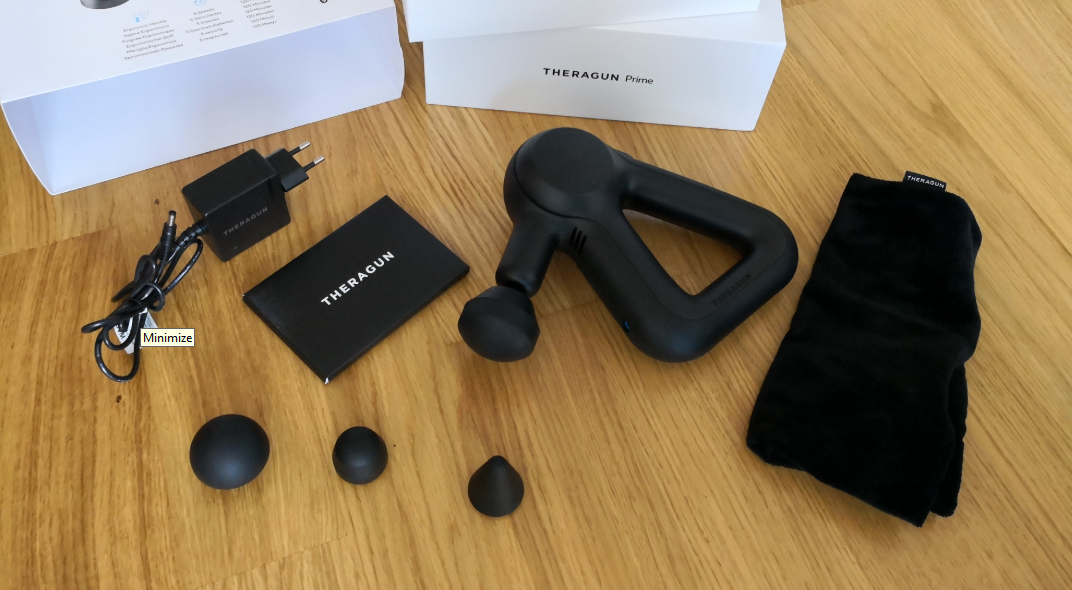
4th:
- Theragun Prime device
- 4 massage attachments: Dampener, Standard Ball, Thumb, Micro-point (or Cone)
- USB-C charging cable
- Travel case
First-Time Setup

- Charge the device fully before first use. Connect the USB-C cable to the charging port on the bottom of the device. The LED battery indicator will flash while charging.
- Download the Therabody app on your smartphone (iOS or Android).
- Power on the device: Firmly press and hold the center button on the button pad. The device will vibrate briefly.
- Pair with the app: Open the app and follow the prompts to pair via Bluetooth. The app will guide you through setup and show you how to get the most out of your device.
- Select a speed: Press the up and down arrows on the button pad to toggle between the five preset speeds. The LED speed indicator bars show the current speed (1 LED = lowest, 5 LEDs = highest).
- Attach the desired head: Align the attachment with the tip of the rotating arm and push to connect.
- Apply to muscles: Float the device across the area in need. Apply light to moderate pressure as needed.
Physical Controls
| Control | Location | Function |
|---|---|---|
| Center Button | Button pad | Press and hold to power on/off |
| Up Arrow | Button pad | Increase speed |
| Down Arrow | Button pad | Decrease speed |
| LED Speed Indicator | Above button pad | Shows current speed (1–5 bars) |
| LED Battery Indicator | Below speed bars | Shows battery level (3 LEDs) |
| Charging Port | Bottom of device | USB-C charging |
Attachments & Their Uses

| Attachment | Best For | Impact Level |
|---|---|---|
| Dampener | Tender or bony areas, overall use | 3/10 |
| Standard Ball | Large and small muscle groups, overall use | 5/10 |
| Thumb | Trigger points, lower back, painful knots | 7/10 |
| Micro-point / Cone | Pinpoint muscle treatment, hands, feet | 10/10 |
| Wedge (Prime Plus) | Shoulder blades, IT bands | Varies |
Connecting attachments: Align the attachment with the tip of the arm and push to connect. To remove, grip the attachment with one finger on each side of the plastic connector and pull off while the device is off.
Battery & Charging

- Battery life: 120 minutes of continuous use.
- Charge time: Approximately 80 minutes for a full charge.
- Charging port: USB-C.
- Battery indicator: Three LEDs below the speed bars. All three lit = fully charged. One LED = low battery.
- Charging: After turning off the device, plug the USB-C cable into the charging port. The LED battery indicator will start flashing. Charging is complete when all three LEDs are lit.
App Integration & Smart Features
The Theragun Prime is a smart device with Bluetooth connectivity. The Therabody app provides:
- Coach by Therabody: Free AI-driven, personalized recovery plans based on your fitness goals, activity data, and scientific research. Connect wearables like Garmin Watch, Apple Watch, Strava, or Google Fit for real-time updates.
- Guided Routines: Step-by-step treatment presets that show you exactly which areas to treat and which settings or attachments to use.
- Customizable Speed Range: Set any speed between 1750 and 2400 PPM (not just the 5 presets).
- Real-Time Recommendations: The app adjusts recommendations based on your feedback and recent activity.
- Remote Control: Adjust speed and activate presets from your phone.
Compatibility & Connectivity
| Feature | Details |
|---|---|
| Bluetooth | Yes, for Therabody app |
| App | Therabody app (iOS and Android) |
| Wearable Integration | Garmin, Apple Watch, Strava, Google Fit |
| Attachment Compatibility | All 4th Generation attachments |
| Accessory Compatibility | Prime Wireless Charging Stand |
| Charging | USB-C |
Internal Structure / Teardown
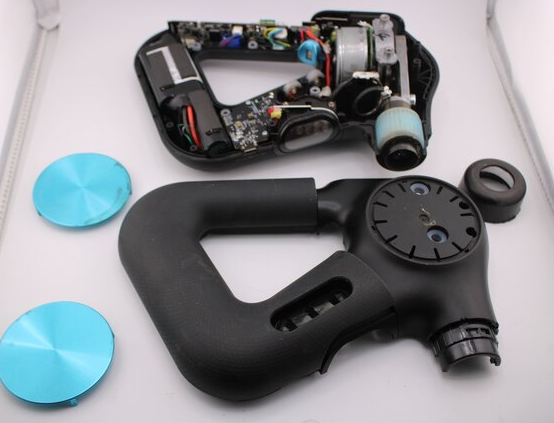
The Theragun Prime is a sealed unit and is not designed for user disassembly. The internal components include:
- QX65 brushless motor with QuietForce Technology
- 12V Lithium-ion battery
- Bluetooth module
- Rotating arm mechanism
- Closed-cell foam attachments
Do not attempt to open the device. Doing so will void the warranty.
Maintenance Schedule
| Frequency | Task |
|---|---|
| After every use | Wipe the device with a disinfectant wipe to remove residue |
| After every use | Use a new wipe to disinfect the surface by wiping all sides in a downward motion |
| Weekly | Inspect attachments for signs of wear; replace if worn |
| Monthly | Check the charging port for debris; clean gently |
| As needed | Replace attachments if they show signs of wear |
Care, Cleaning & Storage
- Cleaning: Sanitize the device after each use by wiping with a disinfectant wipe to remove residue. Once residue-free, use a new wipe to disinfect the surface by wiping all sides in a downward motion.
- Attachments: The closed-cell foam attachments can be wiped clean. They are non-porous and more hygienic than hard plastic.
- Storage: Store in the included travel case or protective pouch when not in use. Keep in a cool, dry place.
- Water: The Theragun Prime is NOT waterproof. Do not allow any liquid or water to enter the device or charging port. Do not submerge.
Warranty & Support Information
- Warranty period: 1-year limited warranty
- Covered: Manufacturing defects
- Not covered: Physical damage, water damage, normal wear and tear
- How to claim: Contact Therabody Support with proof of purchase
- Support: therabody.com/support
Accessories & Optional Add-ons
| Accessory | Purpose |
|---|---|
| Prime Wireless Charging Stand | Convenient wireless charging |
| Additional Attachments | Wedge, Cone, Supersoft, etc. |
| Travel Case | Protection during transport |
Comparison with Other Models

| Feature | Theragun Prime | Theragun Pro Plus | Theragun Mini |
|---|---|---|---|
| Amplitude | 16 mm | 16 mm | 12 mm |
| Speeds | 5 (1750–2400 PPM) | 5 (1750–2400 PPM) | 3 (1750–2400 PPM) |
| Battery Life | 120 min | 150 min | 150 min |
| Weight | 2.1–2.2 lbs | 2.8 lbs | 1.0 lbs |
| App Integration | Yes | Yes | Yes |
| Attachments | 4 (or 2 on 6th Gen) | 6 | 4 |
Price |
$199–$329 | $549–$649 | $149–$199 |
| Best For | All-around recovery | Professional use | Portability |
Pros & Cons
Pros:
- Powerful 16mm amplitude for deep treatment
- Quiet operation thanks to QX65 motor
- Ergonomic triangle grip reaches hard-to-reach areas
- Bluetooth app integration with guided routines
- 120-minute battery life
- Closed-cell foam attachments are hygienic and easy to clean
Cons:
- 6th Gen comes with only 2 attachments (vs. 4 on previous generations)
- Not the most portable (Mini is better for travel)
- Heavier than some competitors
- Not waterproof
What’s New vs Previous Generation
| Feature | 6th Gen | 5th Gen |
|---|---|---|
| Durability | Withstands 10-foot drops | Standard durability |
| Attachments | 2 included | 4 included |
| Weight | 907 g | 1 kg |
| Design | Impact-resistant | Standard |
| Price | $199.99–$329.99 | $299–$399 |
Common Mistakes to Avoid
- Applying too much pressure: The device does the work. Apply light to moderate pressure only. Pressing hard does not improve results and can cause discomfort.
- Using on bony areas with hard attachments: Use the Dampener attachment on bony or tender areas. The Cone and Thumb are for muscle tissue only.
- Not charging before first use: The device may arrive partially charged. Charge it fully before first use for best performance.
- Using near water: The Theragun Prime is not waterproof. Keep it away from water and moisture.
- Skipping the app: The Therabody app provides guided routines and personalized recommendations that make the device significantly more effective.
- Ignoring attachment wear: Replace attachments if they show signs of wear. Worn attachments are less effective and less hygienic.
Quick Reference Card
| Task | How |
|---|---|
| Power on/off | Press and hold center button |
| Increase speed | Press up arrow |
| Decrease speed | Press down arrow |
| Check battery | LED battery indicator (3 LEDs) |
| Charge | USB-C cable to charging port |
| Attach head | Align and push onto rotating arm |
| Remove head | Pull off by gripping plastic connector |
| Pair with app | Enable Bluetooth, open Therabody app |
| Clean | Wipe with disinfectant wipe after each use |
Glossary of Terms
- Percussive Therapy: A form of massage that uses rapid, repetitive pulses to reach deep into muscle tissue.
- Amplitude: The distance the massage head travels with each percussion (16mm on the Prime).
- PPM: Percussions Per Minute — the speed of the massage gun.
- QuietForce Technology: Therabody’s proprietary noise-reduction system.
- QX65 Motor: The brushless motor used in the Theragun Prime.
- Closed-Cell Foam: A non-porous foam material used in attachments that is easy to clean and hygienic.
- Multi-Grip: The ergonomic triangle design that allows multiple holding positions.
Video Tutorials & Resources
- Therabody Official YouTube: Search “Theragun Prime tutorial” for setup, usage, and app guides.
- Therabody App: In-app tutorials and guided routines.
- Therabody Support: therabody.com/support
- Community: Therabody social media for tips and user experiences.
Where to Buy & Price Information
| Retailer | Price |
|---|---|
| Therabody.com | $199.99–$329.99 (depending on generation) |
| Amazon | $199–$299 |
| Best Buy | $249–$329 |
| Dermstore | $199 |
User Scenarios / Use Cases
- Athlete: Use before workouts to warm up muscles and after workouts to reduce soreness and speed recovery.
- Desk Worker: Use on neck, shoulders, and lower back to relieve tension from prolonged sitting.
- Fitness Enthusiast: Use 3–4 times per week for 5–10 minutes per session to reduce pain and soreness.
- Traveler: The Prime is portable enough for gym bags, though the Mini is better for carry-on travel.
- Physical Therapy Patient: Use as part of a recovery routine recommended by a healthcare professional.
Storage & Transport
- Store in the included travel case or protective pouch.
- Keep in a cool, dry place.
- Do not store with a drained battery for extended periods.
- Do not expose to extreme temperatures.
- Keep away from water and moisture.
Cleaning & Care Guide
- Device: Wipe with a disinfectant wipe to remove residue after each use. Follow with a new wipe to disinfect all sides.
- Attachments: Wipe clean with a disinfectant wipe. Closed-cell foam is non-porous and easy to clean.
- Charging Port: Keep dry. Do not allow liquid to enter.
- Storage: Store in travel case when not in use.
Performance Benchmarks
| Test | Result |
|---|---|
| Amplitude | 16 mm |
| Max Speed | 2400 PPM |
| Battery Life | 120 minutes |
| Charge Time | 80 minutes |
| Weight | 2.1–2.2 lbs (4th/5th Gen), 907 g (6th Gen) |
| Noise Level | Quieter than most competitors |
| Drop Resistance | Up to 10 feet (6th Gen) |
System Requirements
- App: Therabody app (iOS and Android)
- Bluetooth: Required for app features
- Charging: USB-C cable (included)
- Power: 12V internal battery
Regulatory Information
- FCC ID: [Model-specific]
- CE Mark: Compliant with EU regulations
- RoHS: Compliant
- WEEE: Dispose of properly at electronics recycling centres
Disposal & Recycling
- Do not dispose of the device or battery in household trash.
- Recycle at an electronics recycling centre.
- Battery: Lithium-ion — follow local disposal regulations.
- Therabody Recycling: Visit therabody.com for details.
Error Code Table
| Issue | Likely Cause | Solution |
|---|---|---|
| Device won’t turn on | Battery drained | Charge for 30 minutes, then try again |
| Motor stops during use | Battery low or overheating | Charge the device. Let it cool if warm. |
| Cannot charge | Faulty cable or charging port debris | Try a different USB-C cable. Clean the port gently. |
| Slow charging | Wrong adapter or cable | Use the included USB-C cable and a 5V/2A adapter. |
| Cannot connect to app | Bluetooth issue | Toggle Bluetooth off/on. Restart the device and app. |
| Battery overheats | Extended use or high ambient temperature | Turn off and let cool. Avoid direct sunlight. |
| Unusual noise | Attachment not seated or worn | Remove and reattach. Replace attachment if worn. |
| LED flashing orange/blue/green | Various error states | Restart the device. If persists, contact support. |
Reset & Recovery Procedures
- Soft Reset: Press and hold the center button for 10 seconds until the device turns off. Release and press again to power on.
- Factory Reset (via App): Open the Therabody app, go to device settings, and select “Reset Device.” This clears Bluetooth pairing and app settings.
- Hard Reset (if frozen): Allow the battery to fully drain, then charge completely and power on.
Bluetooth Reset: Toggle Bluetooth off and on in your phone settings. Forget the Theragun Prime from your Bluetooth list, then re-pair through the app.
Battery Care Deep Dive
- Charge before first use: The device may arrive partially charged. Fully charge before first use.
- Avoid full discharge: Charge when battery drops to 20–30%. Do not regularly drain to 0%.
- Store at 50%: If not using for extended periods, charge to about 50% and store in a cool, dry place.
- Avoid extreme heat: Do not leave in a hot car or direct sunlight. Heat degrades battery life.
- Replace if needed: If runtime drops significantly or the battery swells, contact Therabody support.
- Charge time: 80 minutes for a full charge.
Seasonal / Periodic Maintenance
| Season | Task |
|---|---|
| Spring | Clean attachments and device thoroughly |
| Summer | Avoid leaving in hot cars. Store in cool place. |
| Autumn | Check battery health and attachment wear |
| Winter | Keep device at room temperature. Avoid cold storage. |
First-Time Setup Checklist
- Unbox device and attachments
- Charge device fully (80 minutes)
- Download Therabody app
- Power on device
- Pair with app via Bluetooth
- Select preferred speed
- Attach desired head
- Test on a muscle group
- Explore guided routines in app
- Connect wearable (optional)
- Set up Coach recovery plan (optional)
- Store in travel case
Hidden Features
- App-Controlled Speed Range: Set any speed between 1750 and 2400 PPM, not just the 5 presets.
- Coach by Therabody: Free AI-driven personalized recovery plans based on your fitness data.
- Wearable Integration: Connect Garmin, Apple Watch, Strava, or Google Fit for real-time plan updates.
- Wireless Charging Stand: Optional accessory for convenient charging.
- Remote Control: Adjust speed and activate presets from your phone.
- Real-Time Recommendations: The app adjusts based on your feedback and recent activity.
Advanced Tips
- Use the app for guided routines: The app shows exactly which areas to treat and which attachments to use.
- Connect your wearable: Sync your fitness tracker for personalized recovery recommendations.
- Start with the Dampener: Use the softest attachment on low speed for sensitive areas.
- Use the Thumb for lower back: The Thumb attachment is designed for trigger points and lower back tension.
- Use the Cone for hands and feet: The pinpoint tip is ideal for small muscle groups.
- Clean after every use: Hygiene is important, especially if sharing the device.
- Charge before long sessions: A full charge provides 120 minutes of use.
Troubleshooting Flowchart
Device won't turn on?
├── Charge for 30 min → works? Done
├── Try different USB-C cable → works? Done
└── Hold center button 10s → works? Done

Motor stops during use?
├── Check battery level → charge if low → works? Done
├── Let device cool → works? Done
└── Restart device → works? Done

Cannot connect to app?
├── Toggle Bluetooth → works? Done
├── Restart device and app → works? Done
└── Forget and re-pair → works? Done

Unusual noise?
├── Remove and reattach head → works? Done
├── Replace attachment if worn → works? Done
└── Contact support → Done
Compatibility Matrix
| Device / Accessory | Compatible? | Notes |
|---|---|---|
| Therabody App | Yes | Full control and guided routines |
| 4th Gen Attachments | Yes | All 4th Gen attachments fit |
| Prime Wireless Charging Stand | Yes | Optional accessory |
| Garmin Watch | Yes | Sync for Coach plans |
| Apple Watch | Yes | Sync for Coach plans |
| Strava | Yes | Sync for Coach plans |
| Google Fit | Yes | Sync for Coach plans |
| USB-C Cables | Yes | Any standard USB-C cable |
| Water | No | Not waterproof |
Case Quick Reference Card
| Task | How |
|---|---|
| Power on/off | Hold center button |
| Increase speed | Press up arrow |
| Decrease speed | Press down arrow |
| Check battery | LED battery indicator |
| Charge | USB-C to charging port |
| Attach head | Align and push onto arm |
| Remove head | Pull off by plastic connector |
| Pair with app | Bluetooth + Therabody app |
| Clean | Disinfectant wipe after each use |
| Store | Travel case, cool dry place |
Warranty & Support
- Warranty: 1-year limited warranty
- Covered: Manufacturing defects
- Not covered: Physical damage, water damage, normal wear
- Support: therabody.com/support
- Replacement: Available through Therabody or authorized retailers
User Scenarios
- Athlete: Pre-workout warm-up and post-workout recovery.
- Desk Worker: Neck, shoulder, and lower back tension relief.
- Fitness Enthusiast: 3–4 sessions per week, 5–10 minutes each.
- Traveler: Portable enough for gym bags.
- Physical Therapy: Part of a recovery routine.
Quick Reference Card
| Task | How |
|---|---|
| Power on/off | Hold center button |
| Increase speed | Press up arrow |
| Decrease speed | Press down arrow |
| Check battery | LED battery indicator |
| Charge | USB-C to charging port |
| Attach head | Align and push onto arm |
| Remove head | Pull off by plastic connector |
| Pair with app | Bluetooth + Therabody app |
| Clean | Disinfectant wipe after each use |
| Store | Travel case, cool dry place |
PDF Resources
For the official PDF manual and additional documentation, visit:
- Therabody Theragun Prime User Manual (PDF): Available at therabody.com
- Therabody App Setup Guide: Available in the Therabody app
- Safety and Warranty Guide: Included in the box and available online
You can also save the official manual as a PDF by opening it in your browser and using File > Print > Save as PDF.
Related Manuals
If this guide was helpful, here are a few more popular manuals from productsmanuals.com:
- Theragun Mini Manual – Setup, Features & Troubleshooting
- Theragun Pro Plus Manual – Setup, Features & Troubleshooting
- Samsung Galaxy Buds FE Manual – Setup, Features & Troubleshooting
- Google Nest Doorbell (Battery) GA01318– Setup, Features & Troubleshooting
- Ring Battery Video Doorbell (2nd Gen) Manual – Setup, Motion Zones
Browse all guides at productsmanuals.com .
Copyright 2026 productsmanuals.com All rights reserved. This Theragun Prime manual is original content and may not be copied, republished, or redistributed without written permission. Theragun, Therabody, QuietForce, and the Theragun logo are trademarks of Therabody, Inc. This guide is unofficial and not affiliated with Therabody.

[…] Theragun Prime g4 Manual – Setup, Features & Troubleshooting […]