
July 4, 2026

Haier Super T3 HR‑18T3 Manual – Specs, Features, Setup & Troubleshooting Guide

Haier-logo-productsmanuals.com

Haier Super T3 HR‑18T3 Manual – Specs, Features, Setup & Troubleshooting Guide

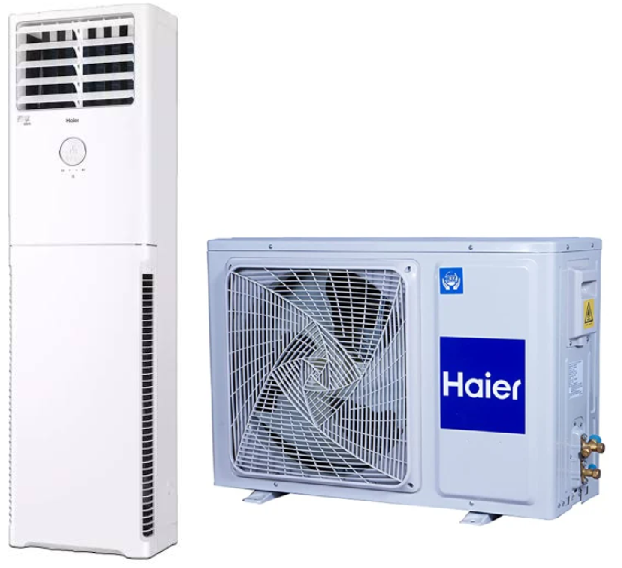
Haier-Super-T3-HR‑18T3-Manual– Specs,-Features,-Setup-&-Troubleshooting-Guide-Product-image

Introduction

The Haier Super T3 is a 1.5‑ton inverter split air conditioner designed for efficient cooling in tropical climates. Haier includes an installation kit, a wireless remote, and a brief user leaflet, but the printed material doesn’t always explain how to use the timer, what the blinking lights on the indoor unit mean, or how to activate the self‑clean function. Thousands of users search for a “Haier Super T3 AC manual” every month. This guide provides all the specifications, a complete remote button walkthrough, and practical troubleshooting in clear, jargon‑free language.

Full Specifications

Specification Detail
Model HSU‑18T3SV (Haier Super T3, 1.5 Ton)
Type Split air conditioner (indoor wall‑mounted + outdoor unit)
Cooling Capacity 5,100 W (18,000 BTU/h)
Energy Rating 3‑Star (BEE rating; varies by region)
Refrigerant R‑32 (eco‑friendly, low GWP)
Compressor Inverter rotary compressor (variable speed)
Power Supply 220‑240V, 50Hz, single phase
Indoor Unit Dimensions (W x H x D) 910 x 305 x 215 mm
Outdoor Unit Dimensions (W x H x D) 800 x 545 x 315 mm
Indoor Unit Weight 11 kg
Outdoor Unit Weight 32 kg
Operating Range (Ambient Temp.) Up to 54 °C (129 °F) for cooling
Airflow 4‑speed fan (Low, Medium, High, Auto)
Timer 24‑hour on/off timer
Special Modes Turbo Cool, Sleep Mode, Dry Mode, Self‑Clean, ECO Mode
Filter Type High‑density dust filter + optional anti‑bacterial filter (washable)
Noise Level (Indoor) 32 dB (low fan speed)
Wi‑Fi No built‑in Wi‑Fi; works with external smart plug (not included)

Key Features at a Glance

  • Inverter Compressor: Varies its speed to maintain the set temperature without frequent starts and stops. This reduces power consumption and keeps the room at a stable temperature.
  • Turbo Cool: Press this button to run the compressor and fan at maximum speed for 20 minutes, cooling the room quickly. The AC returns to the previous settings automatically.
  • Self‑Clean: Dries the indoor unit’s evaporator coil after use, preventing mould and bacteria growth. Run it manually once a month.
  • Sleep Mode: Gradually increases the set temperature by 1 °C after the first hour and another 1 °C after the second hour, then holds. This saves energy while you sleep without you feeling the change.
  • Dry Mode: Runs the fan at low speed and cycles the compressor to remove humidity from the air. Ideal for rainy or monsoon days.
  • Auto Restart: If the power goes out and comes back, the AC remembers the last settings and resumes operation automatically. No need to reconfigure.

What’s in the Box (Indoor & Outdoor Units)

  • Indoor floor standing cabinet unit (with display panel and air louvers)
  • Outdoor condenser unit (pre‑charged with R‑32 refrigerant)
  • Wireless remote control (with 2 AAA batteries)
  • Installation kit (copper pipes, drain hose, connecting cables – handled by the technician)
  • User manual leaflet and warranty card

The AC must be installed by a qualified technician. The outdoor unit should be placed in a shaded, well‑ventilated area with at least 30 cm clearance on all sides.
Understanding the Remote Control

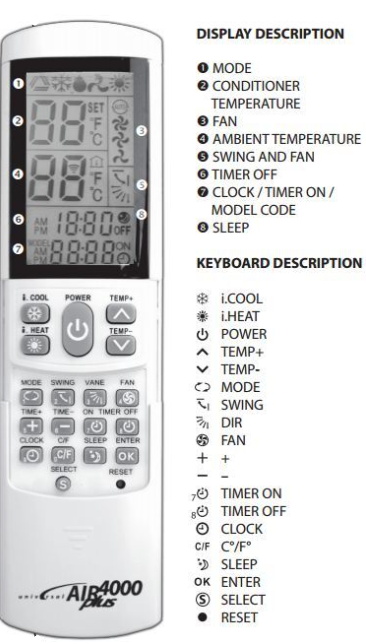
Haier-Super-T3-HR‑18T3-Manual– Specs,-Features,-Setup-&-Troubleshooting-Guide-Fig-1-remote-control-lebeled-diagram

The remote is your main interface. Point it at the receiver on the indoor unit.

Button Function
Power Turns the AC on or off.
Mode Cycles through Cool (snowflake), Dry (water drop), Fan (fan blades), and Auto (the letter “A”).
Temp ▲/▼ Set the desired temperature (16–30 °C).
Fan Speed Select Low, Medium, High, or Auto fan speed.
Swing (Horizontal) Press to start or stop the vertical louvers (up/down movement). Press again to fix at a desired angle.
Swing (Vertical) Press to start or stop the horizontal louvers (left/right movement).
Turbo Activates maximum cooling for 20 minutes.
Sleep Activates Sleep Mode.
Timer On / Timer Off Set a delayed start or stop. Press Timer On, use ▲/▼ to set hours (0‑24), press Timer On again to confirm. Same for Timer Off.
Self‑Clean Press and hold for about 3 seconds to start the self‑cleaning cycle (indoor unit runs on low heat to dry the coil).

Resetting the remote: If the display becomes scrambled, remove the batteries, press any button for 5 seconds to drain residual power, then reinsert fresh AAA batteries.

First‑Time Setup and Daily Operation

  1. Ensure the installation is complete (technician should have released the refrigerant, checked for leaks, and tested the unit).
  2. Insert the batteries into the remote. Point the remote at the indoor unit and press the Power button. The unit will beep and the louvers will open.
  3. Press Mode until the snowflake icon appears. Set the temperature to 24 °C – this is a comfortable balance for most people.
  4. Press Fan Speed to Auto. The AC will adjust the fan based on the difference between the set and room temperature.
  5. After the room is cool, you can reduce energy consumption by setting the temperature to 25–26 °C and using the ECO Mode if available (some models activate ECO via a button combination; check your remote).

Cleaning the Air Filters

Clean the filters every 2 weeks during heavy use.

  1. Turn off the AC and unplug the outdoor unit (or switch off the breaker).
  2. Lift the front panel gently from both sides until it clicks open.
  3. Slide out the two rectangular filters. Rinse them under lukewarm running water. Use a soft brush and mild soap if they’re very dusty.
  4. Dry the filters completely in the shade before reinstalling. Never run the AC without filters.

Troubleshooting Common Issues

Problem Likely Cause What to Try
AC not cooling enough Dirty filter or low refrigerant Clean the filters. Check that the outdoor unit is running. If the air is still warm, a technician should check the refrigerant charge.
Remote not working Dead batteries or blocked sensor Replace both AAA batteries. Point the remote directly at the receiver on the indoor unit (usually a small dark window on the right side).
Water leaking from indoor unit Clogged drain pipe Pour a cup of warm water mixed with a tablespoon of vinegar down the drain pipe. Ensure the indoor unit is mounted level.
Outdoor unit makes a loud humming or clicking Normal compressor sound, or loose panel A steady hum is the compressor. A clicking sound may be the contactor engaging. If the sound is rattling, tighten the outdoor unit’s cover screws.
AC turns on and off frequently Thermostat setting or dirty filter Clean the filter. The AC cycles the compressor off when the room reaches the set temperature; this is normal inverter behavior. If it cycles every few minutes, the unit may be oversized for the room.
Display light blinking continuously Error code Count the number of blinks and refer to the table below.
Bad smell from indoor unit Mould or clogged drain Run the Self‑Clean function. Clean the filters. If the smell persists, the evaporator coil may need professional cleaning.

Error Codes (Blinking Display)

Number of Blinks Meaning What to Do
1 Indoor room temperature sensor fault Power cycle the AC at the breaker. If the error returns, the sensor may need replacement.
2 Indoor coil temperature sensor fault Same as above.
3 Communication error between indoor and outdoor units Check that the outdoor unit is powered on. Power cycle both units.
4 Indoor fan motor fault Turn off, open the front panel, ensure nothing is blocking the fan. Restart.
5 Outdoor unit fault (compressor overload, high pressure) Clean the outdoor coil gently with a garden hose (power off). Ensure the outdoor unit has clearance. Power cycle.
6 Refrigerant leak or low pressure Turn off immediately and call a qualified technician. Do not run the AC.

Power cycling: Switch off the breaker for both indoor and outdoor units for 2 minutes, then turn back on. This clears many temporary errors.

How to Reset the AC

Soft reset: Press the Power button on the remote to turn the unit off. Wait 10 seconds, then turn it back on.

Hard reset (power cycle): Switch off the circuit breaker for the AC (both indoor and outdoor) for at least 2 minutes. Turn it back on. The unit will take about 3 minutes to restart – this is a built‑in compressor protection delay.

Remote reset: Remove the batteries, press any button for 5 seconds, and reinsert fresh batteries.

Quick Reference Card

Task How
Turn on cooling Power > Mode (snowflake) > set temp
Activate Turbo Press Turbo button; runs for 20 minutes
Set timer Press Timer On/Off, use ▲/▼ to set hours, confirm
Start Self‑Clean Press and hold Self‑Clean for 3 seconds
Adjust airflow Press Swing buttons; press again to lock position
Reset remote Remove batteries, press a button for 5 seconds, reinsert

Official Haier Support and Manuals

For warranty, service, and the official PDF manual, visit: https://www.haier.com/in/support/

Frequently Asked Questions

  • Can I use the AC on an inverter or generator?
    Yes, the inverter compressor handles voltage fluctuations well. For generator use, ensure the generator’s output is stable and the AC’s breaker is rated correctly.
  • What does the “T3” in Super T3 mean?
    It indicates the unit is designed for tropical climates and can operate in ambient temperatures up to 54 °C (129 °F).
  • How often should I service the AC?
    Clean the filters every 2 weeks. Have a professional service the unit once a year (coil cleaning, refrigerant check, electrical connections).
  • Why does the outdoor unit drip water?
    It’s condensation. This is normal, especially in humid weather. The water should drain through a dedicated pipe. If it drips excessively, check the drain port isn’t blocked.
  • Can I set the temperature below 16 °C?
    No, the remote’s minimum setting is 16 °C. Running the AC at a very low temperature constantly can freeze the indoor coil.
  • The display shows two temperatures – which is the current room temperature?
    The larger number on the remote display is your set temperature. The indoor unit’s display (if present) might show the ambient temperature when you press a specific button; check your model’s leaflet.
  • Why does the AC sometimes blow warm air for a short time?
    This can happen during defrost mode (if the outdoor coil ices up in very cold weather) or when the compressor pauses to protect itself. It’s usually temporary.
  • My remote has a “Health” button. What does it do?
    On some Haier models, this activates an ionizer or UV function that sterilizes the air passing through the unit. Your specific model may or may not include this.
  • Can I wash the filters in a dishwasher?
    No, hand‑wash only. Dishwasher heat can warp the plastic frame.
  • What should I do if the outdoor unit is covered in snow or leaves?
    Turn off the AC, clear the debris gently with a soft brush. Keep the area around the outdoor unit clear for proper airflow.
  • Does this AC have a heating function?
    No, the Super T3 HSU‑18T3SV is a cooling‑only model. Haier sells separate heat pump models for heating.
  • Is the installation kit included?
    Yes, the standard installation kit (copper pipes, drain hose, cables) is included. Any extra piping or custom brackets may incur additional costs.

Other Manuals You May Like

If this guide was helpful, here are a few more popular manuals from productsmanuals.com that you might find useful:

Browse our all guides and manuals at productsmanuals.com .

Copyright Warning ⚠

Copyright 2026 productsmanuals.com All rights reserved. This Haier Super T3 HR‑18T3 manual is original content and may not be copied, republished, or redistributed without written permission. Haier, Super T3, and the Haier logo are trademarks of Haier Group. This guide is unofficial and not affiliated with Haier.

Leave a Reply

Your email address will not be published. Required fields are marked *