
Table of Contents
ToggleGarmin Forerunner 265 A04325 Setup Training Features and Troubleshooting Guide

Why This Companion Exists
Garmin ships the Forerunner 265 with a charging cable, a small Quick‑Start leaflet, and a link to the full online manual. Many new owners search for a “Garmin Forerunner 265 manual” because they want clear, practical help with setting up training zones, understanding the Morning Report, using music features, or fixing a watch that won’t sync. This companion gives you all of that in plain, straightforward English.
What Comes in the Box
Your package includes:
- The Garmin Forerunner 265 (model A04325) with a colourful AMOLED display
- A standard 22 mm silicone sport band (pre‑installed)
- A Garmin proprietary charging cable (USB‑A to four‑pin clip)
- A Quick‑Start Guide and warranty card
No USB wall adapter is included. Use any standard USB‑A power adapter (5V/1A) or your computer’s USB port.
Physical Tour and Button Layout
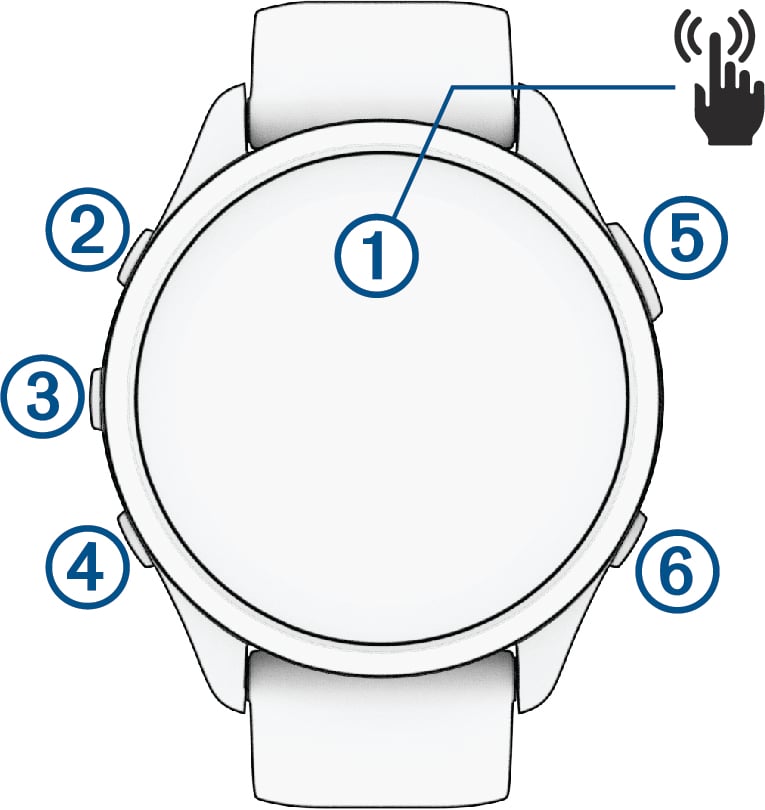
The Forerunner 265 has five physical buttons and a touchscreen.
- Top left (Light): Press to turn the backlight on/off. Press and hold for the quick controls menu (power, assistance, lock).
- Middle left (Up): Scroll up through widgets and menus.
- Bottom left (Down): Scroll down through widgets and menus.
- Top right (Start/Stop): Press to start or stop an activity. Press to confirm selections.
- Bottom right (Back/Lap): Press to go back one screen. During an activity, press to mark a new lap. Press and hold to return to the watch face.
The touchscreen can be used for swiping and tapping, but it automatically locks during an activity (you can unlock it by pressing any button).
First‑Time Setup and Garmin Connect
- Press and hold the Light button until the watch turns on.
- Select your language and region. The watch will ask you to pair it with your phone.
- Download the Garmin Connect app (iOS or Android). Open the app, create a Garmin account or sign in, and tap “More” > “Garmin Devices” > “Add Device.”
- The app will search for your watch. Enter the six‑digit code displayed on the watch into the app to confirm pairing. The watch will then sync and check for software updates.
- Once paired, the watch will guide you through setting up your user profile (age, weight, heart rate zones) and your preferred training goals.
Understanding the Morning Report
When you wake up, the Forerunner 265 displays a Morning Report – a personalized summary of your sleep, recovery, training status, heart rate variability (HRV), and the day’s weather. Swipe through the pages to see each metric. You can customize what appears in the report in Garmin Connect > Settings > Morning Report.
Key Training Features
- Wrist‑Based Running Power: The watch measures your running power directly from the wrist, no external sensor needed. You can add a data field during a run to see your power in watts.
- Training Readiness: A score from 1–100 that tells you how ready your body is for a hard workout. It’s based on your sleep, recovery, HRV status, and recent training load.
- Daily Suggested Workouts: The watch recommends a daily run or ride based on your current fitness, training load, and recovery. From the main watch face, press Start, select Run, and if a suggested workout appears, press Start again to begin.
- Recovery Advisor: After a run, the watch shows how many hours of rest you should take before your next intense effort.
Music and Audio Features
The Forerunner 265 can store music and play it to Bluetooth headphones without your phone.
To load music:
- Connect the watch to your computer via the charging cable.
- Open Garmin Express (free download from Garmin). Select your watch, then Music. Drag and drop MP3 files into the music folder.
- For streaming services (Spotify, Amazon Music, Deezer), open the Music widget on the watch, select a service, and sign in via the Garmin Connect app. You can then sync playlists over Wi‑Fi.
- Pair your Bluetooth headphones: Hold Up, select Settings > Music > Headphones > Add New, then put your headphones in pairing mode.
Troubleshooting Common Issues
| Problem | Likely Cause | What to Try |
|---|---|---|
| Watch won’t turn on | Battery fully drained | Charge the watch for at least 30 minutes. Ensure the charging cable is clipped on securely (the pins must contact the watch). |
| GPS not acquiring signal | Obstructed view or first use | Go outside, away from tall buildings. The first GPS fix may take 2–3 minutes. Ensure the watch has clear sky view. |
| Heart rate data seems inaccurate | Watch too loose or dirty sensor | Tighten the band so the watch sits snugly above your wrist bone. Clean the back sensor with a dry cloth. |
| Not syncing with Garmin Connect | Bluetooth issue | Turn Bluetooth off and on again on your phone. Restart both the watch and the app. |
| Music playback stutters | Bluetooth interference | Keep the watch on the same side of your body as the headphones (e.g., both on left wrist). Avoid crowded Wi‑Fi areas. |
| Buttons unresponsive | Dirt or moisture | Rinse the watch with fresh water and wipe dry. Press each button several times to dislodge debris. |
How to Restart and Factory Reset
Restart: Press and hold the Light button for about 15 seconds until the watch turns off, then press it again to turn it on. This does not erase any data.
Factory reset (clear all data): Hold the Light button for 15 seconds to turn off the watch. While it’s off, press and hold Back and Start/Stop simultaneously, then press and release the Light button while still holding the other two. Release all buttons after the first beep. The watch will reset to factory settings and ask you to set it up again.
Quick Reference Card
| Task | How |
|---|---|
| Start a run | Press Start/Stop, select Run, press Start/Stop again |
| Mark a lap | Press Back/Lap during an activity |
| Pause/Resume | Press Start/Stop during an activity |
| View widgets | Swipe up or down, or press Up/Down |
| Pair headphones | Hold Up, Settings > Music > Headphones > Add New |
| Factory reset | Turn off, hold Back + Start/Stop, press Light, release after beep |
Download the Forerunner 265 Cheat Sheet
A one‑page PDF with button shortcuts, training feature tips, and reset instructions. Print it and keep it in your gym bag.
“Garmin Forerunner 265 Quick Guide (PDF)”
Official Garmin Support and Manuals
For warranty, software updates, and the full PDF manual, visit: https://support.garmin.com
Frequently Asked Questions
- Is the Forerunner 265 waterproof?
It has a water rating of 5 ATM (50 metres), meaning you can wear it swimming, running in the rain, and showering. Avoid pressing buttons underwater. - How long does the battery last?
Up to 13 days in smartwatch mode, and up to 20 hours in GPS mode with music. Always‑on display reduces battery life. - Can I use the watch to pay for things?
Yes, it supports Garmin Pay. Set it up in the Garmin Connect app under Garmin Pay. You can add supported credit/debit cards. - Does it have built‑in maps?
The Forerunner 265 does not have full topo maps like the 965, but it does have breadcrumb trail navigation for saved courses. - How do I clean the watch?
Rinse with fresh water after sweating or swimming. Use a soft, dry cloth to wipe the screen and sensors. Avoid soap and lotions on the optical heart rate sensor.
A Quick Note Before You Head Out
Your Forerunner 265 is built to be a training companion, not just a gadget. Let it guide your hard days and your recovery days. Rinse it after sweaty workouts, and charge it before long runs. With regular software updates, it’ll only get smarter.
Copyright Warning!
Copyright 2026 productsmanuals.com All rights reserved. This Garmin Forerunner 265 A04325 manual is original content and may not be copied, republished, or redistributed without written permission. Garmin, Forerunner, and the Garmin logo are trademarks of Garmin Ltd. This guide is unofficial and not affiliated with Garmin.

Products Manuals is a very informative website, I also like this because it’s about all products informations or resolved my problems🔥