
How to Use Brother CS6000i Sewing Machine: Ultimate Beginner’s Guide
Introduction
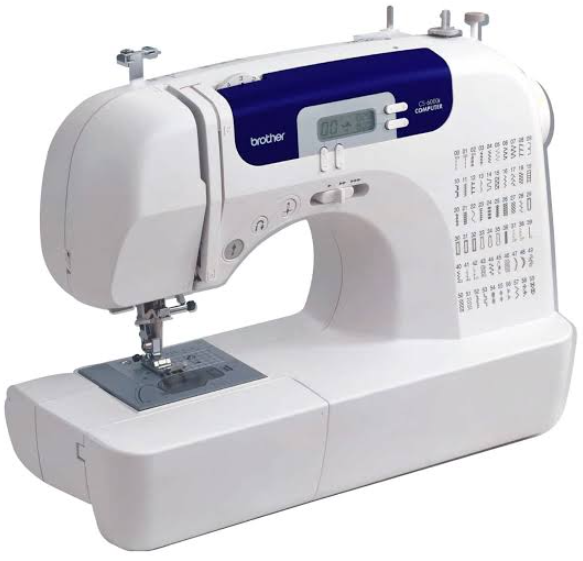
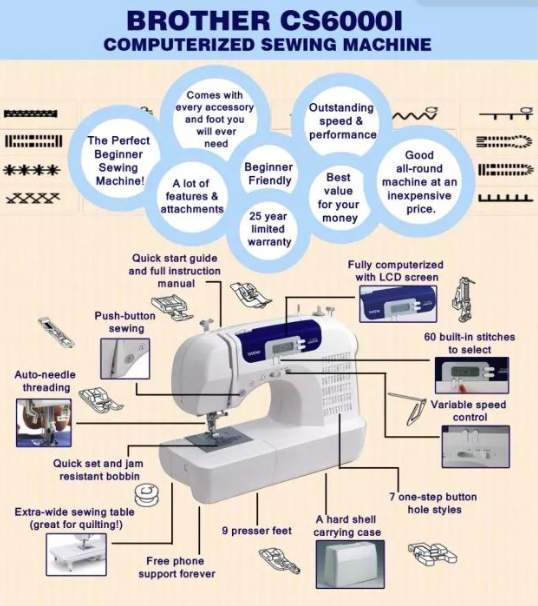
The Brother CS6000i is a computerized sewing machine designed for beginners, intermediate sewists, and quilters. It has remained the top-selling sewing machine on Amazon for years because it quietly delivers what most sewists actually need at a price that doesn’t require second-guessing. It comes with 60 built-in stitches, 7 one-step auto-size buttonholes, a wide table for quilting, and 9 included presser feet. This manual covers setup, operation, stitch selection, maintenance, and troubleshooting.
Product Overview
The Brother CS6000i is a lightweight (approximately 13 lbs) computerized sewing machine with a 2.0-inch backlit LCD display. It features a jam-resistant top drop-in bobbin system, an automatic needle threader, and adjustable speed control via a slider or foot pedal. The machine includes a detachable wide table for quilting, a hard carrying case, and a comprehensive accessory pouch. It has a free arm for hemming jeans, sleeves, and cuffs.
Full Specifications
| Specification | Detail |
|---|---|
| Built-in Stitches | 60 (utility, decorative, quilting, heirloom) |
| Buttonhole Styles | 7 one-step auto-size |
| Display | 2.0-inch backlit LCD |
| Presser Feet Included | 9 (zigzag, buttonhole, overcasting, monogramming, zipper, blind stitch, button fitting, walking, spring-action quilting) |
| Bobbin Type | Top drop-in, jam-resistant (SA156 / Class 15) |
| Needle Threader | Automatic |
| Max Sewing Speed | 850 stitches per minute |
| Speed Control | Adjustable slider + foot pedal |
| Feed Dogs | Drop feed dogs for free-motion quilting |
| Free Arm | Yes (detachable front compartment) |
| Wide Table | Detachable oversized table included |
| Weight | ~13 lbs |
| Carrying Case | Hard protective case included |
| Warranty | 25-year limited |
Key Features
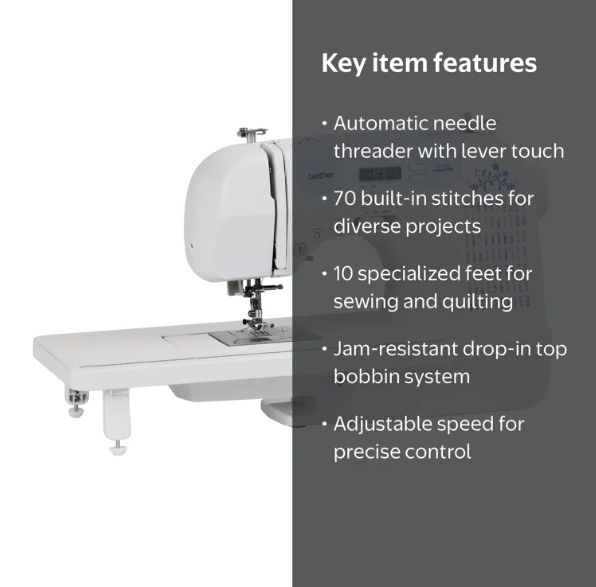
- 60 Built-in Stitches: Covers utility, decorative, quilting, and heirloom stitching. Includes stretch stitches for knits and a variety of overcasting stitches for finishing edges.
- 7 One-Step Auto-Size Buttonholes: Creates consistent buttonholes in a single step without manual sizing.
- Automatic Needle Threader: Pushes thread through the needle’s eye with a lever, eliminating eye strain and frustration.
- Jam-Resistant Drop-In Bobbin: The top-loading bobbin system is easy to load and resists the jams that frustrate beginners.
- Speed Slider: Caps the maximum sewing speed regardless of foot pedal pressure, allowing beginners to learn stitch control without the machine running away.
- Start/Stop Button: Sew without the foot pedal by pressing a button on the front of the machine.
- Drop Feed Dogs: Lower the feed dogs for free-motion quilting and darning.
- Wide Quilting Table: The detachable wide table supports large quilts and garments.
- 9 Presser Feet Included: Includes a walking foot, spring-action quilting foot, zipper foot, blind stitch foot, buttonhole foot, overcasting foot, monogramming foot, button fitting foot, and zigzag foot.
How to Use
What’s in the Box
- Brother CS6000i sewing machine
- 9 presser feet (pre-installed: zigzag foot)
- Detachable wide table
- Hard carrying case
- Foot pedal
- Power cord
- Bobbins (SA156 / Class 15)
- Twin needle
- Accessory pouch with seam ripper, cleaning brush, screwdriver, extra needles, and spool caps
First-Time Setup
- Connect power: Plug the power cord into the machine and a wall outlet. Plug the foot pedal into the designated jack on the right side of the machine.
- Turn on: Flip the power switch on the right side of the machine to the “I” position. The LCD display lights up.
- Select a stitch: Use the stitch selection buttons to scroll through the 60 built-in stitches. The selected stitch number appears on the LCD.
- Set stitch length and width: Use the stitch length and width buttons to adjust these settings. The recommended settings for each stitch appear automatically.
- Thread the machine: Follow the numbered threading path printed on the machine. Use the automatic needle threader to thread the needle.
- Wind the bobbin: Place the thread spool on the spool pin, wind thread onto the bobbin using the bobbin winder, then insert the bobbin into the top drop-in compartment.
- Test the machine: Sew on a scrap piece of fabric to check tension and stitch quality.
Physical Controls
| Control | Location | Function |
|---|---|---|
| Power Switch | Right side | Turns the machine on/off |
| Speed Slider | Front panel | Caps maximum sewing speed |
| Start/Stop Button | Front panel | Sew without foot pedal |
| Reverse Button | Front panel | Sews in reverse for backstitching |
| Needle Position Button | Front panel | Raises/lowers needle |
| LCD Display | Front panel | Shows stitch number and settings |
| Stitch Selection Buttons | Front panel | Selects stitch patterns |
| Stitch Length/Width Buttons | Front panel | Adjusts stitch dimensions |
| Presser Foot Lever | Right side (behind needle) | Raises/lowers presser foot |
| Hand Wheel | Right side | Manually raises/lowers needle |
| Feed Dog Drop Lever | Right side (under free arm) | Lowers feed dogs for free-motion quilting |
Stitch Selection Guide
| Stitch Category | Stitch Numbers | Best For |
|---|---|---|
| Straight Stitches | 1-4 | Seams, topstitching, quilting |
| Zigzag Stitches | 5-8 | Overcasting, appliqué, stretch fabrics |
| Overcasting Stitches | 9-12 | Finishing raw edges |
| Blind Hem Stitches | 13-14 | Invisible hems on garments and curtains |
| Stretch Stitches | 15-20 | Knits, activewear, lingerie |
| Decorative Stitches | 21-40 | Embellishment, crafting, heirloom sewing |
| Quilting Stitches | 41-50 | Piecing, quilting, decorative quilting |
| Buttonholes | 51-57 | Shirts, dresses, bags |
| Eyelet and Specialty | 58-60 | Eyelets, darning, specialty techniques |
Winding the Bobbin
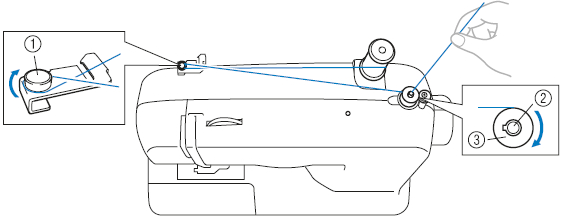
- Place the thread spool on the spool pin and slide a spool cap over it.
- Pull the thread to the right and pass it through the bobbin winding tension disc.
- Place the bobbin on the bobbin winder spindle and push it to the right until it clicks.
- Hold the thread end and press the foot pedal. The bobbin winds automatically.
- When the bobbin is full, the winder stops. Push the spindle to the left and remove the bobbin.
Threading the Machine
- Raise the presser foot lever.
- Turn the hand wheel toward you to raise the needle to its highest position.
- Place the thread spool on the spool pin.
- Follow the numbered threading path: pass the thread through the upper thread guide, down through the tension discs, around the take-up lever, and down to the needle.
- Use the automatic needle threader: lower the lever, hook the thread, and release. The threader pushes the thread through the needle’s eye.
Inserting the Bobbin
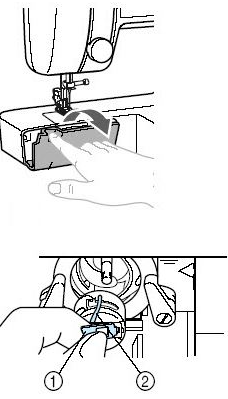
- Raise the needle and presser foot.
- Open the bobbin cover (slide it to the right).
- Place the bobbin in the compartment with the thread unwinding clockwise.
- Pull the thread through the tension spring and guide it under the presser foot.
- Replace the bobbin cover.
Adjusting Tension
- Upper tension: Adjust using the tension dial (typically numbered 0-9). Higher numbers increase tension. For most sewing, set between 3 and 5.
- Bobbin tension: The bobbin case tension is pre-set at the factory and rarely needs adjustment.
- Testing tension: Sew a test seam on scrap fabric. The ideal stitch has the upper and lower threads meeting in the middle of the fabric. If loops appear on the top, increase upper tension. If loops appear on the bottom, decrease upper tension.
Using the Free Arm
The free arm is the narrow, cylindrical section at the front of the machine. It is used for sewing tubular items like sleeves, cuffs, pant legs, and hemming jeans. To use it, simply slide the accessory compartment (the wide table) off to the left. The free arm is revealed underneath.
Using the Wide Table
Attach the wide table for quilting, large garments, and projects that need extra fabric support. Align the table’s tabs with the slots on the free arm and push it into place.
Compatibility & Connectivity
| Feature | Details |
|---|---|
| Power | Standard US 120V AC outlet |
| Foot Pedal | Included, plugs into machine |
| Bobbin Type | SA156 / Class 15 (standard) |
| Needle Type | Standard household sewing machine needles (size 11-14 recommended) |
| Presser Feet | Snap-on (compatible with Brother snap-on feet) |
| Computer Connectivity | None (standalone machine) |
Maintenance Schedule
| Frequency | Task |
|---|---|
| After every use | Brush lint from the bobbin case and feed dogs |
| Weekly | Clean the bobbin case area with the included brush |
| Monthly | Remove the needle plate and clean underneath |
| Every 3 months | Oil the machine at designated points (check manual for locations) |
| Annually | Have the machine professionally serviced if used heavily |
Troubleshooting & Common Problems
| Problem | Likely Cause | What to Try |
|---|---|---|
| Upper thread breaks | Thread path incorrect, tension too tight, or needle bent | Re-thread the machine. Check that the thread is seated in the tension discs. Replace the needle. |
| Bobbin thread breaks | Bobbin incorrectly inserted or wound unevenly | Remove and re-insert the bobbin. Rewind the bobbin evenly. |
| Skipped stitches | Needle bent, dull, or incorrect type | Replace the needle. Use a needle appropriate for the fabric. |
| Needle breaks | Needle hitting the needle plate, or fabric pulled | Check that the needle is fully inserted. Do not pull fabric while sewing. |
| Loops on top of fabric | Upper tension too loose | Increase upper tension dial by 1-2 numbers. |
| Loops on bottom of fabric | Upper tension too tight | Decrease upper tension dial by 1-2 numbers. |
| Fabric not feeding | Feed dogs lowered or presser foot up | Raise the feed dogs (lever on the right side). Lower the presser foot. |
| Machine jams | Thread tangled in bobbin case | Turn off machine. Remove the bobbin and clean the bobbin case. Re-thread. |
| Needle threader fails | Needle not in highest position or threader worn | Raise the needle fully. If the threader consistently fails, it may need replacement. |
| Machine runs away at full speed | Speed slider set to maximum | Reduce the speed slider setting. |
Frequently Asked Questions
- What type of bobbin does the CS6000i use?
It uses SA156 bobbins (also known as Class 15). These are widely available and inexpensive. - Can I use the CS6000i for quilting?
Yes. It includes a spring-action quilting foot, a walking foot, a wide table, and drop feed dogs for free-motion quilting. - Does the CS6000i have an automatic needle threader?
Yes. The automatic needle threader pushes thread through the needle’s eye with a lever. Note that the threader may eventually fail with heavy use. - Can I sew denim with this machine?
The CS6000i can handle medium-weight denim, but anything heavier may cause trouble. It is not designed for four layers of heavy denim. - Does the machine come with a hard case?
Yes, a hard carrying case is included. - Can I use a twin needle with the CS6000i?
Yes. A twin needle is included in the accessory pouch. Set the machine for straight stitch or zigzag as desired. - What is the warranty on the CS6000i?
It comes with a 25-year limited warranty. - Why does the machine vibrate at full speed?
The lightweight plastic body vibrates at high speed. This is normal. Reduce the speed slider for smoother operation.
Tips
- Use the speed slider when learning: Cap the speed at a slow setting to master fabric guidance before sewing at full speed.
- Always test on scrap fabric: Before starting a project, sew a test seam to check tension and stitch quality.
- Backstitch at the start and end of seams: Use the reverse button for 3-4 stitches at the beginning and end of each seam to secure it.
- Change the needle regularly: Replace the needle after every 6-8 hours of sewing, or immediately if it hits the needle plate.
- Clean the bobbin case after every project: Lint buildup is the most common cause of jams.
- Use the wide table for quilting: The extra support makes managing large quilts significantly easier.
- Keep the manual handy: The 52-page instruction manual is comprehensive and covers all 60 stitches.
Safety Information
- Always unplug the machine before cleaning or maintenance.
- Never sew over pins. They can break the needle and damage the machine.
- Keep fingers away from the needle area. Use the presser foot as a guard.
- Do not pull or push fabric while sewing. Let the feed dogs move the fabric.
- Keep the machine on a stable, flat surface.
- Disconnect the foot pedal when not in use to prevent accidental activation.
- Keep children and pets away from the machine while it is running.
PDF Resources
For the official PDF manual and additional documentation, visit:
- Brother CS6000i Operation Manual (PDF): Available for download at support.brother.com.
- Brother Quick Start Guide (PDF): Available at the same support page.
- Brother Accessories Catalog (PDF): Available at support.brother.com.
You can also save the official manual as a PDF by opening it in your browser and using File > Print > Save as PDF.
Browse all guides at productsmanuals.com.
Copyright 2026 productsmanuals.com All rights reserved. This Brother CS6000i manual is original content and may not be copied, republished, or redistributed without written permission. Brother, CS6000i, and the Brother logo are trademarks of Brother Industries, Ltd. This guide is unofficial and not affiliated with Brother.

[…] How To Operate Brother CS6000i […]