
Introduction
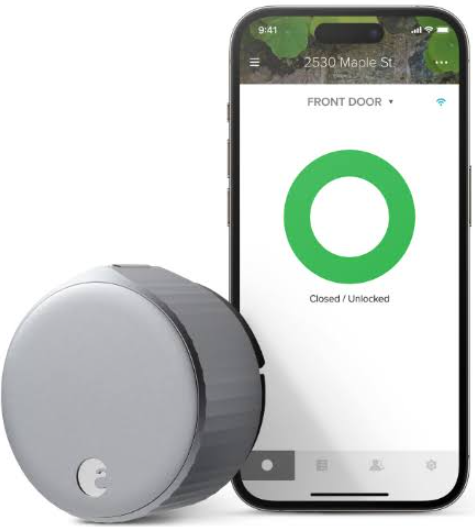
The August Wi‑Fi Smart Lock (4th Gen) upgrades most standard single‑cylinder deadbolts with remote access, voice control, and automatic locking — all without replacing your keys or the exterior hardware. August ships the lock with a mounting plate, a set of adapters, and a small Quick‑Start leaflet. The full manual is a digital PDF, but many new owners search for an “August Wi‑Fi Smart Lock manual” because they need help with the physical installation, the DoorSense calibration, or the auto‑lock timing. This guide covers every specification, feature, and common fix in practical, easy‑to‑follow language.
Full Specifications
| Specification | Detail |
|---|---|
| Model | AUG‑SL05‑M01‑G01 (August Wi‑Fi Smart Lock, 4th Gen) |
| Colour | Matte Black or Silver |
| Connectivity | Wi‑Fi (2.4 GHz 802.11 b/g/n) built in — no separate bridge required; Bluetooth 5.0 for local connection |
| Lock Compatibility | Fits most standard single‑cylinder deadbolts; works on doors 1‑⅜” to 2‑¼” thick |
| Installation | Retrofit: attaches to the interior thumb‑latch using the existing deadbolt, leaving the exterior keyhole untouched |
| Power | Two CR123A 3V lithium batteries (included); typical battery life 6‑9 months |
| Keypad Compatibility | Optional August Smart Keypad (sold separately) |
| Door Sense® | A small sensor that detects whether the door is open or closed, enabling accurate auto‑lock and open‑door alerts |
| App | August Home (iOS 14.0+ / Android 9.0+) |
| Voice Assistants | Amazon Alexa, Google Assistant, Apple Home kit (via Wi‑Fi, no bridge needed for Siri voice control) |
| Auto‑Lock | Customizable timer (30 seconds to 30 minutes) with Door Sense to prevent locking when the door is open |
| Activity Log | 24/7 log of who locked/unlocked and when (with app) |
| Guest Access | Send temporary or permanent virtual keys to friends, family, or service providers |
| Security | Two‑factor authentication, AES 128‑bit and TLS encryption, biometric‑secure app access |
| Dimensions (lock unit) | 3.4” diameter x 2.2” depth (86 mm x 56 mm) |
| Weight | 0.93 lbs (422 g) |
| Certifications | ANSI/BHMA Grade AAA (highest residential security), IPX4 splash‑resistant |
| In‑the‑Box | August Wi‑Fi Smart Lock unit, mounting plate, 3 adapters (for different tailpieces), two CR123A batteries, adhesive strip for the door sensor, Quick‑Start Guide, warranty card |
Key Features at a Glance
- Built‑in Wi‑Fi: Unlike older August models, the 4th Gen has Wi‑Fi built into the lock itself. You don’t need a separate Connect bridge. Remote lock/unlock, guest key management, and voice commands work out of the box.
- Door Sense®: A small magnetic sensor mounted on the door frame tells the lock if the door is actually closed. Auto‑lock only engages when the door is shut, and you can get immediate alerts if the door is left open.
- Retrofit Installation: The lock replaces only the interior thumb‑latch. Your existing deadbolt, keys, and exterior hardware stay the same. Installation takes about 10‑20 minutes with a screwdriver.
- Auto‑Lock & Auto‑Unlock: Auto‑Lock automatically secures the door after a set time. Auto‑Unlock (geofencing) senses when you arrive home and unlocks the door as you approach — no hands required.
- Guest Access (Virtual Keys): Issue temporary or recurring keys to dog walkers, cleaners, or guests. Keys can be scheduled (e.g., only Tuesdays 2‑4 PM) and revoked instantly.
- Activity Log: See who came and went and when, directly in the August app. Useful for monitoring kids or confirming a delivery was placed inside.
- Biometric Verification: The app supports fingerprint and face recognition for an extra layer of security before unlocking.
What’s Inside the Box
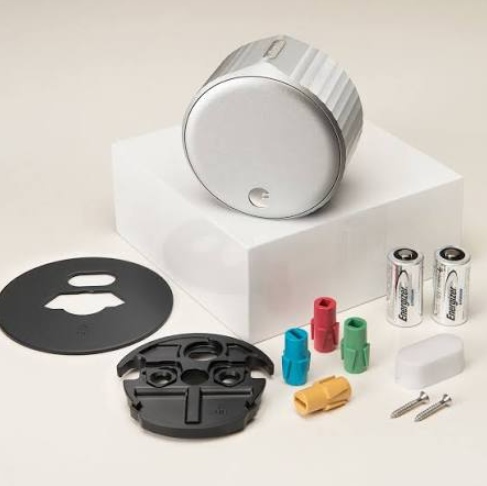
- August Wi‑Fi Smart Lock main unit (with the thumb‑latch)
- Metal mounting plate with 4 screws
- 3 adapters (silver, gold, black) to fit different deadbolt tailpieces
- Two CR123A batteries (already inserted in the lock; pull the plastic tab to activate)
- Door Sense® magnetic sensor and an adhesive strip for mounting
- Quick‑Start Guide and warranty card
No screwdriver is included; you’ll need a standard Phillips‑head screwdriver.
Physical Installation and Mounting
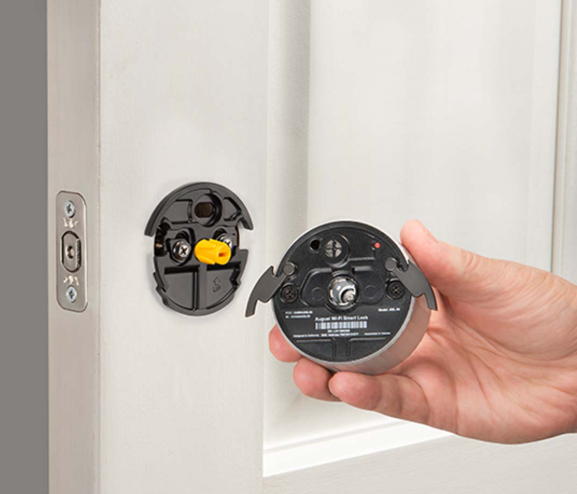
- Remove the existing interior thumb‑latch from your deadbolt (usually two screws). Keep the exterior key cylinder in place.
- Slide the correct adapter onto the deadbolt tailpiece (the metal rod protruding from the door). The kit includes silver, gold, and black adapters — use the one that fits snugly without play.
- Attach the metal mounting plate to the door with the provided screws, threading the tailpiece and adapter through the centre hole.
- Slide the August lock onto the mounting plate, ensuring the adapter engages with the slot on the back of the lock. Rotate the lock slightly until it sits flush.
- Secure the lock to the mounting plate using the two small set screws on the sides (you’ll feel them tighten with the included hex key or a small screwdriver).
- Peel the backing off the Door Sense sensor and stick it to the door frame, within 1 inch of the lock, on the side opposite the hinges. The small magnet must align with the lock unit when the door is closed. Test by opening and closing the door — the app will show “Door Open” / “Door Closed.”
First‑Time App Setup and Calibration
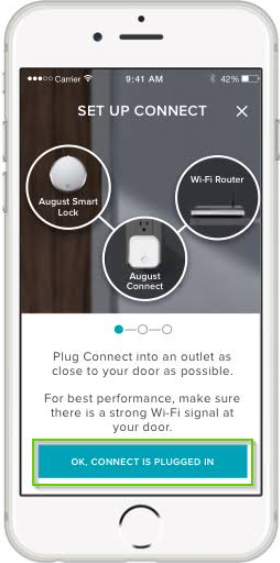
- Download the August Home app from the App Store or Google Play. Create an August account or sign in.
- Ensure Bluetooth and Location services are enabled on your phone. Pull the battery tab to activate the lock if you haven’t already. The lock’s LED ring will flash green.
- In the app, tap “Set Up a New Device” and select August Wi‑Fi Smart Lock (4th Gen). The app will detect the lock via Bluetooth.
- Enter your Wi‑Fi password when prompted (2.4 GHz only). The lock will connect to your home network. This enables remote access.
- The app will guide you through Door Sense calibration: open and close the door a few times until the app confirms the sensor is working.
- Set up your Smart Keypad (if purchased separately) and grant any initial guest keys.
Everyday Use and Auto‑Lock Settings
- Locking/Unlocking manually: Simply turn the August thumb‑latch by hand. You’ll hear a soft motor whir and a confirmation tone.
- App control: From the August Home app, tap the lock icon to lock or unlock. The app shows the current status, battery level, and activity history.
- Voice control: Link your August account to Amazon Alexa, Google Assistant, or Apple Siri (HomeKit). Commands: “Alexa, lock the front door,” “Hey Google, unlock the back door” (requires a PIN for unlock).
- Auto‑Lock: In the app, go to Lock Settings > Auto‑Lock. Choose a timer from 30 seconds to 30 minutes. Auto‑Lock only activates when DoorSense confirms the door is closed. If the door is open, you’ll get a notification instead.
- Auto‑Unlock: Enable in Lock Settings > Auto‑Unlock. The app uses geofencing to unlock the door as you approach. You’ll need to allow location access always.
Battery Replacement and Low‑Battery Alerts
- The lock uses two CR123A batteries. When the battery is low, the app will send a notification, and the LED ring on the lock will flash red three times after locking/unlocking.
- To replace, slide the faceplate off the front of the lock (there’s a small indent on the side). Pull out the old batteries and insert new CR123A cells, matching the polarity marked inside.
- After replacing, the lock will automatically reconnect to Wi‑Fi and Bluetooth; no re‑pairing is needed.
Troubleshooting Common Issues
| Problem | Likely Cause | What to Try |
|---|---|---|
| Lock won’t calibrate DoorSense | Sensor not aligned or too far from magnet | Reposition the DoorSense sensor on the door frame so it’s within 1 inch of the lock unit. Ensure the adhesive is secure. |
| Auto‑Lock triggers while door is open | DoorSense not calibrated or weak magnet | Re‑calibrate DoorSense in the app (Lock Settings > DoorSense). Replace the adhesive and realign. |
| App can’t connect to lock (remote) | Wi‑Fi disconnected or router issue | Check that the lock’s Wi‑Fi LED (inside the battery compartment) is solid green. Restart your router. If Wi‑Fi is down, you can still unlock via Bluetooth when within range. |
| Lock jams or struggles to turn | Deadbolt misalignment or tight strike plate | Check that the deadbolt extends smoothly with the door open. If it’s binding, loosen the strike plate screws and adjust slightly. The August motor can handle minor resistance but not a seized deadbolt. |
| Auto‑Unlock doesn’t trigger | Location services restricted or low battery | Ensure the August app has “Always” location permission. Check battery level. The feature requires you to be away from home for a period before returning. |
| LED ring flashes red three times | Low battery | Replace both CR123A batteries soon. |
| Guest can’t unlock with virtual key | Key not yet active or expired | Verify the key’s schedule and that the guest’s app is signed in with the correct email. Resend the invitation. |
| Lock unresponsive after battery change | Temporary electronic glitch | Remove the batteries, wait 30 seconds, reinsert. The lock will restart and reconnect automatically. |
How to Factory Reset the Lock
- Remove the faceplate and take out one battery.
- Press and hold the small black button inside the battery compartment (near the top).
- While holding the button, reinsert the battery. Continue holding for about 10 seconds until the LED ring pulses red, then release.
- The lock will restart with factory settings. All user accounts, Wi‑Fi credentials, and DoorSense calibration are erased. You’ll need to set it up again in the August app.
Quick Reference Card
| Task | How |
|---|---|
| Lock manually | Turn the thumb‑latch clockwise |
| Unlock manually | Turn the thumb‑latch counter‑clockwise |
| Enable Auto‑Lock | App > Lock Settings > Auto‑Lock > choose timer |
| Check battery level | App home screen shows battery percentage |
| Factory reset | Hold internal button while reinserting battery until LED pulses red |
| Add a guest key | App > Guest Keys > Invite > enter email, set schedule |
| Share access via HomeKit | Add the lock to Apple Home, then invite family members |
Download the August Wi‑Fi Smart Lock Cheat Sheet
A one‑page PDF with installation tips, DoorSense calibration steps, and battery replacement guide. Print it and keep it in a drawer near the door.
“August Wi‑Fi Smart Lock Quick Guide (PDF)”
Official August Support and Manuals
For warranty, firmware updates, and the official PDF manual, visit: https://support.august.com
Frequently Asked Questions
- Does the August lock work with my existing deadbolt?
It fits most standard single‑cylinder deadbolts with a tailpiece. If your deadbolt is very old or an unusual brand, check the compatibility guide on August’s website. The exterior keyhole and key remain unchanged. - What happens if the Wi‑Fi goes down?
The lock still works manually, and you can control it via Bluetooth when within range (about 30 feet). Remote access requires Wi‑Fi. - Can I use the August lock with a mortise lock?
No, it’s designed only for standard tubular deadbolts. Mortise locks are not supported. - How long do the batteries last?
Typically 6‑9 months with Wi‑Fi enabled, depending on usage. Auto‑Lock and frequent remote unlocking shorten battery life slightly. - Is the lock compatible with Ring or other smart home systems?
It works with Alexa (which integrates with Ring), Google Assistant, and Apple HomeKit. There’s no native Ring integration, but you can use Alexa routines. - Can I lock the door from the outside without my phone?
You can use the optional August Smart Keypad, a physical key (the exterior lock remains unchanged), or set Auto‑Lock to secure the door behind you. - What is the difference between Auto‑Lock and Auto‑Unlock?
Auto‑Lock locks the door after a set time once it’s closed. Auto‑Unlock unlocks the door automatically when you arrive home (uses geofencing). Both are optional. - Does the August app track who locks/unlocks?
Yes, the activity log shows each event with the user name (if they have their own key) or device. Guest key usage is also logged. - Can I install the lock on a door without a deadbolt?
No, a single‑cylinder deadbolt is required. The August lock attaches to the interior thumb‑latch of an existing deadbolt. - Is the lock weatherproof?
The interior lock unit is splash‑resistant (IPX4). It should not be directly exposed to heavy rain or water. It’s designed for interior side only. - What if I lose my phone?
You can log in to your August account on any device, revoke the lost phone’s access, and still operate the lock manually with the thumb‑latch. - How do I clean the lock?
Wipe with a dry or slightly damp cloth. Do not use solvents or abrasive cleaners.
Maintenance Reminders
- Replace batteries every 6‑9 months, or when the low‑battery notification appears.
- Test DoorSense calibration after any door adjustment or if the auto‑lock behaves unexpectedly.
- Clean the exposed thumb‑latch and mounting ring with a dry cloth to prevent dust buildup that can strain the motor.
Copyright Warning ⚠
Copyright 2026 productsmanuals.com All rights reserved. This August Wi‑Fi Smart Lock AUG‑SL05‑M01‑G01 manual is original content and may not be copied, republished, or redistributed without written permission. August Home, DoorSense, and the August logo are trademarks of August Home, Inc. This guide is unofficial and not affiliated with August Home.
