July 10, 2026

Fake Google & Cloudflare Verification – The ClickFix Scam Explained

Cloudflare-logo-productsmanuals.com

Fake Google & Cloudflare Verification – The ClickFix Scam Explained

Fake-Google-&-Cloudflare-Verification-The-ClickFix-Scam-Explained-productsmanuals.com

Warning: If You See a Fake “Google Security” or “Cloudflare Verification” Screen, Your Data Is at Risk

Introduction

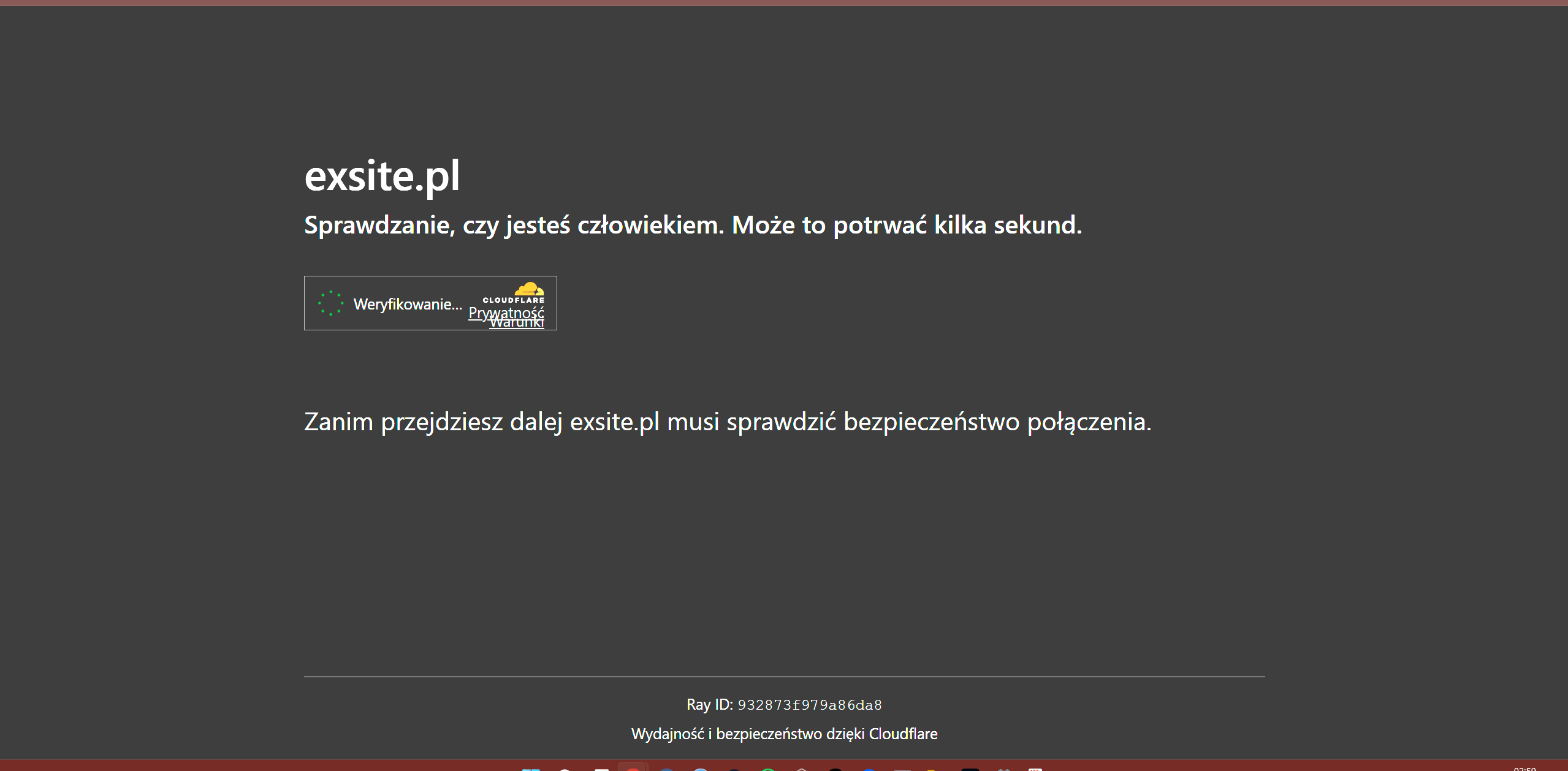
Cybercriminals are constantly evolving their tactics, and in 2026 one of the most dangerous threats you can encounter online is the ClickFix attack. Unlike traditional malware that relies on software vulnerabilities, this attack uses social engineering to trick you into compromising your own computer. You might be stopped by a page that looks exactly like a legitimate Google security check or Cloudflare verification screen, complete with official logos and a countdown timer. It asks you to “Verify you are human,” but the real goal is far more sinister – getting you to run a malicious command that opens the door to ransomwareinfostealers, and remote access trojans.

In this article we explain how the ClickFix attack works, the red flags you need to recognize, and the immediate steps to take if you’ve already been exposed. Protecting your online privacy and personal data starts with understanding this modern threat.

What Is the ClickFix Attack?

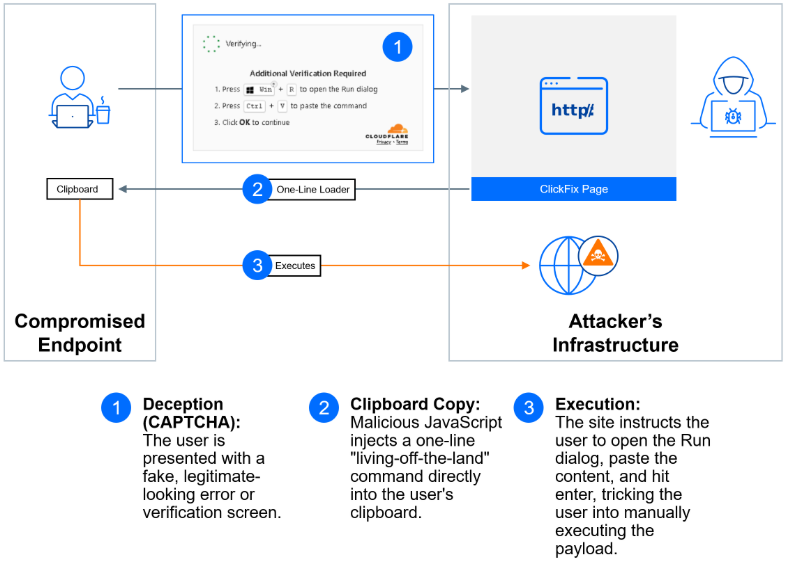
Fake-Google-&-Cloudflare--Verification-The-ClickFix-Scam-Explained-fig-2

In the past, hackers often used “drive‑by” malware that infected your system the moment you landed on a compromised page. Today’s security software is far better at blocking those automatic infections. So attackers have shifted their approach: they use psychological manipulation to make you install the malware yourself. They don’t force their way in – they convince you to open the door.

This is called social engineering, and the ClickFix attack is one of its most effective forms. By abusing the trust you place in well‑known brands like Google and Cloudflare, criminals turn a fake security verification prompt into a weapon.

How the Attack Typically Unfolds

Fake-Google-&-Cloudflare--Verification-The-ClickFix-Scam-Explained-fig-3Attackers use a deceptive four‑step process to compromise your system:

  1. The Interception – You land on a website (often a compromised or fake page) and a pop‑up blocks your access.
  2. The “Fix” – The site claims your “browser is outdated” or “security settings are incorrect” and offers a button to fix the problem.
  3. The Trap – Clicking that button copies a hidden, malicious PowerShell script to your clipboard.
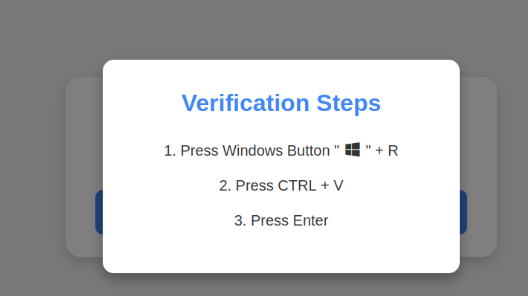
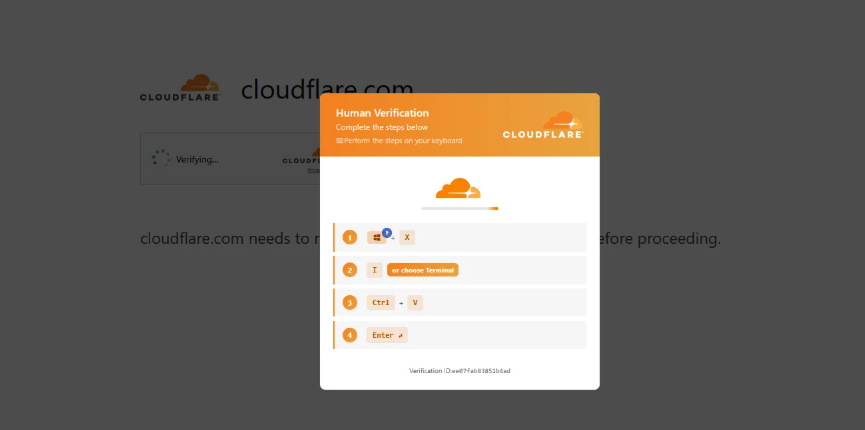
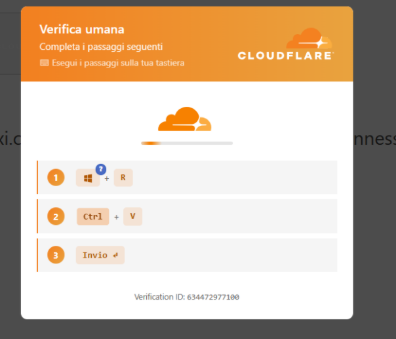
  4. The Execution – The page then gives you instructions: “Press Windows + R, paste this command, and hit Enter to verify you are human.”

The result? You’ve just given that malicious script permission to download ransomwareinfostealers, or remote access tools (RATs) directly onto your machine.

Real‑World Examples

Fake-Google-&-Cloudflare--Verification-The-ClickFix-Scam-Explained-fig-1Real‑World Examples: What to Watch For (2026 Trends)

Security researchers have identified several variations of this threat. Here are the red flags our team has spotted:

  • The “CrashFix” Lure – This variant intentionally causes your browser to lag or crash. When the browser “recovers,” it displays a fake “System Repair” prompt that leads to the same dangerous PowerShell command.
  • The “Hehe” Signature – In technical analysis, we’ve found that backend servers hosting these fake verification pages often return a simple, taunting response: “hehe” hidden in the HTML code. If you see this in any technical logs, you’re dealing with known malicious infrastructure.
  • Living off the Land (LotL) – Attackers use standard Windows tools like curl.exe or finger.exe to download their payloads. Because these are legitimate Windows programs, basic antivirus software often ignores the activity.

How to Tell a Real Security Check from a Fake One

Knowing the difference between a genuine Google or Cloudflare screen and a fraudulent one can save your system. Use this quick comparison:

Feature Legitimate Security Check ClickFix Fake Verification
Asks for terminal commands Never Yes – “Run this PowerShell script”
Domain Official (google.com, cloudflare.com) Imitates but uses variations (e.g., google-verify.net)
Pop‑up behaviour Seamless, usually doesn’t block the whole page Often full‑screen, difficult to close
Timer May show a short “Checking your browser” animation Often includes an aggressive countdown to create urgency
Instructions “Wait while we verify your browser” “Copy this command and paste it into your terminal”
Tone Neutral Threatening or urgent – “Your data is at risk unless you verify”

If you ever see any request to open a command prompt, copy a script, or press Windows + R, it’s a scam.
Fake-Google-&-Cloudflare--Verification-The-ClickFix-Scam-Explained-product-image

Why ClickFix Attacks Are So Effective in 2026

Several trends have made the ClickFix attack a dominant threat this year:

  • AI‑generated phishing pages – Attackers now use large language models to create flawless fake verification screens in any language. The pages look professional and adapt in real time based on your browser type and location.
  • Abuse of legitimate tools – By relying on trusted Windows executables like PowerShell, curl, or certutil, the attack hides in plain sight. Most antivirus software will not flag these because they’re essential system programs.
  • The rise of hybrid work – More employees are using personal devices or working from home, where endpoint security may be weaker. A single compromised home PC can provide a stepping stone to corporate networks.
  • Cookie theft via infostealers – Many ClickFix payloads deploy infostealers that steal browser cookies. Because cookies can bypass passwords and MFA, attackers can hijack online accounts without ever needing your credentials.

Understanding these trends helps reinforce why basic security advice (like “don’t run unknown commands”) is more important than ever.

A Closer Look at the Malicious Payload

What exactly does that one‑line PowerShell script do? While the exact code varies, most ClickFix payloads follow a simple three‑step pattern:

  1. Download – The script uses a command like Invoke-WebRequest or curl.exe to fetch a larger malicious file from a remote server. The download source is often a legitimate‑looking domain that was compromised or registered specifically for the attack.
  2. Execute – The downloaded file is immediately executed. It could be a .exe, a .msi installer, or an obfuscated script. Because the download happens in memory or a temporary folder, it rarely triggers file‑based antivirus scans.
  3. Establish persistence – The malware adds itself to the Windows Registry or creates a scheduled task so it survives reboots and remains hidden. Once persistence is established, the hacker can remotely control the computer, steal data, or encrypt files for ransomware.

The key takeaway is that even a single command can initiate a chain reaction that is nearly impossible to stop once started.

What Businesses Should Do to Protect Employees

If you run a small business or manage an IT team, add these layers of defence against ClickFix attacks:

  • Restrict PowerShell execution – Use Group Policy (on Windows) to enforce PowerShell Constrained Language Mode or disable PowerShell entirely for users who don’t need it. This prevents many scripts from running even if a user is tricked.
  • Deploy application allowlisting – Tools like Windows Defender Application Control (WDAC) can block any executable that isn’t on a pre‑approved list. Even if a script downloads a payload, the system will refuse to run it.
  • Provide visual examples in training – Show employees real screenshots of ClickFix attacks during security awareness training. Tell them exactly what to watch for: any website that mentions PowerShell, Windows + R, or cmd.exe in its instructions.
  • Monitor for suspicious command lines – Use Endpoint Detection and Response (EDR) solutions to generate alerts whenever a script downloads content from the internet. Early detection can stop an attack before the payload executes.

How to Report a ClickFix Page

If you encounter a fake Google or Cloudflare verification screen, reporting it helps protect others.

  1. Google Safe Browsing – Go to safebrowsing.google.com/safebrowsing/report_phish/ and submit the deceptive URL.
  2. Cloudflare Abuse – If the site appears to be behind Cloudflare, forward the URL to abuse@cloudflare.com with a brief description and a screenshot.
  3. Microsoft Security Intelligence – Submit the malicious URL or file hash via microsoft.com/wdsi/support/report if the payload targets Windows.
  4. Your local CERT or CSIRT – Many countries have a national Computer Emergency Response Team that tracks cyber threats and can issue wider alerts.

Taking two minutes to report a phishing page can help get it taken down within hours.
Fake Google & Cloudflare Verification - The ClickFix Scam Explained

Quick Checklist: Is That Security Prompt Real?

Before you follow any on‑screen instructions, run through this mental checklist:

  • Did the page appear suddenly after clicking a link or opening an email? (If yes, be suspicious.)
  • Is the domain exactly google.comcloudflare.com, or the official website you intended to visit?
  • Does the page mention PowerShellcmdTerminal, or Windows + R? (If yes, close the tab immediately.)
  • Is there a countdown timer pressuring you to act quickly? (Legitimate checks don’t use fear tactics.)
  • Can you close the tab without issue? (If the page resists closing, use Task Manager to end the browser process.)

If you answered “no” to any of these, assume the page is malicious. Close it, run a quick scan with your security software, and clear your browser cache.

How to Protect Your System and Your Data

You don’t need to be a cybersecurity expert to stay safe. Follow these three rules:

  1. The Terminal Rule
    Legitimate services like Google, Cloudflare, or Microsoft will never ask you to run a command, script, or batch file to “prove you are human.” If a website asks you to use cmd, PowerShell, or the Windows + R run dialog, close the tab immediately.
  2. Trust the URL, Not the Design
    Hackers can copy logos and colors in seconds. They cannot copy the official domain. Always check that the URL matches the real service you’re trying to visit (e.g., google.com vs. google-verification-center.net).
  3. Implement Endpoint Protection (EDR)
    If you manage a business, simple antivirus is no longer enough. You need Endpoint Detection and Response (EDR) solutions that flag “anomalous PowerShell execution.” This is the best way to stop a ClickFix attack before the script completes its task.

What to Do If You Already Ran the Command

If you suspect you’ve been tricked, act immediately:

  • Disconnect – Pull the network cable or turn off Wi‑Fi. This stops the malware from sending your passwords or crypto‑keys to the hacker.
  • Use a Different Device – Do not use the infected computer to change your passwords. Use your phone or another laptop to reset all sensitive credentials.
  • Wipe the System – Because these loaders hide deep in system folders, standard “cleaners” often fail. The safest path is a clean re‑installation of your operating system.
  • Enable MFA – Ensure Multi‑Factor Authentication is active on every account. Even if they have your password, they will be blocked from accessing your accounts.

IOCs

Hash 

  • 72907d0ca3258365838626f6a8d993a6: ResiLoader DLL
  • 0234E3188F2883A438B3F2BEAB7A78B2: StealC
  • 6a9ac6b3fff7b695dbd4df6ff7f6c516: Remus
  • 206ce339febca0c3bcc850f42595fc63: Amatera Stealer
  • eee416efcb1e33f220cdb4b05496a07a: NetSupport RAT
  • b8d53740024d126cb55f83854335a4ab: Rust Stealer

Domains

Distribute ClickFix pages:

  • onegeekworld[.]com 
  • thefirmos[.]com 
  • antibotv3[.]com 
  • centralwildcats[.]com 
  • cloud.antibotv3[.]com 
  • cloudautosolutions[.]com 
  • sunseekersupply[.]com 
  • 123clocks[.]com 
  • orcanegames[.]com 
  • rwmonitoring[.]com 
  • 100furniture[.]com 
  • nepalcharchaa[.]com 
  • p-floribunds.pages[.]dev 
  • pg-altirade2.pages[.]dev 
  • pg-cordivant-m6.pages[.]dev 
  • g-luminence.pages[.]dev 
  • generator-qrcode[.]online 
  • regdev-google[.]com 
  • khosla[.]capital 
  • eorgke09054909j[.]com 
  • dropboxi[.]com 

CloudFlare buckets used for payload distribution:

  • pub-4ed7b8ecee744dea930d74ba4ac74285.r2[.]dev 
  • pub-620528e2dc874e16937673265aa23d39.r2[.]dev 
  • pub-4ed7b8ecee744dea930d74ba4ac74285.r2[.]dev 
  • pub-9682d5896df841679c5a17eb41273f89.r2[.]dev 
  • pub-18d99d0d18b94e85824c1cc4d5b5c637.r2[.]dev 
  • pub-0170eabb9df346bd822f863b7c3946e3.r2[.]dev 
  • pub-4ed7b8ecee744dea930d74ba4ac74285.r2[.]dev 
  • unitedstateverif[.]com: payload distribution
  • bigflaredefence[.]com: payload distribution
  • popularcard[.]shop: Rust Stealer C2
  • xzz[.]proxygrid[.]cc: Amatera Stealer C2
  • completstep[.]com: Loader C2
  • eventlogerps1[.]ink: Deno Loader
  • be231ro963[.]com: Deno Loader

IPs 

IP used for payload distribution:

  • 151.240.151[.]126 
  • 85.239.149[.]16 
  • 85.239.149[.]40 
  • 93.152.224[.]29 
  • 151.240.151[.]46 
  • 93.152.224[.]167 
  • 85.239.149[.]78 
  • 192.69.195[.]131 
  • 135.181.171[.]40 
  • 94.26.83[.]206 
  • 91.92.34[.]128 
  • 85.239.144[.]31 
  • 93.152.224[.]39 
  • 94.26.90[.]112 
  • 146.19.248[.]120: StealC C2

Additional Research and Sources

The technical details in this article are supported by recent threat intelligence published by Malwarebytes Labs. Their research team has tracked multiple malware families using fake Google and Cloudflare verification pages to distribute infostealers and remote access tools. For a deeper dive into the infection chain and indicators of compromise, read the full report here:
Fake Google and Cloudflare Verification Pages Spread Multiple Malware Families (Malwarebytes)

Final Thoughts

Modern hackers no longer just attack software – they exploit your trust. By weaponizing familiar security prompts, they turn your own computer against you. Stay skeptical of any site requesting terminal commands, and always verify the domain before interacting with a security screen. In today’s landscape, a healthy dose of caution is the most effective layer in your personal security stack.

Comments

david kelson

im facing the same issue

Leave a Reply

Your email address will not be published. Required fields are marked *