

Introduction
The iPhone 18 Pro and iPhone 18 Pro Max introduced a new 60W wired fast-charging standard, but achieving that peak speed requires more than just any USB-C adapter. Apple has confirmed that the fastest charging rate depends on a power adapter supporting USB Power Delivery 3.1 (USB PD 3.1) and a technology called Adjustable Voltage Supply (AVS). Without an AVS-compatible adapter, your iPhone 18 will still charge, but not at its maximum speed. This manual explains exactly which adapters work, how to identify them, and how to troubleshoot charging issues.
Model Compatibility: iPhone 18 Pro, iPhone 18 Pro Max, iPhone 18 Duo
Important: This guide covers the iPhone 18 Pro, iPhone 18 Pro Max, and iPhone 18 Duo. The standard iPhone 18 and iPhone 18 Air have different charging requirements and are noted where applicable.
Product Overview
The iPhone 18 charger adapter is not a single Apple product but a category of USB-C power adapters that meet specific technical requirements. Apple’s own recommended adapter is the 40W Dynamic Power Adapter with 60W Max, which uses AVS to dynamically adjust voltage and deliver up to 60W peak output when paired with a compatible USB-C cable. Third-party manufacturers including Anker, UGREEN, and Spigen now produce AVS-compatible adapters that can also trigger the iPhone 18’s fastest charging speeds.
The key distinction is this: a standard 60W or 96W USB-C adapter (like those sold for MacBooks) will not deliver the fastest charging on the iPhone 18 Pro. The adapter must specifically support USB PD 3.1 with AVS. This is a newer standard that allows the charger and phone to negotiate a precise voltage level for optimal efficiency.
Full Specifications
| Specification | Detail |
|---|---|
| Fastest Wired Charging | 60W peak (requires USB PD 3.1 + AVS adapter) |
| Charging Speed (0–50%) | ~15 minutes with 60W AVS adapter |
| Charging Speed (0–50%) with 35W + MagSafe | ~30 minutes |
| MagSafe Wireless Charging | Up to 25W |
| Qi2 Wireless Charging | Up to 25W |
| Required Cable | USB-C to USB-C, 60W or higher rated |
| Adapter Standard | USB Power Delivery 3.1 (USB PD 3.1) with Adjustable Voltage Supply (AVS) |
| Apple Recommended Adapter | 40W Dynamic Power Adapter with 60W Max |
| Apple Adapter Price | $39 (sold separately) |
| In-the-Box Cable | 1m USB-C Charge Cable (included with iPhone) |
| Adapter in Box | Not included |
Key Features
- 60W Peak Wired Charging: The iPhone 18 Pro and Pro Max can draw up to 60W during the initial charging phase. Real-world tests show the phone drawing around 52W for the first 12 minutes before tapering down.
- USB PD 3.1 with AVS: AVS (Adjustable Voltage Supply) allows the adapter and phone to negotiate a precise voltage level rather than switching between fixed voltage steps. This improves efficiency and reduces heat during fast charging.
- 15-Minute 50% Charge: With the correct 60W AVS adapter, the iPhone 18 Pro reaches 50% battery in approximately 15 minutes. The iPhone 18 Duo takes about 20 minutes for the same charge level.
- 25W MagSafe and Qi2: Wireless charging is capped at 25W on both MagSafe and Qi2 standards. With a 35W adapter and MagSafe, you can reach 50% in about 30 minutes.
- Backward Compatibility: Non-AVS adapters (including older 20W, 30W, and 96W MacBook chargers) will still charge the iPhone 18, but at slower rates. The phone will not draw more power than the adapter can safely provide.
- Compact GaN Options: Third-party adapters from Anker, UGREEN, and Spigen use Gallium Nitride (GaN) technology for smaller, cooler, and more efficient chargers compared to traditional silicon-based adapters.
How to Use
What You Need
To achieve the fastest charging speed on your iPhone 18 Pro, Pro Max, or Duo, you need:
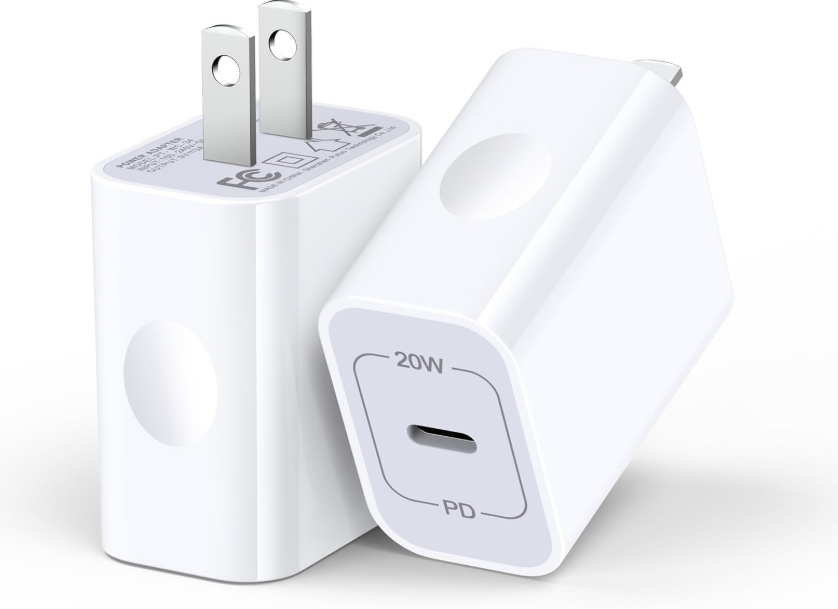
- A USB PD 3.1 adapter with AVS support (60W or higher)
- A USB-C to USB-C cable rated for 60W or higher
- A wall outlet
The USB-C cable that comes in the iPhone 18 box is rated for 60W and is sufficient for fast charging. You do not need to buy a separate cable unless you want a longer one.
Identifying an AVS-Compatible Adapter
Not all 60W adapters support AVS. Here’s how to check:
- Look for “USB PD 3.1” and “AVS” in the product specifications. This is the most reliable indicator.
- Apple’s 40W Dynamic Power Adapter with 60W Max is the reference adapter. Despite its “40W” name, it can output up to 60W peak when AVS is active.
- Third-party brands that have confirmed AVS compatibility include Anker (Nano 45W/70W), UGREEN (Nexode 65W), Spigen (ArcStation Pro 70W), and Mukiya (70W GaN).
Adapters that will NOT deliver 60W fast charging:
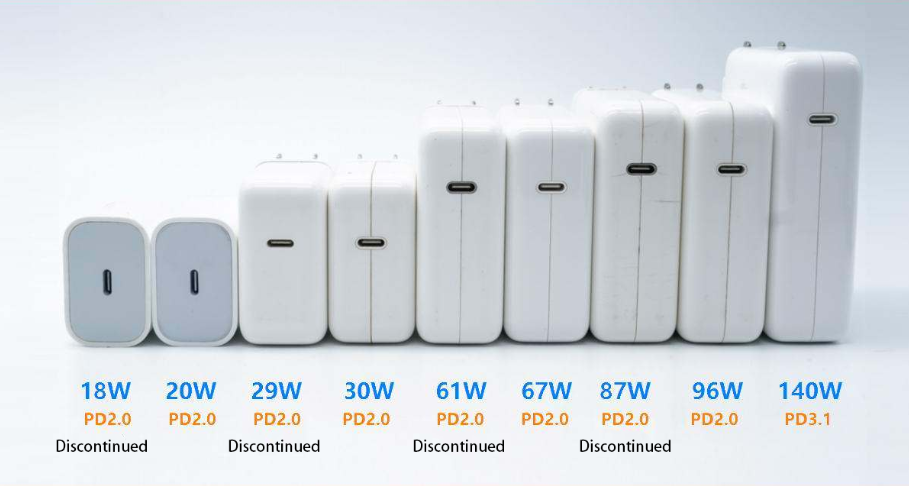
- Older Apple 20W, 30W, or 35W adapters
- MacBook 96W or 140W adapters (these do not support AVS in the required format)
- Standard USB-C PD adapters without AVS support
Charging Your iPhone 18
- Connect the USB-C cable to the adapter and the iPhone 18.
- Plug the adapter into a wall outlet.
- The iPhone will display a charging indicator. During the first 12 minutes, it may draw up to 52W of power.
- Monitor the charge level. The iPhone 18 Pro reaches 50% in about 15 minutes and 100% in approximately 1 hour and 15 minutes.
Wireless Charging Setup
For wireless charging at 25W:
- Use a MagSafe charger or Qi2-certified wireless pad.
- Connect the wireless charger to a 30W or higher USB-C adapter. Apple recommends a 30W adapter for faster wireless charging.
- Place the iPhone 18 on the charger. It will magnetically align and begin charging at up to 25W.
- Expected speed: 50% in about 30 minutes with a 35W adapter and MagSafe.
Compatibility & Connectivity
| Adapter / Charger | AVS Support | Fastest Charge for iPhone 18 Pro |
|---|---|---|
| Apple 40W Dynamic Power Adapter (60W Max) | Yes | 60W — 50% in ~15 min |
| Anker Nano 45W | Yes | Up to 45W |
| Anker Nano 70W | Yes | Up to 60W |
| UGREEN Nexode 65W | Yes | Up to 60W |
| Spigen ArcStation Pro 70W | Yes | Up to 60W |
| Apple 20W USB-C Adapter | No | ~20W — much slower |
| Apple 30W USB-C Adapter | No | ~30W — slower |
| Apple 35W Dual USB-C Adapter | No | ~35W — slower |
| MacBook 96W / 140W Adapter | No | Will charge but not at 60W AVS speed |
| Standard USB-C PD Adapter (no AVS) | No | Variable, but not peak speed |
Remote Control & App Section
The iPhone 18 charging system does not use a companion app. Charging speed and battery health are managed automatically by iOS and the adapter’s firmware. You can monitor charging status in the Settings > Battery menu, which shows:
- Current battery percentage
- Charging status (Fast Charging, Charging, or Not Charging)
- Battery health and maximum capacity
- Optimized Battery Charging status
Internal Structure / Teardown
The iPhone 18 charger adapter is a sealed unit and should not be disassembled. Internal components vary by manufacturer but typically include:
- GaN (Gallium Nitride) power transistors for efficient power conversion
- USB PD 3.1 controller chip with AVS negotiation firmware
- Thermal management components
- Safety isolation circuitry
Do not attempt to open or repair a charger adapter. Doing so risks electric shock and fire.
Maintenance Schedule
| Frequency | Task |
|---|---|
| Monthly | Inspect the adapter and cable for damage, fraying, or bent pins |
| Monthly | Check the USB-C port on the iPhone for lint or debris; clean gently with a wooden toothpick |
| Every 3 months | Wipe the adapter with a dry cloth to remove dust |
| As needed | Replace the cable if charging becomes intermittent |
Firmware & Software Updates
Charger adapters do not receive firmware updates in the traditional sense. However, iOS updates can improve charging efficiency and compatibility with AVS adapters. Keep your iPhone updated via Settings > General > Software Update.
Warranty & Support Information
- Apple 40W Dynamic Power Adapter: 1-year limited warranty
- Third-party adapters: Warranty varies by manufacturer (typically 12–24 months)
- Covered: Manufacturing defects
- Not covered: Physical damage, liquid damage, normal wear
- Apple Support: support.apple.com
- Anker Support: anker.com/support
- UGREEN Support: ugreen.com/support
Accessories & Optional Add-ons
| Accessory | Purpose |
|---|---|
| USB-C to USB-C Cable (60W+) | Required for fast charging |
| MagSafe Charger | 25W wireless charging |
| Qi2 Wireless Pad | 25W wireless charging |
| Apple 30W USB-C Adapter | Recommended for MagSafe fast charging |
| Car Charger with USB PD 3.1 | Fast charging on the road |
Comparison with Other Models
| Feature | iPhone 18 Pro | iPhone 18 Air | iPhone 17 Pro |
|---|---|---|---|
| Fastest Wired Charging | 60W (AVS required) | 20W | 27W |
| 50% Charge Time (Wired) | ~15 min | ~30 min | ~30 min |
| MagSafe / Qi2 Max | 25W | 25W | 25W |
| Adapter Required | 60W USB PD 3.1 + AVS | 20W USB-C | 27W USB-C |
Pros & Cons
Pros:
- 60W charging is significantly faster than previous iPhone generations
- 50% charge in just 15 minutes
- AVS improves charging efficiency and reduces heat
- Multiple third-party AVS adapters available
- Backward compatible with older adapters (at slower speeds)
Cons:
- Adapter is not included in the box — extra cost
- Requires specifically AVS-compatible adapter for peak speed
- Older MacBook chargers (96W, 140W) do not work at peak speed
- Third-party AVS support list is still growing
What’s New vs Previous Generation
| Feature | iPhone 18 Pro | iPhone 17 Pro |
|---|---|---|
| Max Wired Charging | 60W | 27W |
| 50% Charge Time | ~15 minutes | ~30 minutes |
| Required Standard | USB PD 3.1 + AVS | USB PD |
| Apple Recommended Adapter | 40W Dynamic (60W Max) | 20W USB-C |
| MagSafe Max | 25W | 25W |
Common Mistakes to Avoid
- Using a MacBook 96W or 140W adapter: These do not support AVS in the required format and will not deliver 60W charging to the iPhone 18 Pro.
- Assuming all 60W adapters work: The adapter must specifically support USB PD 3.1 with AVS. A standard 60W PD adapter will not trigger peak speed.
- Using the wrong cable: A USB-C cable rated for 60W or higher is required. The included cable works, but a damaged or low-rated cable will limit charging speed.
- Not updating iOS: Software updates can improve AVS compatibility and charging efficiency.
- Charging in a hot environment: Fast charging generates heat. Avoid charging in direct sunlight or in a hot car, as the iPhone will reduce charging speed to protect the battery.
Quick Reference Card
| Task | How |
|---|---|
| Achieve 60W fast charging | Use Apple 40W Dynamic Adapter or AVS-compatible 60W+ adapter |
| 50% charge time | ~15 minutes with 60W AVS adapter |
| MagSafe fast charging | Use 30W+ adapter with MagSafe charger |
| Check battery health | Settings > Battery > Battery Health |
| Clean charging port | Wooden toothpick, gentle motion |
| Replace cable | Use 60W+ USB-C to USB-C cable |
Glossary of Terms
- AVS (Adjustable Voltage Supply): A feature in USB PD 3.1 that allows precise voltage negotiation between charger and device.
- USB PD 3.1: The latest Power Delivery standard, supporting higher voltages and AVS.
- GaN (Gallium Nitride): A semiconductor material that enables smaller, more efficient chargers.
- Peak Power: The maximum wattage drawn during the initial charging phase before tapering down.
- MagSafe: Apple’s magnetic wireless charging system, up to 25W on iPhone 18.
- Qi2: The latest wireless charging standard, supporting up to 25W on iPhone 18.
Video Tutorials & Resources
- Apple Support: support.apple.com — Search “Fast charge iPhone 18”
- ChargerLAB: YouTube channel with in-depth charging tests
- 9to5Mac: Charger recommendation articles for iPhone 18
- Anker Official: anker.com — AVS-compatible adapter product pages
Where to Buy & Price Information
| Adapter | Price | AVS Support |
|---|---|---|
| Apple 40W Dynamic Power Adapter (60W Max) | $39 | Yes |
| Anker Nano 45W | ~$30 | Yes |
| Anker Nano 70W | ~$50 | Yes |
| UGREEN Nexode 65W | ~$40 | Yes |
| Spigen ArcStation Pro 70W | ~$45 | Yes |
| Apple 20W USB-C Adapter | $19 | No |
User Scenarios
- Frequent Traveler: Carry the Apple 40W Dynamic Adapter for fast charging in hotels and airports.
- Power User: Use Anker Nano 70W for charging iPhone and MacBook from a single adapter.
- MagSafe User: Pair a 30W adapter with MagSafe for 25W wireless charging.
- Overnight Charger: Use Optimized Battery Charging with any adapter to reduce battery aging.
Storage & Transport
- Store the adapter in a cool, dry place.
- Avoid wrapping the cable tightly around the adapter.
- Do not leave the adapter plugged in with no device connected for extended periods.
- For travel, use a compact GaN adapter with folding prongs.
Cleaning & Care Guide
- Adapter: Wipe with a dry, soft cloth. Do not use liquids.
- USB-C Port (iPhone): Clean gently with a wooden toothpick. Never use metal.
- Cable: Inspect regularly for fraying. Replace if damaged.
- Charging Port (Adapter): Keep free of dust and debris.
Performance Benchmarks
| Test | Result |
|---|---|
| Peak Power Draw | ~52W for first 12 minutes |
| 0–50% Charge Time | ~15 minutes |
| 0–100% Charge Time | ~1 hour 15 minutes |
| MagSafe 0–50% | ~30 minutes |
| MagSafe Peak Power | 25W |
| Qi2 Peak Power | 25W |
System Requirements
- iPhone Model: iPhone 18 Pro, iPhone 18 Pro Max, or iPhone 18 Duo
- Adapter: USB PD 3.1 with AVS, 60W or higher
- Cable: USB-C to USB-C, 60W or higher
- iOS Version: iOS 27 or later (for optimal AVS support)
Regulatory Information
- FCC: Compliant with Part 15
- CE: Compliant with EU safety directives
- UL: Listed (Apple adapters)
- RoHS: Compliant
Disposal & Recycling
- Do not dispose of the adapter in household trash.
- Recycle at an electronics recycling centre.
- Apple offers free recycling programs in many regions.
Error Code Table
| Issue | Likely Cause | Solution |
|---|---|---|
| iPhone not fast charging | Adapter lacks AVS support | Use a USB PD 3.1 adapter with AVS |
| Charging stops intermittently | Faulty cable or dirty port | Clean port, replace cable |
| Adapter feels very hot | Normal during fast charging | Ensure ventilation; reduce ambient temperature |
| Charging slower than expected | Using MacBook adapter or non-AVS adapter | Switch to AVS-compatible adapter |
| MagSafe not charging at 25W | Adapter below 30W | Use 30W or higher adapter with MagSafe |
Reset & Recovery Procedures
- Soft Reset (Charging Issue): Unplug the adapter, wait 10 seconds, and plug it back in.
- Force Restart iPhone: Press and release Volume Up, press and release Volume Down, then hold the Side button until the Apple logo appears. This can resolve charging-related software glitches.
- Clean Charging Port: Turn off iPhone. Use a wooden toothpick to gently remove lint from the USB-C port. Do not use metal.
Battery Care Deep Dive
- Optimized Battery Charging: Enable in Settings > Battery > Battery Health & Charging. This learns your routine and delays charging past 80% overnight.
- 80% Limit: You can hard-limit charging to 80% for maximum battery lifespan.
- Avoid Full Discharge: Charge when battery drops to 20–30%.
- Avoid Extreme Heat: Do not charge in direct sunlight or hot cars.
- Use AVS Adapter: AVS charging is more efficient and generates less heat than standard PD charging.
Seasonal / Periodic Maintenance
| Season | Task |
|---|---|
| Spring | Inspect cables for winter damage |
| Summer | Avoid charging in hot cars; use ventilated area |
| Autumn | Check for iOS updates |
| Winter | Keep adapter at room temperature; cold can slow charging |
First-Time Setup Checklist
- Purchase a USB PD 3.1 adapter with AVS (60W+)
- Confirm the adapter is on the AVS compatibility list
- Use the included USB-C cable or a 60W+ rated cable
- Connect adapter to iPhone 18
- Verify “Fast Charging” appears in Settings > Battery
- Enable Optimized Battery Charging
- Test charging speed (50% in ~15 minutes)
Hidden Features
- AVS Voltage Negotiation: The adapter and iPhone communicate to find the optimal voltage, which is not visible to the user but improves efficiency.
- Charging Speed Indicator: iOS displays “Fast Charging” in the Battery settings when an AVS adapter is detected.
- MagSafe Magnetic Alignment: The magnets in MagSafe ensure perfect coil alignment for maximum wireless efficiency.
Advanced Tips
- Use the same brand cable and adapter: While not required, matching brands can sometimes improve compatibility.
- Test with a USB power meter: Tools like ChargerLAB POWER-Z can confirm your adapter is delivering AVS voltage.
- Charge in airplane mode for maximum speed: Turning off radios reduces power draw and can slightly increase charging speed.
- Keep the adapter cool: Fast charging generates heat; ensure the adapter has airflow.
- Update iOS: Apple occasionally improves AVS compatibility with software updates.
Troubleshooting Flowchart
iPhone not fast charging?
├── Check adapter: Is it USB PD 3.1 with AVS?
│   ├── No → Replace with AVS adapter
│   └── Yes → Check cable: Is it 60W+ rated?
│       ├── No → Replace cable
│       └── Yes → Clean iPhone port → Retest
└── Still slow → Check iOS version → Update → Retest

Adapter very hot?
├── Normal during fast charging
└── If too hot to touch → Unplug, let cool, check ventilation

MagSafe not 25W?
├── Check adapter: 30W or higher?
│   ├── No → Upgrade adapter
│   └── Yes → Check case thickness → Remove thick case → Retest
Compatibility Matrix
| Device / Accessory | Compatible? | Notes |
|---|---|---|
| Apple 40W Dynamic Adapter | Yes | Reference AVS adapter |
| Anker Nano 45W/70W | Yes | AVS-compatible |
| UGREEN Nexode 65W | Yes | AVS-compatible |
| Spigen ArcStation Pro 70W | Yes | AVS-compatible |
| MacBook 96W/140W Adapter | No | Charges but not at 60W AVS |
| Apple 20W/30W/35W Adapter | No | Slower charging |
| MagSafe Charger | Yes | Up to 25W with 30W+ adapter |
| Qi2 Charger | Yes | Up to 25W |
| USB-C to USB-C 60W Cable | Yes | Required for fast charging |
Case Quick Reference Card
| Task | How |
|---|---|
| Fast charge (wired) | 60W USB PD 3.1 + AVS adapter + 60W cable |
| Fast charge (MagSafe) | 30W+ adapter + MagSafe charger |
| Check charging status | Settings > Battery |
| Clean port | Wooden toothpick |
| Force restart | Vol Up, Vol Down, hold Side button |
| Enable battery care | Settings > Battery > Battery Health |
Warranty & Support
- Apple Adapter: 1-year limited warranty
- Third-Party Adapters: 12–24 months (varies)
- Support: support.apple.com or manufacturer websites
Where to Buy
- Apple.com: Official store
- Amazon: Wide selection
- Best Buy: Retail stores
- Anker.com: Official store
- UGREEN.com: Official store
User Scenarios
- Business Traveler: Use a compact 65W GaN AVS adapter to charge iPhone and laptop from one plug.
- MagSafe User: Pair a 30W adapter with MagSafe for 25W wireless charging.
- Power User: Keep a 70W AVS adapter at your desk for rapid top-ups throughout the day.
Quick Reference Card
| Task | How |
|---|---|
| Fast charge (wired) | 60W USB PD 3.1 + AVS adapter + 60W cable |
| Fast charge (MagSafe) | 30W+ adapter + MagSafe charger |
| Check charging status | Settings > Battery |
| Clean port | Wooden toothpick |
| Force restart | Vol Up, Vol Down, hold Side button |
| Enable battery care | Settings > Battery > Battery Health |
PDF Resources
For the official PDF manual and additional documentation, visit:
- Apple Fast Charge Guide: Available at support.apple.com
- Apple 40W Dynamic Power Adapter Product Page: Available at apple.com
- ChargerLAB iPhone 18 Charging Review: Available at chargerlab.com
You can also save the official manual as a PDF by opening it in your browser and using File > Print > Save as PDF.
Related Manuals
If this guide was helpful, here are a few more popular manuals from productsmanuals.com:
- iPhone 18 Pro Max Field Guide – Variable Aperture, A20 Pro & iOS 27
- Apple 40W Dynamic Power Adapter Manual – Setup, Compatibility & Troubleshooting
- Anker Nano Charger Manual – Setup, Features & Troubleshooting
- Samsung Galaxy S26 Ultra Manual – Privacy Display, 200MP Camera & S Pen
- MacBook Air M5 Manual – Setup, Features & Troubleshooting
Browse all guides at productsmanuals.com .
Copyright 2026 productsmanuals.com All rights reserved. This iPhone 18 charger adapter manual is original content and may not be copied, republished, or redistributed without written permission. Apple, iPhone, MagSafe, and the Apple logo are trademarks of Apple Inc. This guide is unofficial and not affiliated with Apple.
